

Description
Control allies and enemies with signals, but rain and water interrupt you—broken connections create huge, fast, enraged foes.
Mod Wiki
Mob Controller
Quickstart
- Craft the Storm Signal Controller.
- Craft a Storm Signal Battery.
- Combine the controller and battery at a crafting table to make a Charged Controller.
- Hold the Charged Controller and aim directly at a nearby mob with a clear line of sight.
- Use the controller to link the mob. The first link makes the mob follow you.
- Press M while holding a controller to open the Storm Signal Menu. Choose Follow, Stay, or Disconnect. Hostile mobs also have an Attack nearest mob command.
- Keep the weather and your position in mind: the controller cannot be used while it is raining at your location or while your eyes are underwater.
A Charged Controller starts with 100% battery charge. Each use consumes 10%, providing up to 10 uses before recharging.
Overview
Mob Controller lets you create a temporary signal connection with one mob at a time. Linked friendly mobs can follow you or stay in place. Linked hostile mobs can also be ordered to attack another nearby mob.
Signals are temporary:
- Friendly mobs remain linked for 15 seconds.
- Hostile mobs remain linked for 10 seconds.
- When a hostile signal expires, the enemy breaks free and becomes enraged for 20 seconds.
An enraged enemy becomes much larger and faster, and cannot be linked again until its rage ends.
What It Adds
| Item | Purpose |
|---|---|
| Storm Signal Controller | The uncharged controller used as the base for crafting. |
| Storm Signal Battery | Used to charge or recharge a controller. |
| Charged Controller | The usable version of the controller, with a 100% battery charge. |
The controller displays its current battery percentage in the lower-right HUD whenever it is held in your main hand or off-hand.
How To Use
Link a Mob
- Hold a Charged Controller in either hand.
- Face the mob you want to control.
- Use the controller while the mob is within range and visible.
- Look closely at the intended mob—the controller only connects to a mob near the center of your view.
- A successful connection automatically starts the Follow command.
The controller uses a line-of-sight signal. You cannot link a mob through blocks, including glass.
Signal range depends on the mob:
- Villagers: 48 blocks
- Animals: 32 blocks
- Other mobs: 24 blocks
Only one mob can be linked to you at a time. Linking another mob disconnects your previous target. A mob can also only be controlled by one player at a time.
Open the Signal Menu
Hold a controller in your main hand or off-hand and press M. The menu shows the linked target and provides commands. Press M or Esc to close the menu without selecting a command.
The menu is only available while a mob is linked and a controller is held.
Friendly Commands
Friendly mobs, such as animals and villagers, have these commands:
- Follow: Move toward and follow you.
- Stay: Stop moving and stop attacking.
- Disconnect: End the signal immediately.
A linked mob’s normal attacks are restricted. It will not attack targets unless the command permits it.
Hostile Commands
Hostile mobs have the same Follow, Stay, and Disconnect commands, plus:
- Attack nearest mob: Select the nearest living mob within 16 blocks and attack it.
The hostile mob continues pursuing that selected target until the target dies or the command ends. When the target dies, the mob returns to following behavior.
Crafting And Obtaining
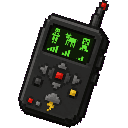
Storm Signal Controller
Craft the uncharged controller from iron, redstone lamps, gold, a repeater, and black dye.


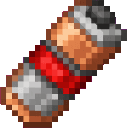
Storm Signal Battery
Craft a battery from copper, redstone, iron, and coal.


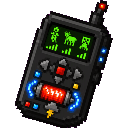
Charged Controller
Combine an uncharged Storm Signal Controller with a Storm Signal Battery. The result starts at 100% charge.
Recharge a Controller
Combine a Charged Controller with another Storm Signal Battery to restore it to a full 100% charge.
Batteries stack up to 16. Controllers do not stack.
Abilities And Mechanics
Battery Use
A valid controller use consumes 10% battery charge. The battery indicator changes color when the charge is low:
- Above 20%: green
- 20% or below: red
The controller must have at least 10% charge to be used. Uses made in valid weather conditions consume charge even if no mob is found, so aim carefully before activating it.
The uncharged controller cannot link mobs. It must be combined with a battery first.
Weather And Water
The controller is disabled when:
- It is raining at your position.
- Your eyes are underwater.
Move under cover or out of the water before trying to create a signal.
Enraged Enemies
When a hostile signal expires naturally, the hostile mob becomes enraged for 20 seconds. Enraged enemies:
- Become approximately twice as large.
- Move approximately twice as fast.
- Glow, making them easier to see.
- Cannot be linked during the enraged state.
- Attack more frequently.
The enemy returns to its normal size and behavior when the 20 seconds end.
Enraged Mob Effects
Different hostile mobs gain additional dangers while enraged:
- Zombies can break nearby logs, planks, stone, cobblestone, deepslate, and cobbled deepslate. Wooden blocks take 5 hits; stone-type blocks take 12 hits.
- Creepers have a longer fuse and an explosion radius of 9 blocks instead of the normal 3.
- Spiders place a cobweb beneath a player when they successfully attack, if there is room and a solid block below.
- Skeletons fire more powerful arrows at twice their normal ranged attack power. Their arrows home toward their current target, and arrows that hit a player apply Slowness for 2 seconds.
- Other hostile mobs gain the general size, speed, glowing, and faster-attack effects.
Progression And Strategy
- Start with animals or villagers to practice aiming and menu commands safely.
- Keep batteries ready before attempting hostile control. A hostile connection lasts only 10 seconds.
- Use Stay when positioning a friendly mob, then switch back to Follow when you are ready to move.
- Use Attack nearest mob to turn a hostile mob against another nearby mob, but remember that the target is selected within a 16-block area.
- Disconnect hostile mobs before their signal expires if you do not want to create an enraged enemy.
- Do not rely on a signal during storms, underwater fights, or battles behind glass.
- If a hostile mob becomes enraged, wait out its 20-second rage or defeat it instead of trying to reconnect it.
How to install
This Java mod can be used on Windows and Mac PCs with the CreativeMode Launcher or any Minecraft launcher of your choice.

1. Download and install the new CreativeMode Launcher
2. Click to play on the top of the screen.
3. That's it — launches instantly. No complicated setup required.
Want to use on a different launcher? Download mod and manually install.
Players also liked

Waystone mod


Adds a personal Waystone teleportation system: place a Waystone to register a travel point tied to your player account, right-click an unactivated Waystone to add and name it, and right-click an activated Waystone to open your teleport GUI and travel to any Waystone you have pers…

Universal Mob Foundry


🌌 ADVANCED SPAWNER ─ Universal Mob Foundry (UMF) │ ├─ ⚙️ Main Functionality: │ ├─ 🧟♂️ Automatically spawns mobs that YOU purchase from the spawner menu │ ├─ 💎 Generates and collects mob loot over time directly inside the block │ └─ 📦 Works as a full simulation…
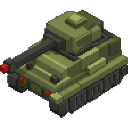
Jumbo Siege Tank
 anon
Pilot a Sherman tank: realistic engine rumble, shell blasts, and unstoppable foliage-crushing force.
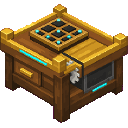
Custom Crafter

The Custom Crafter is a placeable 3D workstation that faces the direction you place it; right-click it to open a three-tab recipe creator UI (Crafting, Furnace, Stonecutter). In the Crafting tab place ingredients into the input slots and the desired output into the output slot, t…

Camouflage Clutch

Flip to phase through walls; short-looking clutches still let you safely walk over them. Right Click to cycle between phasing through 1,2 or 3 blocks placed above the Clutch.
This mod is licensed under the CreativeMode Mods License.