

Description
Blast bedrock with the Starfall Gun, unleashing a deadly orbital strike and massive crater.
Mod Wiki
Starfall Gun
Quickstart
Craft the Starfall Gun with the recipe below, then hold it and right-click while aiming at a block within 50 blocks.


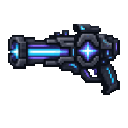
A four-second orbital charge marks the target with particles and a growing ring. The strike then tears open a large crater and a deep vertical shaft. Keep clear of the impact area: nearby living entities take heavy damage. Each shot has a 12-second cooldown.
Overview
The Starfall Gun is a destructive weapon for reshaping terrain. It can erase bedrock as well as ordinary blocks, so use it with care around builds and useful terrain.
What It Adds
- Starfall Gun: A craftable weapon that calls an orbital strike on the block you target.
- Crater and shaft: The impact creates a bowl-shaped crater up to 12 blocks in radius and 24 blocks deep, plus a circular shaft 4 blocks in radius that cuts from the world’s ceiling to its lower boundary.
How To Use
- Aim at a block and right-click with the gun. If no block is hit within 50 blocks, the strike won’t start.
- Watch for the charge effects and wait about four seconds for impact. The target is set when you fire.
- Move away from the target before the strike lands. Living entities near the impact can take 60 damage; the shooter is spared.
The strike removes blocks directly, including bedrock. Removed blocks do not drop as items.
Crafting And Obtaining
The recipe uses two netherite ingots, a nether star, two diamond blocks, a crossbow, and an iron ingot. Place the ingredients as shown in the recipe above.
Abilities And Mechanics
- The crater is deepest near the target and shallower toward its edge.
- The central shaft extends through the world and can break through bedrock.
- The cooldown begins when the strike is locked and lasts 12 seconds.
Progression And Strategy
Try the gun in an open area first, aiming at a spot away from valuable builds. The shaft clears a substantial vertical column, while the wider crater removes terrain around the impact; plan for both before firing.
How to install
This Java mod can be used on Windows and Mac PCs with the CreativeMode Launcher or any Minecraft launcher of your choice.

1. Download and install the new CreativeMode Launcher

2. Click to play on the top of the screen.
3. That's it — launches instantly. No complicated setup required.
Want to use on a different launcher? Download mod and manually install.
Players also liked
Endless Mastery


Endless Mastery replaces the vanilla Creative stub with a persistent, open-ended mastery progression that tracks XP and levels for nearly every action—mining, using items, eating, movement, sprinting, jumping, combat and more—granting immediate, permanent attribute modifiers to t…

Hydrocoal Factory


The Hydrocoal Factory is a magical energy conversion device inspired by Mekanism technology that transforms water and coal into usable energy. To use it, simply have a water bucket and coal in your inventory, then right-click the Hydrocoal Factory item to instantly convert these…
The Virus Mod


Enter Hygron rifts to be pulled into the Hygron Core — a sprawling raid stronghold of themed sections (corrupted courtyards, labs, cathedrals, factories, mirror halls, sky bridges and a final castle) where you fight patrols, ambushes, minibosses and cinematic bosses to unlock pro…
Boss Progression Checklist

Boss Progression Checklist is a persistent, world-global boss journal that tracks confirmed boss-bar entities (vanilla Wither and Ender Dragon always included; modded bosses appear if listed in the config or actually spawn with a boss event) and orders them by max health, with th…
Sword Of Slime


The Sword of Slime is a powerful enchanted weapon that harnesses the bouncy power of slime blocks. Right-click to fire a barrage of three bouncing slime ball projectiles that explode on impact, dealing area damage and creating slime blocks where they land. Simply holding the swor…
This mod is licensed under the CreativeMode Mods License.