

Description
Open endless black rifts and wither foes with unbreakable Riftblades in Minecraft Java 1.20.1.
Mod Wiki
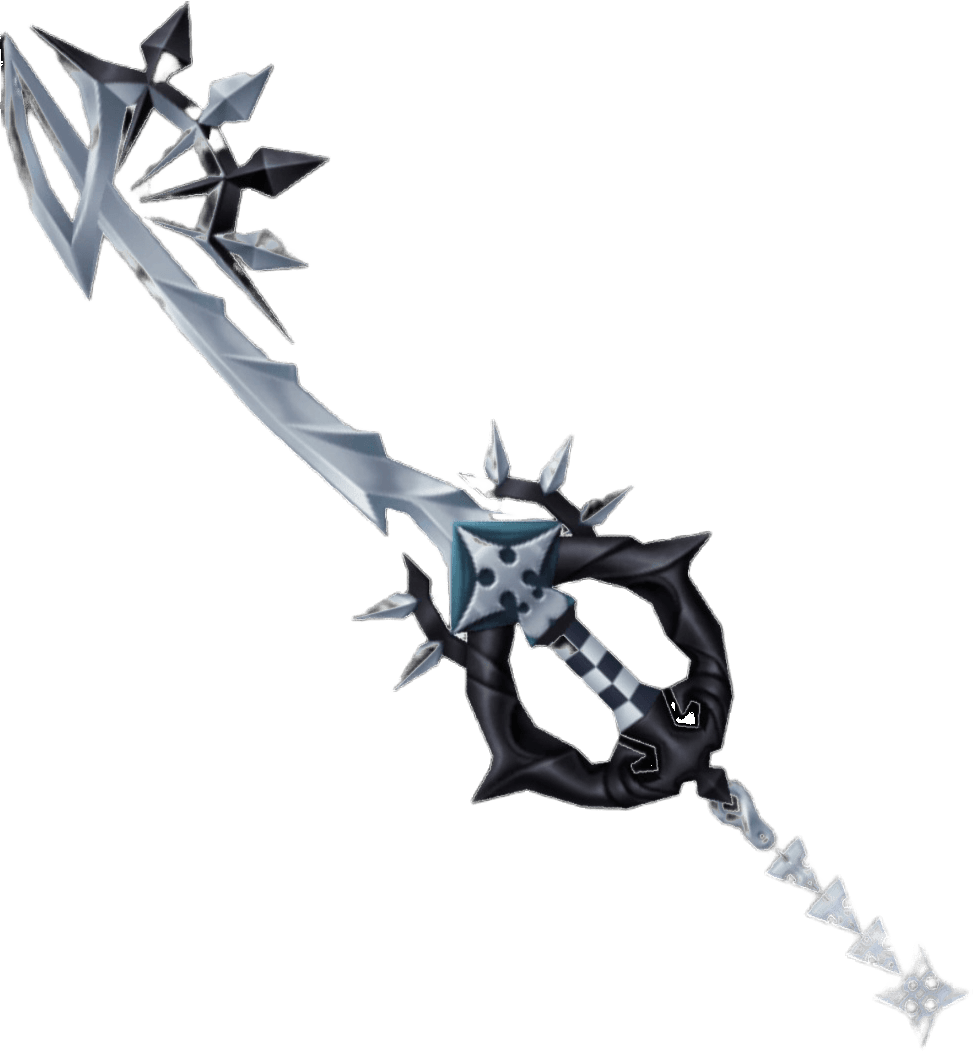
Shadow Riftblade
Quickstart
- Obtain the Shadow Riftblade by crafting it or, in Creative mode, searching for it in the Combat item group.
- Equip it in your hotbar and use right-click near hostile mobs. One to three black rifts appear around you and launch homing blades.
- Strike enemies directly with the blade to deal melee damage and apply Wither.
- For movement, hold Shift and right-click. A traveling rift moves in the direction you are looking. Keep holding Shift, then release it to teleport to the rift.
Craft the blade with:


You can also obtain it with:
/give @s shadow-riftblade-2xm4inqp:shadow_riftblade_2xm4inqp
Overview
The Shadow Riftblade is an unbreakable, Netherite-grade sword that opens short-lived black rifts. Its rifts attack nearby hostile mobs with volleys of summoned blades, while a sneak-use mode turns a rift into a guided teleport.
The blade:
- Is a single-stack sword.
- Never loses durability from combat or mining.
- Has a permanent enchantment glint.
- Counts as a sword.
- Applies Wither when it hits a living target.
What It Adds
Shadow Riftblade
The Shadow Riftblade is both a melee weapon and a rift-creating artifact. It uses the normal sword controls for attacks and mining, plus two special right-click abilities.
Shadow Rifts
Combat rifts are large, black, violet-edged portals that briefly hover around the player. They swirl visibly and release five summoned Riftblades before disappearing.
Summoned Riftblades
Each projectile is rendered as a spinning copy of the Shadow Riftblade. Summoned blades:
- Seek hostile mobs.
- Deal 9 damage when they hit.
- Apply Wither for 6 seconds.
- Cannot be collected as items.
- Disappear after a short time if they do not hit a target.
How To Use
Melee Attacks
Attack a mob with the Shadow Riftblade as you would with any sword. A successful hit applies Wither for 6 seconds.
The sword can also be used to mine blocks without consuming durability.
Open an Offensive Rift
With the blade equipped, press right-click without sneaking.
- At least one rift always opens.
- Up to three rifts can open, depending on nearby hostile mobs.
- Rifts form in a circle around you, with the first rift oriented toward your facing direction.
- Each rift searches for hostile mobs and launches a five-blade volley.
- Rifts can continue selecting another hostile mob if their original target dies.
Combat rifts search within roughly 20–22 blocks. They remain active for less than two seconds, firing blades in rapid succession.
Create a Teleport Rift
Hold Shift and press right-click.
- A single rift launches from your eye level in the direction you are looking.
- Continue holding Shift while the rift travels.
- Release Shift to teleport to the rift.
- Your velocity is stopped when the teleport completes.
Only one traveling teleport rift can be active for you at a time. If you create another, it replaces the previous one. A pending rift expires after about 12 seconds if you do not release Shift.
Crafting And Obtaining
The recipe uses Netherite, End, and Nether materials:
- Netherite Scrap
- Netherite Ingot
- Ender Eye
- Wither Skeleton Skull
- Stick
The recipe becomes available in the recipe book after joining a world. In Creative mode, look for the Shadow Riftblade in the Combat item group.
Abilities And Mechanics
| Ability | Control | Effect |
|---|---|---|
| Melee curse | Attack a target | Deals sword damage and applies Wither for 6 seconds |
| Offensive rift | Right-click | Opens one to three nearby rifts that fire homing blades |
| Teleport rift | Hold Shift + right-click | Sends a rift forward; release Shift to teleport to it |
| Durability protection | Passive | The blade is unbreakable during combat and mining |
Offensive rifts target living hostile mobs rather than the player who created them. Their summoned blades curve toward targets while traveling, making them useful against moving enemies.
Progression And Strategy
- Craft the blade after gathering Netherite, an Ender Eye, and a Wither Skeleton Skull.
- Use offensive rifts when surrounded: the rifts spread around you and can divide their attacks among multiple hostile mobs.
- Strike a tough target first to apply Wither, then open rifts to add homing damage.
- Aim the teleport rift through open space before releasing Shift. It travels forward from your eye level, allowing quick movement across terrain or away from danger.
- Avoid releasing Shift before the traveling rift reaches your intended destination.
- Because the blade does not break, it is suitable for repeated combat, mining, and exploration.
How to install
This Java mod can be used on Windows and Mac PCs with the CreativeMode Launcher or any Minecraft launcher of your choice.

1. Download and install the new CreativeMode Launcher

2. Click to play on the top of the screen.

3. That's it — launches instantly. No complicated setup required.
Want to use on a different launcher? Download mod and manually install.
Ported from

Shadow Riftblade
zagizenken
Java 1.21.5
Players also liked




Boomeraxe


The Boomeraxe adds tiered throwable axes (wood, stone, iron, gold, diamond, and netherite) that also function as effective handheld pickaxes and multipurpose tools: hold right-click to charge and release to throw — a full-charge throw sends it far and it returns to you like a loy…
This mod is licensed under the CreativeMode Mods License.