

Description
Reveal nearby blocks as blue outlines with the Stone Sight Keyblade, seeing through walls, floors, and roofs.
Mod Wiki
Stone Sight Keyblade
Quickstart
- Obtain the keyblade by crafting it, selecting it from the Combat creative inventory tab, or using:
/give @s stone-sight-keyblade-ct27nowq:stone_sight_keyblade_ct27nowq - Hold the Stone Sight Keyblade in your main hand or off-hand.
- Press I to activate Stone Sight. The default key can be changed in the Controls menu.
- Look through nearby walls, floors, and roofs. Blocks inside the active area appear as blue outlines.
- Press I again to turn Stone Sight off. You must be holding the keyblade for its vision effect to display.
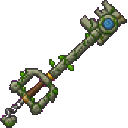
The crafting recipe is automatically available in the recipe book:


Overview
The Stone Sight Keyblade is a glinting sword that reveals nearby blocks through solid terrain. When Stone Sight is active, normal terrain faces inside a local area are hidden and non-air blocks are shown as blue wireframe outlines.
The revealed area follows you as you move and covers a 20 × 20 × 20 block volume around your player.
What It Adds
- Stone Sight Keyblade weapon
- Toggleable local block vision
- Blue outlines for blocks hidden behind walls, floors, and roofs
- Night vision while the keyblade is held
- Protection from vanilla in-wall suffocation damage while held
- Combat-tab creative inventory entry
- Stack size of one
How To Use
Activate Stone Sight
- Place the keyblade in either hand.
- Press I, or use your remapped Stone Sight control.
- Explore the highlighted area and inspect the outlines of blocks around you.
Stone Sight only affects the nearby 20-block cube. Terrain outside this area renders normally, and the revealed area moves with you as you walk.
Deactivate Stone Sight
Press I again while holding the keyblade. Putting the keyblade away also removes the active visual reveal until you hold it again.
The toggle remains ready when you re-equip the keyblade, so you can quickly resume Stone Sight without activating it again.
Holding Requirements
The keyblade must be in your main hand or off-hand for its special effects to work. Simply having it in your inventory is not enough.
Crafting And Obtaining
Craft one Stone Sight Keyblade from:
- 3 Stone
- 1 Eye of Ender
- 1 Diamond
You can also obtain it from the Combat tab in Creative mode or with:
/give @s stone-sight-keyblade-ct27nowq:stone_sight_keyblade_ct27nowq
Abilities And Mechanics
Block Outlines
Stone Sight reveals non-air blocks in its active 20 × 20 × 20 area as blue outlines. This lets you locate hidden rooms, caves, ores, structures, and other blocks through terrain.
The outlines follow the shapes of the blocks, so unusual block shapes can appear as partial or irregular wireframes.
Night Vision
Holding the keyblade grants night vision, making dark caves and underground spaces easier to explore even when Stone Sight is turned off.
In-Wall Protection
While holding the keyblade, you do not take vanilla suffocation damage from being inside a solid block. Stone Sight is a visual ability, however; it does not let you walk through blocks or remove collision.
Weapon Use
The Stone Sight Keyblade is also a sword-class weapon and can be used in combat like other swords. It has a permanent enchantment glint and cannot be stacked.
Progression And Strategy
- Craft the keyblade before exploring unfamiliar caves or large underground areas.
- Activate Stone Sight briefly to locate hidden spaces and valuable blocks, then turn it off for a clearer normal view.
- Use the keyblade’s night vision while scouting dark areas.
- Move slowly through unexplored terrain so the active reveal window follows your position.
- Remember that Stone Sight shows blocks, not a global map: areas outside the nearby cube remain concealed by normal terrain.
How to install
This Java mod can be used on Windows and Mac PCs with the CreativeMode Launcher or any Minecraft launcher of your choice.

1. Download and install the new CreativeMode Launcher

2. Click to play on the top of the screen.

3. That's it — launches instantly. No complicated setup required.
Want to use on a different launcher? Download mod and manually install.
Players also liked



This mod is licensed under the CreativeMode Mods License.