

Description
Record the world around you and carry its three-dimensional holographic map wherever you go.
Mod Wiki
Holo Map
Quickstart
- Craft a Holo Map using the recipe below, or take one from the Functional creative inventory tab. It is a single-stack item.
- Keep the map in your inventory while exploring. It automatically records each new chunk you enter.
- Hold the map in your main or off hand and use it to project the recorded map in front of you.
- Use the map again to turn the projection off.
- While the projection is off, sneak and use the map to scan the current chunk for living mobs and display them in the hologram.


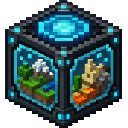
The map projection starts with the saved chunk you are currently in. If you have recorded multiple chunks, press . to cycle through them.
Overview
Holo Map records complete chunks as three-dimensional snapshots and displays them as a movable hologram. Recorded blocks are stored in the map, so the snapshot does not change when the world is later modified.
The map can record multiple chunks as you travel. It must be somewhere in your inventory for automatic recording to work, and it must be held in your main hand or off hand to display the hologram.
What It Adds
- Holo Map item
- Automatic recording of newly entered chunks
- Three-dimensional block holograms
- Multiple saved chunks per map
- Optional mob scanning for the current chunk
- Controls for moving, rotating, and changing the displayed chunk
How To Use
Record the world
Carry the Holo Map in your inventory as you explore. When you enter a chunk that the map has not recorded before, the map saves the complete vertical block range of that chunk.
A chunk is recorded only once. Later changes to blocks in that chunk do not update its saved snapshot.
Using the map also ensures that your current chunk is recorded before the projection appears.
Display the hologram
Hold the Holo Map in either hand and use it. The hologram appears in front of and above you, showing one of the saved chunks.
Use the map again while the projection is active to turn it off.
Scan mobs
To include mobs in the projection:
- Turn off the active projection if necessary.
- Sneak and use the Holo Map while standing in the chunk you want to scan.
- The map records living mobs throughout that chunk and displays them with the selected chunk.
A mob scan replaces the map's previous mob scan. Mobs are shown as recorded snapshots and are not live-tracked afterward. The mob display is enabled only for the chunk that was scanned.
Choose a saved chunk
When multiple chunks are recorded, press . to show the next saved chunk. The selection loops back to the first chunk after the last one.
The action bar reports the selected chunk's position and its number in the saved-chunk list.
Abilities And Mechanics
Hologram positioning
While the projection is active and the map is held, use these controls to position it:
| Action | Default key |
|---|---|
| Move hologram up | Up Arrow |
| Move hologram down | Down Arrow |
| Move hologram left | Left Arrow |
| Move hologram right | Right Arrow |
| Move hologram forward | = |
| Move hologram backward | - |
| Rotate hologram left | [ |
| Rotate hologram right | ] |
| Show next saved chunk | . |
Hold a movement or rotation key to make continuous adjustments. Movement changes the projection in small steps, while rotation turns it in five-degree increments.
You can rebind these controls in Minecraft's Options → Controls menu under the Holo Map category.
Saved snapshots
Each saved chunk contains its block layout across the world's full vertical range at the time it was recorded. Air is omitted from the visible hologram, while non-air blocks are rendered in their recorded positions.
The map has a maximum stack size of one, so keep each map separate if you want different exploration records.
Crafting And Obtaining
The Holo Map is crafted with glass, redstone, a map, iron ingots, and a diamond. Its recipe is automatically available to players, and the item is also available in the Functional creative inventory tab.
Progression And Strategy
- Carry the map from the beginning of an expedition so newly entered chunks are captured automatically.
- Use separate maps for separate regions or exploration routes.
- Scan mobs after reaching a point of interest if you want a snapshot of its current inhabitants.
- Use the movement controls to place the hologram beside your base, above a work area, or at a comfortable viewing distance.
- Cycle through saved chunks with
.to compare locations without opening a menu.
How to install
This Java mod can be used on Windows and Mac PCs with the CreativeMode Launcher or any Minecraft launcher of your choice.

1. Download and install the new CreativeMode Launcher

2. Click to play on the top of the screen.

3. That's it — launches instantly. No complicated setup required.
Want to use on a different launcher? Download mod and manually install.
Players also liked
Boomeraxe


The Boomeraxe adds tiered throwable axes (wood, stone, iron, gold, diamond, and netherite) that also function as effective handheld pickaxes and multipurpose tools: hold right-click to charge and release to throw — a full-charge throw sends it far and it returns to you like a loy…

This mod is licensed under the CreativeMode Mods License.