

Thunderwarp Hover Bike
Description
Take to the skies on a Thunderwarp Hover Bike and blast across the world with electric teleporting power!
Mod Wiki
Thunderwarp Hover Bike
Quickstart
- Obtain the bike from the Functional Creative inventory, craft it with the recipe below, or use:
/give @s thunderwarp-hover-bike-6y6vy6cs:thunderwarp_hover_bike_6y6vy6cs_1_0_0 - Clear an open area before placing it. The bike assembles as a connected display occupying a 3×3×3 space, and its front faces toward you when placed.
- Right-click any visible part of the assembled bike to mount it. Only one player can ride at a time.
- While mounted, use your normal movement keys to fly, aim your view to set the bike’s heading, and try the two electric abilities:
- Right-click: Call down lightning at the block under your crosshair.
- Hold W + Right-click: Send out a forward warp cloud. Release either input to teleport.
- The bike automatically switches to a third-person view while ridden and restores your previous camera perspective after you dismount.
Overview
The Thunderwarp Hover Bike is a single-seat flying vehicle powered by lightning and teleportation. It can travel horizontally, rise or descend freely, strike distant targets with lightning, and warp forward through a cloud of electric energy.
The bike has two forms:
- Placed display: A connected multiblock model used to activate the bike.
- Rideable bike: The flying vehicle created when you right-click the display.
Mounting removes the placed display and leaves the rideable bike under your control. After dismounting, the bike remains in the world and can be ridden again.
What It Adds
- A single-seat hover bike
- Automatic assembly of the bike’s connected display parts
- Horizontal and vertical flight
- Electric spark effects while riding
- A lightning-strike ability with a range of up to 48 blocks
- A forward warp ability that can travel up to approximately 192 blocks
- Collision-safe warp destinations that avoid placing the bike or rider inside solid blocks
How To Use
Placing And Mounting
Place the bike item in a clear area. Its connected parts are assembled automatically, with the structure rotating to face away from you.
Right-click any part of the completed display to mount it. You do not need to click a specific seat or central block. The display disappears when the ride begins.
If you break any part of an unmounted display, the entire connected display is removed. Make sure there is enough room for all of its parts before placing it.
Controls
| Input | Action |
|---|---|
| W | Move forward |
| S | Move backward |
| A / D | Steer sideways |
| Jump key — default Space | Ascend |
| Sneak key — default Shift | Descend |
| Sprint key — default Left Ctrl | Dismount |
| Right-click | Strike lightning |
| W + Right-click | Charge and release a forward warp |
The bike follows the direction you are looking. Sneaking lowers the bike instead of using the normal dismount behavior.
Dismounting
Press your Sprint key to leave the bike. The bike looks for a clear position beside itself and places you there when possible. The hover bike remains available for another ride.
Crafting And Obtaining
The recipe is supplied automatically when you join the world and can also be viewed in the recipe book. In Survival, craft one bike item at a crafting table:


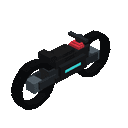
The recipe uses vanilla electrical, metal, teleportation, and flight-related materials shown in the recipe display.
Abilities And Mechanics
Hover Flight
The bike has no normal gravity while ridden. Use the Jump key to gain height and the Sneak key to descend. Without either input, it gradually loses a small amount of altitude.
The bike emits electric sparks while occupied, making it easy to identify during flight.
Lightning Strike
Right-click while riding to summon a lightning bolt at the block you are looking at, up to 48 blocks away. If no block is targeted, the strike is placed at the end of the bike’s targeting range.
Lightning has a short cooldown, so allow a moment between strikes.
Forward Warp
Hold W and Right-click together to create a cloud of charged particles ahead of the bike. The cloud travels forward horizontally and can reach approximately 192 blocks.
Release either W or Right-click to teleport the bike and its rider to the cloud’s endpoint. The destination is checked for both the bike and the player:
- The warp stops when it reaches a solid obstruction.
- The bike lands at the furthest nearby safe position in front of its starting point.
- The destination may be adjusted slightly vertically to find open space.
- If no safe position is immediately available, keep the warp input ready and allow the cloud to advance.
Progression And Strategy
- Craft the bike after gathering the materials shown in its recipe, then keep it in a clear outdoor area for easy takeoff.
- Use third-person view to judge the bike’s full length and avoid clipping the model into terrain.
- Gain altitude before crossing uneven ground or dense forests.
- Use lightning for targets that are difficult to approach directly.
- Hold the warp only as long as needed. Release early for short hops and keep holding to reach distant locations.
- Aim warps along open paths; walls and terrain cause the cloud to stop and select a shorter safe destination.
- Remember that the bike remains where you leave it after dismounting, so use clear landing areas when traveling with it.
How to install
This Java mod can be used on Windows and Mac PCs with the CreativeMode Launcher or any Minecraft launcher of your choice.

1. Download and install the new CreativeMode Launcher

2. Click to play on the top of the screen.

3. That's it — launches instantly. No complicated setup required.
Want to use on a different launcher? Download mod and manually install.
Players also liked
Yamato


Master Yamato’s nine techniques, chain devastating combos, and tear through enemies with dimensional slashes.
Boomeraxe

The Boomeraxe adds tiered throwable axes (wood, stone, iron, gold, diamond, and netherite) that also function as effective handheld pickaxes and multipurpose tools: hold right-click to charge and release to throw — a full-charge throw sends it far and it returns to you like a loy…
Java Turtle

Adds a working Minecraft interpretation of the turtle from Python Turtle! You can program it with these functions: Place block (places from first available slot in inventory), Break block (breaks and drops the block infront of it), Forward (moves the turtle forward), Hop (moves t…
Greenfire Siege Tank


Ride the Greenfire Siege Tank and unleash rockets, fire, and flying blocks across the battlefield.
Grand Reach Arsenal


Wield colossal glaives, halberds, and pikes with sweeping, slamming, and long-range attacks.
This mod is licensed under the CreativeMode Mods License.