CreativeMode

Creative
Mode

ExploreModJamsCreateJoin our community
Sign in
Craft first mod
CreativeMode

Creative
Mode

Sign in
Create
Account
Community
Resources

Create without limits.

Privacy PolicyTerms of Use

© 2026 CreativeMode. Not an official Minecraft product. Not approved by or associated with Mojang or Microsoft.

CREATIVEMODE

    Create
    Account
    Community
    Resources

    Create without limits.

    Privacy PolicyTerms of Use

    © 2026 CreativeMode. Not an official Minecraft product. Not approved by or associated with Mojang or Microsoft.

    CREATIVEMODE

    v3
    MC Java 1.21.5

    Seismic Geophone Surveyor

    by
    gutimods
    gutimods

    36 downloads

    Tool
    Functional
    v3
    MC Java 1.21.5

    Seismic Geophone Surveyor

    by
    gutimods
    gutimods

    36 downloads

    Tool
    Functional

    Description:

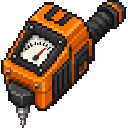
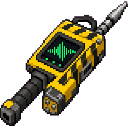
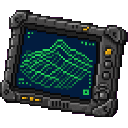
    The Seismic Geophone Surveyor (plus the Handheld Geophone, Seismic Node Surveyor, and Vibroseis Scan Controller) is a handheld geological scanner that now appears as a standard flat 2D item for a clean, consistent inventory look. Right-click any solid block to send a seismic pulse straight down that scans a 15-block column for Iron, Gold, Diamond, Emerald, Lapis, Redstone, and Copper; a sharp ping and chat message tell you what ore was detected and how far below you it is, while a dull thud and message indicate no finds. Each device has 50 charges with a 3-second cooldown between scans and retains its usual sounds, particles, durability behavior, and crafting—use charges wisely to pinpoint deposits.

    Mod Wiki

    Seismic Geophone Surveyor

    Quickstart

    1. Craft a Handheld Geophone at a crafting table (see recipe below).
    2. Hold it in your hand and right-click any solid block on the ground.
    3. Watch the chat — a sharp ping and message tell you which ore was found and how many blocks below it sits. A dull thud means nothing was detected in range.
    4. When your needs grow, upgrade to the Seismic Node Surveyor or Vibroseis Scan Controller for wider and deeper scans.

    Overview

    The Seismic Geophone Surveyor adds three handheld geological scanning tools to the game. Each device sends a seismic pulse downward when you right-click a solid block, then reports any ore deposits found beneath you directly in chat. The tools form a crafting progression: the basic Handheld Geophone feeds into the mid-tier Seismic Node Surveyor, which in turn feeds into the top-tier Vibroseis Scan Controller. All three appear as flat 2D items in your inventory and hotbar.


    What It Adds

    ItemScan AreaDepthUses (Durability)Cooldown
    Handheld Geophone1 × 1 column15 blocks30~4 seconds
    Seismic Node Surveyor3 × 3 column40 blocks60~2 seconds
    Vibroseis Scan Controller5 × 5 column120 blocks150~5 seconds

    All three tools scan for: Iron, Gold, Diamond, Emerald, Lapis Lazuli, Redstone, and Copper.


    How To Use

    • Activate: Right-click any solid block while holding a scanner.
    • Ore found: You hear a sharp ping and receive a chat message naming the ore and its depth in blocks below you.
    • Nothing found: You hear a dull thud and a chat message confirms no ores were detected in range.
    • Cooldown: Each tool has a per-item cooldown before it can scan again. The cooldown timer is independent per item stack.
    • Durability: Every scan consumes one use. When durability runs out, the item breaks, so use it strategically to pinpoint rich deposits before committing.

    The Seismic Node Surveyor also functions as a pickaxe (it is counted in the pickaxe item tag), so it can mine stone-tier blocks in a pinch.


    Crafting And Obtaining

    All three recipes are unlocked as soon as you join a world.

    Handheld Geophone — the entry-level scanner, built from copper and redstone:

    minecraft:copper_ingot
    minecraft:redstone
    minecraft:copper_ingot
    minecraft:copper_ingot
    minecraft:iron_ingot
    minecraft:copper_ingot
    minecraft:stick
    Arrow
    seismic-geophone-surveyor-52z67dej:handheld_geophone

    Seismic Node Surveyor — upgrades the Handheld Geophone into a deeper, wider scanner:

    minecraft:iron_ingot
    minecraft:redstone
    minecraft:iron_ingot
    minecraft:gold_ingot
    seismic-geophone-surveyor-52z67dej:handheld_geophone
    minecraft:gold_ingot
    minecraft:iron_bars
    Arrow
    seismic-geophone-surveyor-52z67dej:seismic_geophone_surveyor_52z67dej

    Vibroseis Scan Controller — the top-tier scanner, requiring advanced materials including an Echo Shard and Netherite Scrap:

    minecraft:diamond
    minecraft:echo_shard
    minecraft:diamond
    minecraft:redstone_block
    seismic-geophone-surveyor-52z67dej:seismic_geophone_surveyor_52z67dej
    minecraft:redstone_block
    minecraft:comparator
    minecraft:netherite_scrap
    minecraft:comparator
    Arrow
    seismic-geophone-surveyor-52z67dej:vibroseis_scan_controller

    All three items appear in the Tools creative tab.


    Abilities And Mechanics

    • Scan column: The pulse travels straight down from the block you clicked. The Handheld Geophone scans a single-block-wide column; the Node Surveyor covers a 3×3 area; the Vibroseis Controller sweeps a 5×5 area — all centered on your position.
    • Depth reporting: The chat message tells you exactly how far below the surface the ore sits, letting you dig straight to it rather than strip-mining.
    • Sound feedback: A distinctive ping on a hit and a thud on a miss give instant audio cues without needing to read chat.
    • Particles: Visual particle effects play at the scan location on activation.
    • Single stack: Each scanner is limited to one per inventory slot (no stacking), so managing multiple charged scanners requires inventory space.

    Progression And Strategy

    1. Start with the Handheld Geophone. It only requires copper, redstone, iron, and a stick — materials available in the early game. Use it to check if a promising cave or hillside has ore beneath it before digging.
    2. Craft the Seismic Node Surveyor once you have gold. Its 3×3 scan area and 40-block depth makes it far more useful for mid-game ore hunting, and the faster cooldown means quicker surveying across a mining level.
    3. Save the Vibroseis Scan Controller for deep ore hunts. Its 120-block depth reaches deep slate layers where diamonds and other rare ores concentrate. The materials (diamonds, Echo Shard, Netherite Scrap, Redstone Blocks) make it a late-game investment, and its 150 uses justify careful management.
    4. Scan before you dig. Right-click the surface or a tunnel wall to get a depth reading, then count blocks downward. This turns speculative branch mining into targeted vertical shafts, saving both time and tool durability.
    5. Watch your charges. Durability is limited and the items cannot stack, so avoid spamming scans in areas you have already surveyed. Move to a new position between scans for maximum coverage per charge.

    How to install

    CreativeMode Launcher

    1. Download and install the new CreativeMode Launcher

    Click to play

    2. Click to play on the top of the screen.
    Launches instantly

    3. That's it — launches instantly. No complicated setup required.

    Install manually

    Download the mod and follow the step-by-step installation guide.

    Players also liked

    Fire Alarm Speaker - media 1
    Java 1.21.5
    Fire Alarm Speaker

    Adds a craftable Fire Alarm Speaker block (recipe uses redstone, iron ingots, an…

    25 plays

    Crimson Foam Sprayer - media 1
    Java 1.21.5
    Crimson Foam Sprayer

    Are you tired of fires? The fire extinguisher gun will help you remove the fire.…

    30 plays

    Bound House Key - media 1
    Java 1.21.5
    Bound House Key

    House Key adds a craftable House Key item that binds to the first player who rig…

    22 plays

    Timber Chainshot - media 1
    Java 1.21.5
    Timber Chainshot

    Timber Chainshot adds a craftable Chainshot tool that fells entire trees sideway…

    24 plays

    Cinematic Replay Recorder - media 1
    Java 1.20.1
    Cinematic Replay Recorder

    Record your sessions and play them back with actors that preserve each player’s…

    97 plays

    This mod is licensed under the CreativeMode Mods License.

    CreativeMode

    Creative
    Mode

    ExploreModJams
    Create
    Items or Blocks icon

    Items or Blocks

    Join our community
    Craft first mod
    CreativeMode

    Creative
    Mode

    Craft first mod