

Description
Fat Man launcher with Mini Nukes, brutal blasts, and crash-proof projectile rendering
Mod Wiki
Mini Nuke Launcher
Quickstart
- Craft a Fat Man Launcher and some Mini Nukes.
- Put the Mini Nukes anywhere in your regular inventory.
- Hold the Fat Man Launcher and use it—usually right-click—to fire in the direction you are facing.
- Move away from the impact point. The projectile detonates when it hits an entity or block, creating a powerful explosion.
- Leave a 1.5-second gap between shots while the launcher’s cooldown is active.
You can also obtain both items from the Creative inventory. In Creative mode, the launcher can fire without consuming Mini Nukes, but it still uses durability.
Overview
The Mini Nuke Launcher adds a Fat Man Launcher and its Mini Nuke ammunition. Fired Mini Nukes travel as visible projectiles, leave a smoke trail, and detonate on impact or after roughly five seconds in flight.
Each detonation creates a blast approximately 10 blocks in diameter, damages nearby living entities, applies Radiation, and can destroy terrain through its explosion.
What It Adds
| Item | Use | Stack size | Durability |
|---|---|---|---|
| Fat Man Launcher | Fires Mini Nuke projectiles | 1 | 512 |
| Mini Nuke | Ammunition for the Fat Man Launcher | 16 | — |
The mod also adds the harmful Radiation effect.
How To Use
Fat Man Launcher
Hold the launcher and use it to fire one Mini Nuke.
- The launcher fires in the direction you are looking.
- One Mini Nuke is consumed per shot in Survival and other non-Creative modes.
- Mini Nukes can be carried anywhere in your regular inventory; they do not need to be placed in a special ammunition slot.
- The launcher has a 30-tick cooldown, or about 1.5 seconds, between shots.
- Each shot reduces the launcher’s durability by 1.
- The projectile is rendered as a thrown Mini Nuke and produces smoke while flying.
Mini Nuke Detonation
A Mini Nuke detonates when it hits an entity or block. It also detonates automatically if it remains in flight for more than approximately five seconds.
The detonation:
- Produces a powerful explosion with a radius of 5 blocks.
- Can destroy blocks because it uses TNT-style explosion interaction.
- Deals 100 points of direct damage, equal to 50 hearts, to nearby living entities.
- Applies Radiation to living entities caught in the direct blast area.
- Produces an explosion sound and visual effect.
Keep the launcher pointed away from yourself and avoid firing at close range.
Crafting And Obtaining
Fat Man Launcher
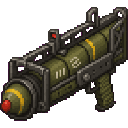
The launcher requires iron, a netherite ingot, sticks, and a blaze rod.


Mini Nuke
Mini Nukes require TNT and a gold ingot.


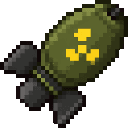
You can carry up to 16 Mini Nukes in one stack. The Fat Man Launcher cannot be stacked.
Abilities And Mechanics
Blast Damage
Living entities within 5 blocks of the detonation receive 100 direct damage. The explosion itself may also affect entities and blocks in the surrounding area.
Radiation
Radiation lasts for 9,600 game ticks, or 8 minutes.
While Radiation is active:
- The affected entity takes half a heart of magic damage every 2 seconds.
- The damage is non-lethal by itself: it will not reduce the target below half a heart.
- Radiation continues for its full duration unless removed by normal effect-clearing mechanics.
Progression And Strategy
- Craft several Mini Nukes before taking the launcher into combat; each shot consumes one outside Creative mode.
- Use long sightlines so the projectile can reach its target before the blast affects you.
- Fire from elevated or distant positions when attacking groups or fortified areas.
- Allow the launcher’s cooldown to expire before attempting another shot.
- Because the explosion can destroy terrain, use the launcher carefully near bases, villages, valuable structures, and item storage.
- Radiation makes surviving targets dangerous even after the initial blast, so retreat or finish them from a safe distance.
How to install
This Java mod can be used on Windows and Mac PCs with the CreativeMode Launcher or any Minecraft launcher of your choice.

1. Download and install the new CreativeMode Launcher
2. Click to play on the top of the screen.
3. That's it — launches instantly. No complicated setup required.
Want to use on a different launcher? Download mod and manually install.
Players also liked
Boss Progression Checklist

Boss Progression Checklist is a persistent, world-global boss journal that tracks confirmed boss-bar entities (vanilla Wither and Ender Dragon always included; modded bosses appear if listed in the config or actually spawn with a boss event) and orders them by max health, with th…
Railrunner Pickaxe


The Railrunner Pickaxe automatically carves a 3×4×4 tunnel in the direction you’re facing whenever you mine a block, laying rails along the bottom center and placing glowstone at the top for instant lighting. Just swing the pickaxe at any block to create a fully lit, minecart-rea…
Limbo Beyond


Dive the endless Bathyal ocean, with distant whale calls and rare mermaid song lures

Stygian Harvest Scythe

Harvest the Nether’s secrets with a scythe that replants crops and uncovers forbidden relics.
Sea Scepter


The Sea Scepter is a magical tool that lets you reshape water levels in a vast 750-block radius around you. Shift + right-click to toggle between Lifting Mode (fills air blocks above water to raise the level) and Lowering Mode (removes water blocks with air above to lower it), th…
This mod is licensed under the CreativeMode Mods License.