

Description
And insanely overpowered weapon which can spawn, teleport and destroy. Refer below to key bindings for controls.
Mod Wiki
Infinity Mirror
Quickstart
- Obtain the Infinity Mirror by crafting it, using the Creative inventory, or running:
/give @s infinity-mirror-bqyapjqg:infinity_mirror_bqyapjqg - Hold it in your main hand or off-hand.
- Try these first:
- Attack a mob with the mirror to create a temporary, stronger fighting double.
- Right-click a mob to send it into the mirror realm.
- Press
Bnear a hostile mob to create an equipped Mirror Clone. - Press
Mto travel to the End's outer islands orNto travel safely to the Nether. - Press
'to summon Herobrine when you are ready for a dangerous encounter.
- Open Options → Controls and find the Infinity Mirror category if you want to remap any ability.
The mirror has 256 durability. Successful attacks and most activated abilities consume durability.
Overview
Infinity Mirror is a multi-purpose utility and combat item built around portals, reflections, teleportation, destructive beams, and supernatural encounters.
The mirror's normal combat interaction is split into two controls:
- Left-click a mob: creates a temporary fighting reflection.
- Right-click while aiming at a mob: sends that mob to a separate mirror realm.
The mirror can affect almost any living mob, including passive mobs, villagers, tameable animals, monsters, bosses, and modded mobs. Players cannot be reflected as mobs.
Crafting And Obtaining
The crafting recipe becomes available after joining a world. It uses iron, glass panes, an Ender Eye, and an amethyst shard.


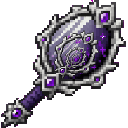
The finished mirror is a single-stack item with 256 durability.
How To Use
Mirror controls
| Key | Ability |
|---|---|
M | Open an End rift on the End's outer islands |
N | Open a safe Nether rift |
, | Return to the Overworld |
U | Return to your last used bed or respawn anchor |
B | Create a Mirror Clone |
Y | Fire the Rainbow Erasure Beam |
; | Open the Nether Suction Portal |
' | Summon Herobrine |
[ | Summon an Ender Dragon |
] | Summon three tamed ghasts |
Keypad 1 | Drop a 9×9×9 water mass |
Keypad 2 | Drop a 2×2×2 lava mass |
Keypad 0 | Enter the geometric pocket dimension |
Keypad 3 | Build a furnished home |
Keypad . | Save location slot 1 |
Keypad + | Save location slot 2 |
Keypad - | Save location slot 3 |
Keypad Enter | Cycle through saved locations |
Keypad * | Teleport to the nearest village |
Most key abilities activate with a press. Hold Y to keep firing the beam.
Abilities And Mechanics
Fighting reflections
Attack a mob while holding the Infinity Mirror to create a reflection beside it. The original and its double immediately target one another and fight.
Reflections:
- Last for about 30 seconds.
- Have doubled maximum health, attack damage, and movement speed.
- Can be made from passive mobs as well as hostile mobs.
- Continue fighting even when the original mob normally has no attack behavior.
Mirror realm
Right-click a mob while aiming at it. The mob must be within roughly 32 blocks and in your line of sight. It is teleported to the mirror realm and placed on stable terrain.
Mirror Clone
Press B while the mirror is held and a hostile mob is within roughly 32 blocks. The nearest hostile mob becomes the clone's target, and the clone joins the fight.
The Mirror Clone:
- Spawns in front of you.
- Copies your visible equipment.
- Has doubled health, attack damage, and movement speed.
- Lasts about 30 seconds.
- Cannot be created if there is no nearby hostile mob.
End and Nether rifts
- Press
Mto travel to a safe landing area on the End's outer islands, far from the central dragon arena. - Press
Nto travel to a safe location in the Nether. - Press
,to return safely to the Overworld. The mirror finds or creates an above-ground landing with 100 blocks of open air overhead.
The destination realm must be available for the rift to work.
Return to your bed
Press U to return to your last used bed or respawn anchor. If you have not used a valid one, the ability does nothing.
Rainbow Erasure Beam
Hold Y while looking in a direction. The rainbow beam reaches about 32 blocks and removes:
- Mobs in its path.
- Solid blocks in its path.
Use it carefully around builds, farms, and other players' creations.
Nether Suction Portal
Press ; to begin charging a portal about nine blocks in front of you.
After roughly three seconds, the portal:
- Opens a route into the Nether.
- Pulls nearby entities toward it.
- Pulls nearby solid blocks into the Nether.
- Remains active for about 66 seconds.
The suction reaches approximately 22 blocks for entities and about 20 blocks horizontally for blocks. Keep clear of the portal unless you intend to be transported. Only one nearby mirror portal can be active at a time.
Fluid masses
Press Keypad 1 to drop a 9×9×9 water mass and Keypad 2 to drop a 2×2×2 lava mass. The mass appears about 16 blocks ahead of you, above the terrain, and falls toward the ground.
In Survival, each fluid ability has one available charge. Creative players can use them repeatedly.
Geometric pocket dimension
Press Keypad 0 to enter a 333×333×333 geometric pocket dimension. It is an enclosed chamber made from light-blue and purple stained glass, with a repeating geometric pattern on its floor, ceiling, and walls.
Use , to return to the Overworld or save a location before entering if you want an easy route back.
Furnished home
Press Keypad 3 to build a small furnished home centered on you. The home includes:
- An oak floor, walls, roof, and chimney.
- Glass windows and a door.
- A red bed.
- A crafting table, furnace, and chest.
- Bookshelves, lanterns, a torch, and a potted sapling.
The structure is placed directly around your current position, so check the area before using it.
Saved locations
The mirror provides three personal location slots:
- Press Keypad
.to save slot 1. - Press Keypad
+to save slot 2. - Press Keypad
-to save slot 3. - Press Keypad
Enterto teleport to the next available slot.
Locations store your exact position, facing direction, and dimension. Successful teleports cycle through the slots and wrap back to slot 1. Saved locations remain available after leaving and rejoining the world.
Nearest village
Press Keypad * to search for and teleport to the nearest village. If no nearby village can be found, the mirror reports that the teleport failed.
Herobrine
Herobrine is a rare hostile encounter in the Overworld. He can naturally appear in dark areas, but does not spawn in Mushroom Fields. Breaking diamond ore or deepslate diamond ore also has a small chance to trigger his arrival.
You can summon him directly with '.
Outside Creative, Herobrine can only be summoned once per server. Creative players can summon him repeatedly for testing.
Herobrine has several unusual behaviors:
- Direct bright light makes him vanish after his arrival grace period.
- He detects players within about 48 blocks.
- Players within about 6 blocks suffer a movement-speed penalty.
- He can suddenly blink to a position behind his target.
- End Rod and reverse-portal particles mark his presence.
Keep the area dark only if you are prepared to fight him.
Creative Summons
Ender Dragon
Press [ to summon an Ender Dragon in front of and above you. It immediately enters an attack phase targeting you.
In Survival, the Ender Dragon ability has one available charge. Creative players can use it repeatedly.
Tamed ghasts
Press ] to summon three persistent tamed ghasts in formation ahead of you. They retain their normal flying and fireball behavior.
In Survival, the ghast summon has one available charge. Creative players can use it repeatedly.
Progression And Strategy
- Craft a spare mirror before experimenting with the beam, suction portal, or fluid masses.
- Use mob reflections on strong enemies to make them fight an enhanced copy of themselves.
- Create a Mirror Clone before entering a dangerous fight so it can distract a hostile mob.
- Save a location before opening a portal or entering the pocket dimension.
- Use the Nether Suction Portal away from important builds because it can move both entities and blocks.
- Use the Rainbow Erasure Beam only when you are certain of its line of fire.
- Build the furnished home in an open area so its walls and roof do not overwrite existing structures.
- Treat Herobrine as a persistent threat: fight in open, well-lit terrain and avoid letting him approach within fear-aura range.
How to install
This Java mod can be used on Windows and Mac PCs with the CreativeMode Launcher or any Minecraft launcher of your choice.

1. Download and install the new CreativeMode Launcher

2. Click to play on the top of the screen.

3. That's it — launches instantly. No complicated setup required.
Want to use on a different launcher? Download mod and manually install.
Players also liked
Vanishing Wooden Executioner


The Vanishing Wooden Executioner is a mysterious sword that automatically appears in your inventory when your health is at or below 50% and will instantly one‑shot any mob while present; it disappears if your health rises above 70% (it remains hidden/non‑usable between 50–70%), p…





Illager Crime Family


Illager Syndicate overhauls illager encounters by pitting you against a four-member mafia crime family: The Muscle (a slow hulking bruiser with a charged launch punch), The Enforcer (a mid-range suppressive shooter with scripted bursts), The Cleaner (a fast hybrid who tosses ling…


This mod is licensed under the CreativeMode Mods License.