

Description
Sneak, grab, and throw mobs, villagers, horses, and players anywhere you want.
Mod Wiki
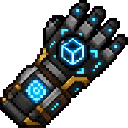
Gravity Grasp Gauntlet
Quickstart
- Craft the gauntlet using the recipe below, or take it from the Tools tab in the Creative inventory.
- Hold it in your main hand or off-hand. Your action bar shows the block or entity under your crosshair.
- To grab a creature, aim at a living entity, hold Sneak, and right-click. This works on mobs, villagers, horses, and other players.
- Look where you want to launch the creature, then right-click open air to throw it.
- To move a block, right-click it while holding an empty gauntlet. Right-click the face of another block to place the held block.


Overview
The Gravity Grasp Gauntlet is a single-item tool for picking up and repositioning living entities or blocks. You can hold one object at a time.
When the gauntlet is in either hand, the action bar identifies the current crosshair target:
Grasp target: <entity>for a living entityGrasp target: <block>for a blockGrasp target: nothingwhen you are not aiming at a supported target
What It Adds
- A gauntlet that grabs and throws living entities
- Support for villagers, horses, mobs, and players
- Block pickup and placement
- Safe handling of bees, beehives, and spawners, including their stored or configured data
- Aiming feedback in the action bar
- Temporary fall-damage protection for entities after they are thrown
How To Use
Grabbing and Throwing Entities
- Aim at a living entity.
- Hold Sneak and right-click.
- The target moves in front of you and follows your view while held.
- Aim in the desired direction.
- Right-click open air to throw the entity.
You can also throw a held entity by right-clicking a block face. The held entity is launched in the direction you are facing with a slight upward boost.
While an entity is held:
- Its gravity is disabled.
- Mob AI is disabled for mobs.
- Its previous gravity and AI settings are restored when it is thrown.
- You cannot grab yourself.
- A creature must be completely dismounted before it can be grabbed. Targets with passengers or a vehicle cannot be picked up.
- Sneaking and right-clicking another living entity throws the creature you are already holding instead of grabbing the new target.
Non-sneaking interaction with villagers, horses, and other mobs remains available for their usual interactions when you are not carrying an entity.
Moving Blocks
- Aim at a solid block and right-click it.
- The block is removed and held by the gauntlet.
- Aim at the face of another block.
- Right-click to place the held block on the adjacent space.
The gauntlet can carry ordinary blocks, including blocks with different orientations or states. The destination must have enough room and support for the block. If placement fails, the block remains held.
You cannot carry blocks with inventories or most other block contents. Bee nests, beehives, and spawners are supported and retain their stored bees, honey data, or configured spawning data when moved.
Crafting And Obtaining
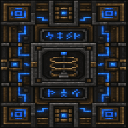
The recipe uses:
- 4 shulker shells
- 3 ender pearls
- 1 chorus fruit
- 1 iron block
The recipe is unlocked automatically when you enter a world. In Creative mode, the gauntlet is available in the Tools category.
The gauntlet stacks to one item.
Abilities And Mechanics
Throw Protection
A creature thrown by the gauntlet is protected from fall damage for 200 game ticks, or approximately 10 seconds. This protects against the landing caused by the throw, but does not make the entity immune to other types of damage.
Placement Safety
When placing a held creature, the gauntlet checks for enough open space for its full hitbox. Tall or wide creatures such as horses are not placed inside walls or ceilings. If no safe space is available, the creature stays held.
When placing a block, the gauntlet checks that the destination is empty and that the block can remain there. Invalid placement does not consume the held block.
Progression And Strategy
- Use the gauntlet to reposition villagers without breaking their job-site arrangements or transporting them by boat.
- Move horses and other mobs across obstacles, then throw them toward a safe landing area.
- Use the target indicator to confirm exactly which entity or block you are aiming at before grabbing it.
- Dismount passengers before attempting to move a horse, rider, or other mounted creature.
- For block relocation, aim at the face where you want the block placed and keep the destination clear.
- Use bee nests, beehives, and spawners when you need to relocate their contents or spawning setup without losing their stored data.
How to install
This Java mod can be used on Windows and Mac PCs with the CreativeMode Launcher or any Minecraft launcher of your choice.

1. Download and install the new CreativeMode Launcher

2. Click to play on the top of the screen.

3. That's it — launches instantly. No complicated setup required.
Want to use on a different launcher? Download mod and manually install.
Ported from
Gravity Grasp Gauntlet
zagizenken
Java 1.21.5
Players also liked
Cheese Launcher Blade


The Cheese Launcher Blade is a powerful sword that sends any mob or player flying approximately 100 blocks through the air when struck, launching them in the direction you are facing with an upward arc. Simply hit an enemy with it as you would any normal sword, and they will be v…




Helldiver B-01 Tactical Armor Skeleton


This mod adds a Helldiver Liberator Skeleton to Minecraft, a unique skeleton variant clad in B-01 Tactical Armor and armed with an AR-23 Liberator rifle; its armor prevents it from burning in daylight so it can patrol and attack at any time. It behaves like a ranged skeleton, kee…




This mod is licensed under the CreativeMode Mods License.