

Description
Sneak, grab, and throw mobs, villagers, horses, and players anywhere you want.
Mod Wiki
Gravity Grasp Gauntlet
Quickstart
- Craft the Gravity Grasp Gauntlet:


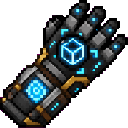
-
Equip it in your main hand or off-hand. It is also available in the Tools creative inventory tab. With commands, you can obtain one using:
/give @s gravity-grasp-gauntlet-3q6g5mne:gravity_grasp_gauntlet_3q6g5mne -
Aim at a mob, villager, horse, player, or other living entity and sneak while right-clicking to grab it.
-
Right-click open air to throw the held entity in the direction you are looking. Right-clicking another entity or a block also throws it.
-
To move a block, right-click the block to pick it up, then right-click the face of another block to place it.
While the gauntlet is held, your action bar identifies the entity or block under your crosshair.
Overview
The Gravity Grasp Gauntlet is a reusable tool for picking up and relocating living entities and blocks. It can:
- Grab mobs, villagers, horses, players, and other living entities
- Hold a creature in front of you while you aim
- Launch held creatures in the direction you are looking
- Pick up and place most non-air blocks
- Preserve the block state of moved blocks
- Preserve the stored data of bee nests, beehives, and spawners
The gauntlet itself occupies one inventory slot and does not require ammunition.
How To Use
| Action | Controls | Result |
|---|---|---|
| Grab an entity | Sneak + right-click the entity | Holds the targeted living entity in front of you |
| Grab a block | Right-click the block | Removes the block and holds it for placement |
| Throw an entity | Right-click open air, an entity, or a block while holding an entity | Launches the entity forward |
| Place a block | Right-click the side of a block while holding a block | Places the held block in the adjacent space |
| Check your target | Aim with the gauntlet equipped | The action bar shows the targeted entity, block, or “nothing” |
Sneaking is required when grabbing an entity so the gauntlet does not override normal interactions. Without sneaking, villagers, horses, and other entities retain their usual right-click behavior.
When holding an entity, right-clicking a block throws the entity instead of placing or releasing it. When holding a block, right-clicking an entity does not place the block.
Grasping Entities
The gauntlet can grab any living entity, including:
- Hostile and passive mobs
- Villagers
- Horses and other rideable creatures
- Players
The target must be dismounted first. You cannot grab:
- Yourself
- An entity with passengers
- An entity currently riding another entity
A grabbed creature stops moving and hovers approximately two blocks in front of your view. Mobs have their artificial intelligence disabled while held, and gravity is disabled for the held creature.
Throwing Creatures
Right-click while holding a creature to throw it. The gauntlet:
- Places the creature just ahead of your view
- Launches it in the direction you are facing
- Adds a small upward boost
- Restores its previous gravity and mob-AI settings after the throw
Thrown creatures receive temporary protection from fall damage for approximately 10 seconds. This protection does not prevent other types of damage and is not permanent.
Moving Blocks
Right-click a non-air block to pick it up. The block is removed immediately and remains held until you place it.
When placed, the block retains its original state, including properties such as orientation when applicable. The destination must be empty and suitable for the block. If placement is invalid, the block remains held.
The gauntlet can carry these block entities while preserving their stored data:
- Bee nests
- Beehives
- Spawners
Other block entities, including storage containers and machines, cannot be carried.
Crafting And Obtaining
The gauntlet requires shulker shells, ender pearls, chorus fruit, and an iron block:
You can also take it from the Tools tab in the creative inventory or use its item ID with /give.
Progression And Strategy
- Start with a passive mob or villager in an open area to practice grabbing and throwing.
- Use the crosshair indicator to confirm the target before sneaking and right-clicking.
- Dismount horses and other creatures before attempting to grasp them.
- Use open-air right-clicking when you want to throw a creature without accidentally targeting another entity.
- Move bee nests and beehives carefully when their stored bees or honey matter.
- Spawners retain their configured spawning behavior when relocated.
- When placing a block, aim at a face with enough empty space. An invalid placement does not destroy the held block.
- Remember that fall protection only lasts briefly, so thrown creatures can still take fall damage after it expires.
How to install
This Java mod can be used on Windows and Mac PCs with the CreativeMode Launcher or any Minecraft launcher of your choice.

1. Download and install the new CreativeMode Launcher

2. Click to play on the top of the screen.

3. That's it — launches instantly. No complicated setup required.
Want to use on a different launcher? Download mod and manually install.
This mod is licensed under the CreativeMode Mods License.