

Description
Chess piece blocks that can be moved around an 8 x 8 block chess board by interacting with them and then a legal destination block
Mod Wiki
Chessbound Blocks
Quickstart
- Obtain a Chessboard Controller from the Creative inventory, or craft one:


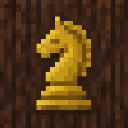
- Place the controller on a level surface with room for an 8 × 8 board above and beside it. Leave extra space around the board for captured pieces.
- Interact with the controller. It creates a complete chessboard with the standard starting setup.
- White moves first. Interact with one of the current player's pieces, then interact with its legal destination square.
- To start a new game, interact with the controller again. This resets the board, pieces, turn, and move count.
In Bedrock, use the normal interact/use control. In multiplayer, agree who will play White and who will play Black; the board enforces the turn order for everyone.
Overview
Chessbound Blocks turns a Minecraft area into an interactive chess game. The controller generates an 8 × 8 board, places all 32 starting pieces, and validates moves using chess rules.
The board supports:
- Legal movement for every chess piece
- Captures
- Check and checkmate
- Stalemate
- Castling
- En passant
- Automatic pawn promotion to a queen
- Displays for captured pieces
- A checkmate reward of 8 gold nuggets
Board sessions remain available when the world is reloaded. Interacting with the controller starts over from the beginning.
What It Adds
Board Blocks
- Chessboard Light Square
- Chessboard Dark Square
- Chessboard Controller
The controller generates the light and dark squares automatically. You do not need to craft or place the individual board squares.
Chess Pieces
Both White and Black have:
- Pawn
- Knight
- Bishop
- Rook
- Queen
- King
The Creative inventory contains placer items for every colored piece. These place the corresponding decorative chess-piece block.
How To Use
Creating A Board
Place the Chessboard Controller where you want one corner of the board. Interact with it to generate the board.
The controller uses the space above its position for the board and pieces. A fresh board replaces blocks in the board area, so clear the area first. Captured pieces are displayed in two columns beside the board, so leaving additional room on both sides is recommended.
The generated starting position is:
| Row | Pieces |
|---|---|
| Black back rank | Rook, Knight, Bishop, Queen, King, Bishop, Knight, Rook |
| Black pawn rank | Eight Black Pawns |
| Middle four rows | Empty |
| White pawn rank | Eight White Pawns |
| White back rank | Rook, Knight, Bishop, Queen, King, Bishop, Knight, Rook |
Moving A Piece
- Interact with a piece belonging to the player whose turn it is.
- Interact with the destination square.
- If the move is legal, the piece moves and the turn changes.
The board reports selections, turns, illegal destinations, checks, captures, and game-ending results on-screen and in chat.
Only the current player's pieces can be selected. An illegal destination clears the selection, so select the piece again before trying another move.
Capturing
Move onto a square occupied by an opposing piece to capture it. The captured piece is removed from the board and placed in a two-column display beside the capturing side of the board.
If that display is full, the capture still occurs, but the captured piece is not shown beside the board.
Resetting A Game
Interact with the Chessboard Controller at any time to create a fresh board. This removes the current arrangement and restores:
- The starting piece layout
- White's turn
- Castling rights
- En passant state
- The move count
Crafting And Obtaining
The controller and several White piece placers can be crafted at a crafting table.
Chessboard Controller


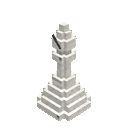
White Chess Bishop


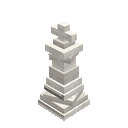
White Chess King

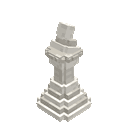
White Chess Queen


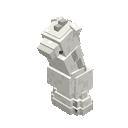
White Chess Knight
The generated board already contains every starting piece, including pawns and rooks. Black placers, White Pawn and Rook placers, and the remaining piece variants can be obtained from the Creative inventory.
Placing a piece manually does not replace the controller's normal starting setup. Interacting with the controller afterward resets the entire board.
Abilities And Mechanics
Pawn
- Moves one square forward into an empty square.
- May move two squares forward from its starting row if both squares are clear.
- Captures one square diagonally forward.
- Can capture en passant immediately after an opposing pawn makes a two-square move.
- Automatically promotes to a Queen upon reaching the far edge of the board.
White pawns move toward the Black side of the board. Black pawns move toward the White side.
Knight
Moves in an L shape: two squares in one direction and one square perpendicular to it. Knights can jump over other pieces.
Bishop
Moves diagonally any number of squares. The path must be clear.
Rook
Moves horizontally or vertically any number of squares. The path must be clear.
Queen
Moves horizontally, vertically, or diagonally any number of squares. The path must be clear.
King
Moves one square in any direction. A king cannot move into check, remain in check, or capture the opposing king.
Castling
Castling moves the king two squares toward a rook and places that rook on the square immediately beside the king.
Castling is allowed when:
- The king and the chosen rook have not moved.
- The squares between them are empty.
- The king is not currently in check.
- The king does not cross an attacked square.
- The king is not in check on its destination square.
Moving a king or a rook from its starting position permanently removes the relevant castling right. Capturing a rook on its starting square also removes that castling right.
Check
When a move attacks the opposing king, the board announces that the king is in check. The checked player must make a move that removes the check.
Checkmate
If the player in check has no legal move, the game ends in checkmate. The player who delivered checkmate wins and receives 8 gold nuggets.
Interact with the controller to reset the board for another game.
Stalemate
If the current player is not in check but has no legal move, the game ends in stalemate. Reset the controller to begin again.
Progression And Strategy
- Protect your king before attacking.
- Keep paths clear for bishops, rooks, and queens.
- Use knights to attack crowded areas because they can jump over pieces.
- Watch for pins and discovered attacks that could expose your king.
- Advance pawns carefully: a two-square pawn move can allow an immediate en passant capture.
- Preserve your rooks and king movement if you want to retain castling rights.
- When a pawn reaches the opposite edge, plan around its automatic promotion to a queen.
- Leave space beside the board so captured pieces can be displayed clearly.
How to install
Download the mod and follow the step-by-step installation guide.
Players also liked
Crimson Apple Switch

Place an apple on the Crimson Apple Switch to trigger a redstone signal.

Bumper Sheep


Bumper Sheep look like ordinary woolly sheep with sturdy little helmets, quietly grazing until you get too close. They’ll give you a gentle nudge when you wander near, but every so often they suddenly dart forward in a playful charge. Shearing or defeating them still drops regula…
Animalfinder V8


I always have trouble finding specific animals that I need when in survival and got tired of not being able to make a bed because I can't find sheep.. So! IF you have the same problem, I developed this one to solve that problem! It shows you what animal is in what direction and…
Diamondbound Iron Sword


Reforge iron with diamonds and unleash devastating sword strikes.
Chichen Itza Builder 2


Chichen Itza 2 is a single-use builder block: place it to clear the surrounding area to a flat grass plane, trigger a 10-second countdown, and then watch it construct a faithful, scaled-up El Castillo replica before removing itself. It builds a proportional nine-tier pyramid on a…
This mod is licensed under the CreativeMode Mods License.