

Description
Craft Hard Nope Buttons and remotes to control redstone, block unwanted signals, and keep favorite locations loaded across dimensions in Minecraft 1.20.1.
Mod Wiki
The Hard Nope Button
Quickstart
- Craft a The Hard Nope Button block and place it near the redstone circuit you want to control.
- Craft a The Hard Nope Button Remote.
- Hold the remote and use it on the placed button to bind the remote to that button.
- Use the bound remote while holding it to toggle the button on or off.
- Connect the button to redstone components. When active, it emits a full-strength redstone signal; when inactive, it emits no signal.
The remote can control a button in another dimension. Each remote remembers one button target at a time.
Overview
The Hard Nope Button is a remotely controlled redstone source and location loader. Use it to enable or disable redstone systems from a distance, including from another dimension, while keeping the area around the placed button loaded.
The button remains a chunk loader as long as it exists, regardless of whether its redstone output is active.
What It Adds
- The Hard Nope Button — A placeable block that can be toggled remotely.
- The Hard Nope Button Remote — A single-target remote that remembers one button and toggles it from anywhere the target dimension is available.
- Persistent area loading — Placing a button keeps the chunks covering the area within 10 blocks of it loaded.
- Redstone output — An active button emits strength-15 redstone power in every direction.
How To Use
Place and control the button
Place the button like a normal block. It starts inactive and does not emit redstone power.
Bind a remote by holding it and using it on the button. A message confirms:
Remote bound to The Hard Nope Button
After binding, use the remote while holding it to toggle the target:
- Activated — The button lights up and emits redstone power.
- Deactivated — The button turns off and stops emitting redstone power.
The remote has a short cooldown after a successful toggle.
Use it with redstone
Connect redstone dust, repeaters, pistons, lamps, doors, machines, or other redstone devices to the button. When active, it behaves as a powerful redstone source, providing strength 15 from all sides.
Use the remote to shut off unwanted signals or enable a circuit without walking back to the button.
Load a remote location
A placed button keeps the chunks around it loaded, even when you travel away or enter another dimension. This is useful for keeping a remote redstone installation, farm, or favorite location active while you work elsewhere.
Removing the button stops the area loading effect.
Crafting And Obtaining
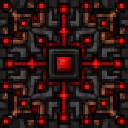
The Hard Nope Button
Craft the button with iron, redstone, and a redstone lamp.


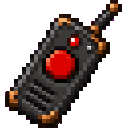
The Hard Nope Button Remote
Craft the remote with iron, redstone, and quartz.

The button and remote are also available in the Redstone Creative inventory. The remote is additionally available in the Tools inventory.
Abilities And Mechanics
- A button emits 15 redstone power while active.
- An inactive button emits no redstone power.
- The button also glows while active.
- The loader effect is independent of the button’s on/off state.
- The loading area is centered on the button and covers chunks within a 10-block horizontal radius.
- A remote stores one target button, including its dimension and position.
- Binding the remote to another button replaces its previous target.
- The remote does not need to remain near the button after it has been bound.
- The button’s active state and loading behavior persist with the world.
Troubleshooting
“This remote has no button target”
Use the remote on a The Hard Nope Button block before trying to activate it.
“The bound button no longer exists”
The button at the saved position was removed or replaced. Bind the remote to another button.
“The target dimension is unavailable”
The dimension containing the target cannot currently be accessed by the server. Try again when that dimension is available.
Progression And Strategy
Craft the button first if you need a permanent loaded location or a remotely controlled redstone source. Add a remote when you want to operate the button without returning to it.
For convenient control:
- Place the button beside the redstone input or system it controls.
- Bind a dedicated remote to each important location.
- Use separate buttons for independent circuits.
- Leave the button in place when traveling between dimensions so its loading effect continues.
- Remember that removing the button also removes its loading effect.
How to install
This Java mod can be used on Windows and Mac PCs with the CreativeMode Launcher or any Minecraft launcher of your choice.

1. Download and install the new CreativeMode Launcher

2. Click to play on the top of the screen.

3. That's it — launches instantly. No complicated setup required.
Want to use on a different launcher? Download mod and manually install.
Ported from
The Hard Nope Button
zagizenken
Java 1.21.5
Players also liked
The Virus Mod


Enter Hygron rifts to be pulled into the Hygron Core — a sprawling raid stronghold of themed sections (corrupted courtyards, labs, cathedrals, factories, mirror halls, sky bridges and a final castle) where you fight patrols, ambushes, minibosses and cinematic bosses to unlock pro…





This mod is licensed under the CreativeMode Mods License.