
Description
Stat Box adds a craftable, handheld tech reader to Minecraft Bedrock that tracks and displays your detailed world and player stats in a clean, categorized interface. There are many stats you can view and many of them do not show on screen until you actually have information to add in that category.
Mod Wiki
Stat Box
Quickstart
- Obtain a Stat Box from the Equipment section of the Creative inventory, or craft one at a crafting table.
- Hold the Stat Box in your hand.
- Use it to open the statistics menu.
- Start with WORLD STATISTICS, then use Next page › to browse the other pages. Use ‹ Previous page to go back or Close to exit.
To craft one, you need 6 iron ingots, 2 redstone, and 1 glass pane:


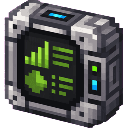
Overview
Stat Box is a handheld progress tracker for your current player and world. It records survival, building, mining, combat, exploration, dimension travel, and everyday activity statistics in a multi-page menu.
The item is single-stack, so each Stat Box occupies one inventory slot.
What It Adds
The Stat Box displays seven categories of information:
| Page | Information |
|---|---|
| World Statistics | Current world day and time of day |
| Player Life Statistics | Play time, deaths, damage taken, current health, and distance traveled |
| Mining & Gathering Statistics | Blocks broken and placed, stone mined, logs chopped, and ores mined |
| Combat Statistics | Damage dealt and mobs killed by type |
| Exploration Statistics | Distance traveled |
| Dimension Statistics | Current dimension, dimension visits, and play time in each visited dimension |
| Extra Activities | Chest interactions and bed uses |
How To Use
Hold the Stat Box and press your normal item-use control:
- Keyboard and mouse: Right-click
- Controller: Use the item button
- Touch: Press the use-item control
The statistics form opens immediately. Navigate it with the on-screen buttons:
- Next page › advances through the categories.
- ‹ Previous page returns to the previous category.
- Close exits the menu.
Using the Stat Box does not interrupt your world activity permanently; close the menu whenever you are ready to continue playing.
Crafting And Obtaining
The Stat Box can be crafted at a crafting table using:
- 6 iron ingots
- 2 redstone
- 1 glass pane
It is also available in the Creative inventory under Equipment.
Abilities And Mechanics
The Stat Box updates its records as you play:
- Breaking blocks increases the total blocks broken count.
- Stone, logs, and recognized ores are tracked in their own categories.
- Placing blocks increases the blocks placed count.
- Damage you receive and damage you deal are recorded separately.
- Player deaths increase the deaths count.
- Killing mobs records kills by mob type.
- Travel increases the distance traveled count.
- Changing dimensions records visits and time spent in each dimension.
- Interacting with chests, trapped chests, and barrels increases chest interactions.
- Using beds increases the bed uses count.
- The menu also shows your current health and the current world day and time.
Ore and mob entries appear individually in their respective pages as you record them.
Progression And Strategy
Use the Stat Box as a personal world journal:
- Check Player Life Statistics before dangerous expeditions to see your health and accumulated damage.
- Review Mining & Gathering Statistics to monitor resource-gathering goals.
- Use Combat Statistics to track hunting or mob-farming progress.
- Check Dimension Statistics when exploring the Nether, End, or other dimensions.
- Compare your travel, bed, chest, and building activity over the course of a world.
Keep the Stat Box in an accessible inventory slot so you can check progress without relying on external notes.
How to install
Download the mod and follow the step-by-step installation guide.
Players also liked
Obsidian Goblet


A goblet made of obsidian. My 5/10 Furniture model I am sharing here on creativemode from my portfolio! :)

Borders Without Borders

Want a fence that actually keeps stuff in or out? Tired of rescuing the iron golem or other mob from one of your livestock enclosures? Say no more—this mod gives you precise border control and looks nice doing it. Turn Pale Oak fences into custom borders with your choice of invis…
Stone Beast Table
This is a coffee table, except for wine and the things a king would put on his coffee table. That's right. We aren't peasants. Built this off platform, as a bbmodel for my furniture addon. This is for everyone to use in their builds. If I get some accolade for this, then I will p…
Home Box
Save and name multiple locations, then teleport to them whenever you need to, also set your respawn point with one handy device.

This mod is licensed under the CreativeMode Mods License.