
Borders Without Borders
Description
Want a fence that actually keeps stuff in or out? Tired of rescuing the iron golem or other mob from one of your livestock enclosures? Say no more—this mod gives you precise border control and looks nice doing it. Turn Pale Oak fences into custom borders with your choice of invisible, light, spark, ground hedge (with different leaf block options), or water line modes. Use the Border Controller to set dual rules on the same enclosure: keep Villagers or Livestock safely inside while keeping Hostile Mobs, Wild Animals, All Mobs, or even Players out, each with its own effect such as push back, warning, damage, or instant death. Fences do not have to be straight or always a square, so you can wrap borders around farms, villages, mob pens, ranches, and protected areas in whatever shape fits your build.
Mod Wiki
Borders Without Borders
Quickstart
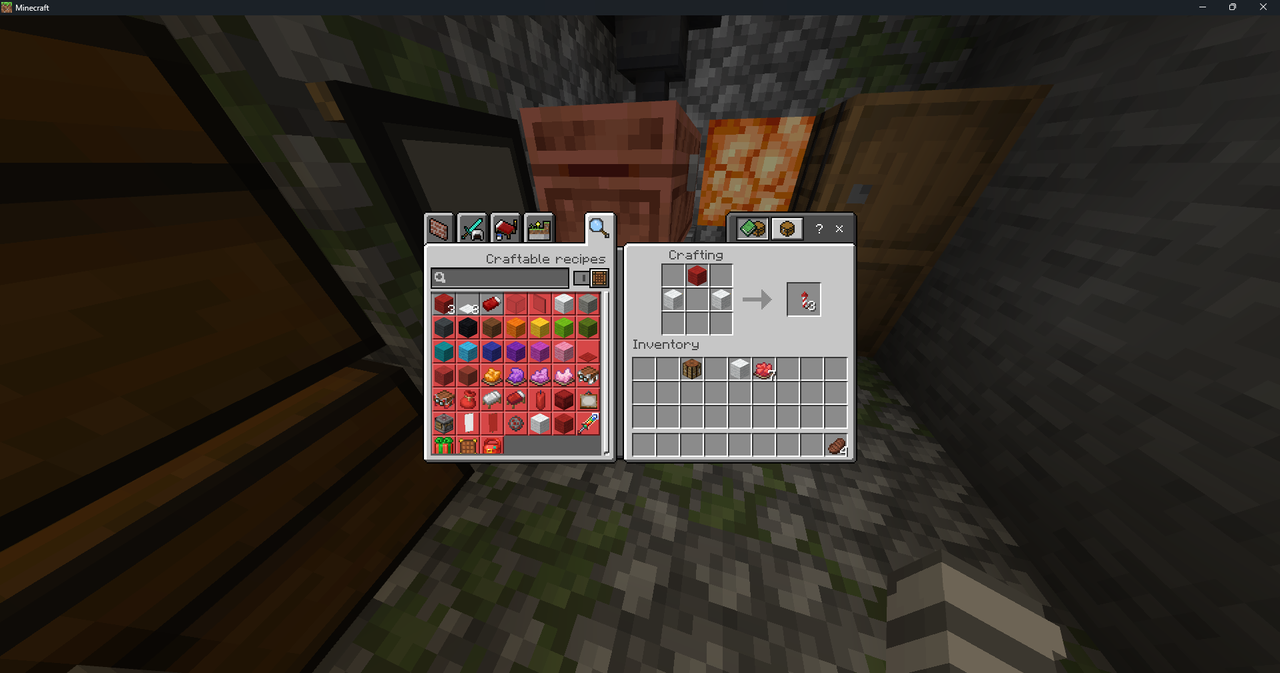
- Craft the Border Controller block using the recipe below.
- Place the controller on the ground.
- Build a boundary out of Pale Oak Fence posts around the area you want to control.
- Interact with (right-click / tap) the Border Controller to open its menu, then choose Register / Refresh Enclosure From Nearby Pale Oak Fence Posts. The controller scans nearby pale oak fence posts and links them together into an enclosure boundary.
- Configure the two independent mob group rules in the menu (see below), then walk near the boundary and watch mobs get kept in, kept out, or otherwise affected according to your settings.
Crafting:


Overview
Borders Without Borders lets you build an invisible (or visible) magical boundary around any area using a ring of Pale Oak Fence posts and a single controller block. Once registered, the enclosure enforces custom rules on entities that try to cross it — for example, keeping villagers inside a village, keeping hostile mobs out of a base, or applying a status effect to any player that steps over the line.
Unlike a simple fence, the boundary works even where you have gaps, corners, or oddly-shaped perimeters — the controller calculates the enclosed area from your fence posts and enforces the border invisibly, without you needing a solid wall.
The most powerful feature is that each enclosure supports two independent group rules at once. You could, for instance, keep livestock inside a pasture while simultaneously keeping hostile mobs out of the same space — all from one controller.
What It Adds
- Border Controller — a placeable block that defines and enforces an enclosure's boundary and rules.
- A boundary system that automatically maps a ring of Pale Oak Fence posts into an enforceable border shape.
- A configurable dual-rule system: two independently-targeted mob groups, each with their own enforcement behavior and optional effect.
- Several visual styles for showing the border in the world.
How To Use
Building an enclosure:
- Place Pale Oak Fence posts around the perimeter of the area you want to enclose (they act as the boundary markers).
- Place a Border Controller anywhere within (or near) that perimeter.
- Interact with the controller and select Register / Refresh Enclosure From Nearby Pale Oak Fence Posts. It scans a wide radius around itself for pale oak fence posts and builds a boundary shape from them.
- If you add, remove, or move fence posts later, interact with the controller again and re-register to refresh the boundary shape.
Configuring rules:
Opening the controller's menu lets you set up two independent rules — a primary and a secondary — each targeting a specific group of entities:
| Group | Includes |
|---|---|
| Villagers | Villager entities only |
| Hostile Mobs | Hostile/monster-type mobs |
| Livestock | Domestic animals kept by villagers (sheep, cows, pigs, chickens, etc.) |
| Wild Animals | Non-domestic passive/neutral animals |
| All Mobs | Any living entity with health (catch-all) |
| Players | Player characters |
For each group you can choose a behavior:
- Keep In — entities of that group are pushed back if they try to leave the enclosure.
- Keep Out — entities of that group are pushed back if they try to enter.
- (Additional rule modes may be available depending on the group, such as applying an effect on crossing.)
You can also assign a status effect to a rule, which is applied to matching entities as they interact with the boundary.
If a specific group (like Hostile Mobs) and the catch-all "All Mobs" group are both configured and would apply to the same entity, the more specific group's rule takes priority — so you can set a general rule for everything and still carve out an exception for one particular group.
Visual styles:
The boundary can be displayed in several ways, selectable from the controller's menu:
- Invisible — no visual indicator, purely functional
- Light Line — a glowing line along the boundary
- Spark Line — a particle-spark effect along the boundary
- Ground Hedge — a hedge-like decorative line
- Water Line — a flowing water-style line
Crafting And Obtaining
The Border Controller is crafted at a crafting table:
Abilities And Mechanics
- Boundary detection: The controller continuously scans for nearby entities and checks their position against the enclosure's boundary shape.
- Enforcement: Entities that violate their assigned rule (crossing in when they should stay out, or leaving when they should stay in) are gently pushed back across the boundary.
- Effects on crossing: If configured, entities can receive a status effect tied to their assigned rule when they interact with the border.
- Dual independent groups: Each enclosure evaluates two rules simultaneously, so different mob categories can be treated completely differently within the same fenced area.
- Persistence: Enclosures remain active and remembered by their controller even after you leave and return to the world — no need to re-register unless the fence layout changes.
Progression And Strategy
- Start with a simple enclosure: fence in your base and set Hostile Mobs to Keep Out for basic protection.
- Expand into more advanced setups, like a villager pen where Villagers are kept in while Hostile Mobs are kept out — using both rule slots on one controller.
- Use different visual styles to mark public safe zones versus subtle, invisible protective boundaries.
- Combine multiple controllers around your world to create distinct zones — pastures, safe zones, no-go areas for players in PvP-style builds, or animal enclosures — each with tailored rules.
How to install
Download the mod and follow the step-by-step installation guide.
Players also liked
Diamondbound Iron Sword


Reforge iron with diamonds and unleash devastating sword strikes.
Grand Walnut Dresser


My 2nd of 10 furniture pieces I am releasing for the creativemode community. Hope you enjoy!
Crimson Apple Switch


Place an apple on the Crimson Apple Switch to trigger a redstone signal.

Dead Parrot

The only reason this parrot was standing for the cover image was that it had been nailed to it's perch... but in all reality it is an ex-parrot. Bereft of life, it's gone to meet it's maker... place this decoration wherever you like and hear a certain angry customer go on about t…


This mod is licensed under the CreativeMode Mods License.