

Description
Turn a starbound waystation into your ride and soar through the skies into space.
Mod Wiki
Starbound Waystation
Quickstart
Craft the waystation, then place it in a clear area so its parts have room to form the station. Right-click any part of the assembled station to turn it into a ride and board it.


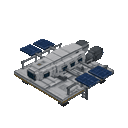
While riding, use WASD to move, Space to rise, and Shift to descend. Press Sprint to dismount.
Overview
The Starbound Waystation is both a placeable structure and a rideable, free-moving vehicle. Activating the structure gathers it into a vehicle beneath you; the station’s blocks are removed as it takes off.
What It Adds
- A waystation item that places the station and its component parts.
- A rideable vehicle with no gravity, for flight through the air.
- A flight HUD showing speed, heading, and altitude.
How To Use
- Place the waystation in an open area. Parts only appear where the surrounding space can be replaced, so obstructions can leave the structure incomplete.
- Right-click any part of the station to activate it and board. The station’s parts disappear as it becomes your vehicle.
- Steer with WASD. Forward travel is faster than reverse or sideways movement; use your movement keys to maneuver.
- Hold Space to ascend or Shift to descend.
- Press Sprint to dismount. The vehicle remains in the world; right-click it to board again.
While mounted, your character is hidden and the camera switches to a rear third-person view. The HUD displays SPD (speed), HDG (heading), and ALT (altitude). Your previous camera view returns after you dismount.
Crafting And Obtaining
The recipe is available in the recipe book after you join a world, and the item can also be found in the Creative inventory. Craft it at a crafting table using the recipe above.
Breaking a station part dismantles the assembled structure, so avoid mining the station if you want to use it as a ride. If the vehicle is damaged, it drops a waystation item.
How to install
This Java mod can be used on Windows and Mac PCs with the CreativeMode Launcher or any Minecraft launcher of your choice.

1. Download and install the new CreativeMode Launcher

2. Click to play on the top of the screen.
3. That's it — launches instantly. No complicated setup required.
Want to use on a different launcher? Download mod and manually install.
Players also liked
Heavenbound Realm
 DigitalNomad
Travel to Upbringing through stone portals, explore heavenly forests and temples, and craft powerful Heavenbound gear.
Cheat Menu [KEY TO OPEN: left alt key]


A mod menu that has enchantments, effects, item spawners, and structure spawners, you can use it in survival and creative,sorry for no other screenshots, the rest is for you to explore and find
Netherite Firestorm Machine Gun


Unleash an onslaught of explosive fireballs with the Netherite Firestorm Machine Gun—right-click to activate and hold to continuously fire up to ten blazing shots per second. Shift + right-click to toggle the weapon on or off, and feel the powerful recoil push you back with every…
Knight Guardian


This mod adds Knight Guardians—loyal armored medieval knights you can summon with spawn eggs that follow simple commands like Follow, Stay, Free Roam and Attack, can be promoted to Captains and Generals to lead squads and patrols, be organized into formations, and use helpful gea…
Tesla Roadster Expansion

Build a Roadster and race, boost, hover, and flip your way across the world.
This mod is licensed under the CreativeMode Mods License.