

Description
Reject humanity, become a fluffy Eevee, and explore Minecraft with unique abilities and playful toys. (im running out of coins to edit this mod...)
Mod Wiki
Project Floof
Quickstart
- Craft an Eevee Serum and hold it in your hand.


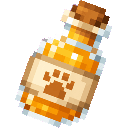
- Use the serum and keep holding the use button until you finish drinking it. You will transform into a fluffy Eevee, gain an advancement, and receive increased movement speed, stronger jumps, a smaller form, and Slow Falling.
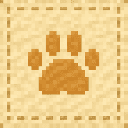
- Craft a Cushion, place it, and use it to sit or curl up.


- Try the other floof items:
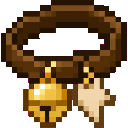
- Use a Bell Collar on yourself or another Eevee player.
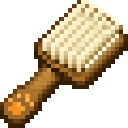
- Use a Brush on animals or another Eevee player.
- Throw a Tennis Ball like a snowball.
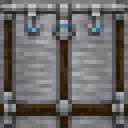
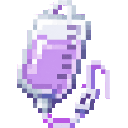
- To return to human form, craft an IV Stand and an IV Bag. Place the stand near a bed, then use the IV Bag on it while you are an Eevee.




Overview
Project Floof lets you reject humanity and become a fluffy Eevee while exploring the world. Transformation changes your appearance and movement, while cushions, collars, brushes, and tennis balls provide playful interactions.
Your Eevee form is visible to other players. The transformation is tied to your current world: changing worlds or dimensions returns you to human form.
What It Adds
| Content | Purpose |
|---|---|
| Eevee Serum | Transforms you into an Eevee |
| IV Stand and IV Bag | Return an Eevee player to human form |
| Bell Collar | Gives an Eevee a collar that jingles while moving |
| Brush | Show affection to animals and Eevee players |
| Tennis Ball | A throwable toy |
| Cushion | Sit down or curl up |
permavee gamerule | Keeps Eevee form after death |
eeveelang gamerule | Changes how Eevee players’ chat appears |
How To Use
Becoming an Eevee
Hold an Eevee Serum and use it. Drinking takes about two seconds. When the transformation finishes:
- Your player appears as a fluffy Eevee.
- You move faster.
- Your jump strength increases.
- Your player becomes smaller.
- Slow Falling is continuously applied.
- Moving along the ground creates small cloud puffs.
- Hearts and a playful sound signal the transformation.
The serum is normally consumed when used. Creative-mode players do not consume it.
Using another serum while already transformed has no effect.
Returning To Human Form
An Eevee can be restored with an IV treatment:
- Craft and place an IV Stand.
- Make sure a bed is within roughly two blocks horizontally and one block vertically of the stand.
- Hold an IV Bag in your main hand or off-hand.
- Use the IV Stand, or use the IV Bag directly on the stand.
The treatment only works for an Eevee player. Without a nearby bed, the stand will indicate that one is required. The IV Bag is normally consumed after a successful treatment.
Returning to human form also removes your Bell Collar and ends your curled-up state.
Using A Bell Collar
Craft a Bell Collar, then:
- Use it while you are an Eevee to put it on yourself.
- Use it on another Eevee player to collar them.
A collar can only be applied once to a player. The recipient hears a bell and receives a message when it is put on. Collared Eevees periodically jingle while moving.
The collar is removed when the player returns to human form. The item is normally consumed when applied; Creative-mode players do not consume it.
Brushing
Hold a Brush and use it on:
- An animal, to put the animal into a loving state and show heart particles.
- Another Eevee player, to show heart particles and play a purring sound.
Brushing another Eevee player uses one point of brush durability. The Brush has 96 durability. The user must be an Eevee to brush animals or players.
Throwing Tennis Balls
Hold a Tennis Ball and use it to throw it like a snowball. The ball follows a normal thrown-projectile arc and produces a throwing sound. Each throw normally consumes one ball.
Sitting On A Cushion
Place a Cushion and use it. Any player can sit on it; an Eevee curls up into a cozy loaf-like pose. Use cushions as small resting spots, pet areas, or decorative furniture.
Crafting And Obtaining
Bell Collar
Brush

Cushion


Eevee Serum
IV Bag
IV Stand
Tennis Ball
The items appear in the Ingredients creative-inventory group, while the Cushion and IV Stand appear in the Functional group.
Abilities And Mechanics
Eevee Movement
Eevee form provides:
- Increased movement speed.
- Increased jump strength.
- A reduced player scale for a smaller appearance.
- Slow Falling while transformed.
Slow Falling makes descents gentler, but it does not prevent all hazards. Cloud particles appear beneath an Eevee moving along the ground.
Transformation Rules
- Death normally ends the transformation.
- Changing dimensions or worlds ends the transformation.
- IV treatment ends the transformation manually.
- A Bell Collar and sitting state are cleared when transformation ends.
- The transformation is preserved when a player reconnects during normal play.
Permanent Eevee Form
The permavee gamerule is disabled by default. A server operator can enable it with:
/gamerule permavee true
With Permavee enabled, death does not undo your Eevee form. Changing dimensions or worlds and using an IV treatment still return you to human form.
Disable it with:
/gamerule permavee false
Eevee Language
The eeveelang gamerule is disabled by default. Enable it with:
/gamerule eeveelang true
When enabled, an Eevee player’s chat is shown normally to other Eevee players. Players who are not Eevees see:
Vee vee... Eevee! Vee!
Disable it with:
/gamerule eeveelang false
Progression And Strategy
A simple floof adventure looks like this:
- Craft an Eevee Serum and transform.
- Use your extra speed, stronger jumps, smaller size, and Slow Falling to explore.
- Build a cozy area with a Cushion.
- Craft a Bell Collar for yourself or a fellow Eevee.
- Carry a Brush to interact with animals and other transformed players.
- Keep Tennis Balls nearby for casual play.
- Build an IV Stand near a bed and store an IV Bag when you want a reliable way back to human form.
- Enable
permaveeif your server wants Eevee form to survive death.
How to install
This Java mod can be used on Windows and Mac PCs with the CreativeMode Launcher or any Minecraft launcher of your choice.

1. Download and install the new CreativeMode Launcher
2. Click to play on the top of the screen.
3. That's it — launches instantly. No complicated setup required.
Want to use on a different launcher? Download mod and manually install.
Players also liked
Saddled Soul

Transform into a horse, charge into powerful jumps, carry friends, and let them saddle, armor, and feed you.
Morpher Orb


The Morpher Orb lets you record mob kills and shapeshift into unlocked mobs — right-click the Orb to open its GUI, search or select a form (hover entries to view passive effects and whether it has a G-activated ability), click Revert to return to normal, and press G while morphed…
The valley civilization {horror}

Explore the Pool Rooms, Backrooms, and an impossible resort—then find the door home.
The Virus Mod


Enter Hygron rifts to be pulled into the Hygron Core — a sprawling raid stronghold of themed sections (corrupted courtyards, labs, cathedrals, factories, mirror halls, sky bridges and a final castle) where you fight patrols, ambushes, minibosses and cinematic bosses to unlock pro…
Optimus prime armor!

Equip the full Prime Commander armor set to replace your third-person player model with a large, fully animated Optimus-style mech; when the full set is worn and you are not in truck mode the mech renderer takes over and the camera automatically switches to a backed-up third-pers…
This mod is licensed under the CreativeMode Mods License.