

Description
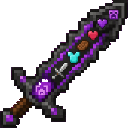
Tame hostile mobs with the Netherite Friendmaker Blade, then heal, equip, and fight beside them.
Mod Wiki
Netherite Friendmaker Blade
Quickstart
- Obtain the blade by using a smithing table with a Netherite Upgrade Smithing Template, a Diamond Sword, and a Netherite Ingot. The recipe is unlocked automatically when you join the world.
- Hold the Netherite Friendmaker Blade in your main hand.
- Find a hostile mob, then either:
- Hit it with the blade, or
- Use the blade on it.
- The hostile mob becomes bonded to you and stops targeting you.
- To heal or equip your bonded mob, keep the blade in one hand and place the supply item in your other hand. Use the blade on the mob:
- Food heals it and consumes one food item.
- Armor equips if the slot is empty or the new armor provides better protection.
- A weapon equips if the mob’s main hand is empty.
Craft the blade here:


Overview
The Netherite Friendmaker Blade is a glinting netherite sword that lets you turn hostile mobs into allies. Bonded mobs can be healed, equipped with armor and weapons, and ordered to defend you when a hostile attacker damages you.
The blade is also a normal sword and can be used in combat.
What It Adds
- Netherite Friendmaker Blade — A single, unstackable sword with mob-bonding abilities.
- Hostile mob bonding — Hostile mobs hit or used on with the blade become bonded to the player.
- Mob care and equipment — Bonded mobs can consume food, wear armor, and equip weapons.
- Automatic defense — Nearby bonded mobs retaliate against hostile mobs that attack their owner.
How To Use
Bond a Hostile Mob
Hold the blade in your main hand and hit a hostile mob. You can also use the blade directly on the hostile mob.
Once bonded, the mob:
- Stops targeting you.
- Stops attacking you.
- Recognizes you as its owner.
A hostile mob can be bonded to a different player if that player uses the blade to bond it.
Feed and Heal a Bonded Mob
Hold the blade in one hand and food in the other. Use the blade on the bonded mob.
Food is consumed one item at a time. The amount of healing depends on the food’s hunger value, and food cannot be used when the mob is already at full health.
Equip Armor
Place an armor item in the hand opposite the blade, then use the blade on the bonded mob.
The mob equips the armor in the appropriate slot when that slot is empty or the supplied armor has better protection than its current armor. Weaker replacement armor is not equipped.
Equip a Weapon
Place a sword, tool, bow, crossbow, or trident in the hand opposite the blade. Use the blade on a bonded mob whose main hand is empty.
The supplied weapon is consumed from your hand and placed in the mob’s main hand.
Use the Blade in Combat
The Netherite Friendmaker Blade functions as a netherite sword. You can attack mobs normally while holding it. Attacking a hostile mob also bonds it to you.
Crafting And Obtaining
Craft the blade at a smithing table using the Netherite Upgrade Smithing Template, Diamond Sword, and Netherite Ingot:
The recipe is automatically unlocked for players when they join the world. The blade appears in the Combat item category and has a maximum stack size of one.
Abilities And Mechanics
Bonded Mob Protection
A bonded mob cannot deliberately target its owner. If it acquires its owner as a target, that target is cleared.
Retaliation
When a hostile mob damages you, every living mob bonded to you within 32 blocks is commanded to target that attacker.
Keep bonded defenders nearby if you want them to protect you during exploration or combat.
Healing And Equipment Rules
| Supply in your other hand | Result |
|---|---|
| Food | Heals a damaged bonded mob and consumes one item |
| Armor | Equips if the slot is empty or the armor is better |
| Sword, tool, bow, crossbow, or trident | Equips if the mob’s main hand is empty |
| Other item | No effect |
The blade must be in one hand and the supply item in the other. When using the blade to bond or interact with a mob, the item in the opposite hand is checked for food, armor, or a weapon.
Progression And Strategy
- Start with a hostile mob that is isolated from other threats so you can bond it safely.
- Heal a newly bonded mob before taking it into a large fight.
- Equip armor first for better survivability, then give the mob a weapon if its main hand is empty.
- Keep defenders within 32 blocks when exploring dangerous areas.
- Carry spare food and equipment so you can restore and upgrade your bonded companions during an adventure.
- Use the blade on additional hostile mobs to build a group of defenders, but watch their health and equipment during combat.
How to install
This Java mod can be used on Windows and Mac PCs with the CreativeMode Launcher or any Minecraft launcher of your choice.

1. Download and install the new CreativeMode Launcher

2. Click to play on the top of the screen.

3. That's it — launches instantly. No complicated setup required.
Want to use on a different launcher? Download mod and manually install.
Players also liked









This mod is licensed under the CreativeMode Mods License.