

Description
A chest of echo-shard oak that refills any stack you store inside, with no visual gap below.
Mod Wiki
Duplication Chest
Quickstart
- Craft a Duplication Chest using the recipe below, or find it in the Functional section of the Creative inventory.
- Place it like a normal chest.
- Right-click it to open its one-item storage slot.
- Put in one item or a partial stack of a stackable item, then close the chest.
- Reopen it and take the filled stack. The chest increases the stored item to that item's maximum stack size when the last viewer closes it.


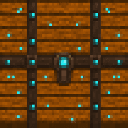
The chest can also be obtained with:
/give @s duplication-chest-gmp4pjsp:duplication_chest_gmp4pjsp
Overview
The Duplication Chest is a magical, enchanted-looking chest made with echo shards, a diamond, and a regular chest. It has a single storage slot and refills the stored item to its normal maximum stack size when the chest is closed.
It is useful for creating renewable supplies of stackable items without repeatedly gathering the same starting item.
What It Adds
- Duplication Chest block and item
- One storage slot
- Automatic stack filling when the chest is closed
- A custom container screen with the player inventory below the chest slot
- Hopper-compatible insertion and extraction
- An echo-shard oak appearance with no visible gap below
How To Use
Filling a stack
- Open the chest by right-clicking it.
- Place a stackable item in the centered slot.
- Close the chest.
- Open it again and remove the item stack.
When the last player closes the chest, the stored stack is set to that item's maximum stack size. For example, placing one cobblestone gives you a full stack of cobblestone after closing and reopening the chest.
The chest has only one slot, so it cannot hold different item types at the same time.
Taking items out
Remove the completed stack manually from the chest, or extract it from below with a hopper or another compatible item-transfer system. The chest must be empty before another item can be inserted through an automated input.
Multiple players
The duplication happens when the last player viewing the chest closes it. If several players have it open, the stack is not filled until everyone has closed the container.
Breaking the chest
The stored item drops when the chest is broken, so empty or collect the contents before moving it. Mine the block with a pickaxe.
Crafting And Obtaining
The recipe uses:
- Echo shards
- One diamond
- One chest
The recipe is unlocked automatically when you enter a world.
In Creative mode, the Duplication Chest is available in the Functional item category.
Abilities And Mechanics
- The chest stores one item stack.
- Closing the chest fills the stored stack to that item's normal maximum stack size.
- Items that normally stack to 64 become a full stack of 64.
- Items with smaller stack limits fill only to their own limit.
- Non-stackable items have a maximum stack size of one and do not produce additional copies.
- The chest opens with standard chest sounds.
- It can be inserted into when empty and extracted from when it contains an item, making it suitable for hopper setups.
- The chest is protected by the standard piglin-guarded-block behavior.
- It requires a pickaxe to mine efficiently.
Progression And Strategy
Start with a single item from a renewable or difficult-to-gather resource and use the chest to produce a full stack. Stackable building materials, utility items, and supplies with a maximum stack size below 64 can all be processed this way.
For repeated use:
- Keep the chest in an accessible location.
- Insert one item or a partial stack.
- Close the chest completely.
- Collect the filled stack.
- Repeat with another item.
Use hoppers to automate collection, but remember that the chest accepts a new input only after its single slot has been emptied.
How to install
This Java mod can be used on Windows and Mac PCs with the CreativeMode Launcher or any Minecraft launcher of your choice.

1. Download and install the new CreativeMode Launcher

2. Click to play on the top of the screen.

3. That's it — launches instantly. No complicated setup required.
Want to use on a different launcher? Download mod and manually install.
Ported from
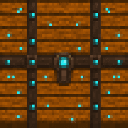
Duplication Chest
zagizenken
Java 1.21.5
Players also liked









This mod is licensed under the CreativeMode Mods License.