

Description
Show off any item in 3D on slim wooden shelves—now reliably visible and synced.
Mod Wiki
Display Shelf
Quickstart
- Craft a Display Shelf using sticks and spruce planks (see recipe below).
- Place it on a wall, floor, or any surface like a normal block.
- Right-click the shelf while holding an item to place that item on display.
- Sneak + right-click (or simply right-click an occupied shelf) to take the item back off the shelf.
Overview
Display Shelf adds a slim wooden shelf block that lets you showcase a single item in full 3D. Instead of hiding items in chests or shulker boxes, put them out where everyone can see them — perfect for showing off rare finds, decorating builds, or setting up item galleries.
What It Adds
- Display Shelf — a thin wooden block that holds and shows one item at a time, tilted and rendered in 3D on top of the shelf.
How To Use
- Placing an item: Right-click an empty shelf with any item in your hand. One copy of that item is placed on the shelf and consumed from your stack (unless you're in Creative mode).
- Removing an item: If the shelf already holds an item, sneak-right-click it to take the item back. Right-clicking an occupied shelf without sneaking will also remove the item.
- Feedback: Placing or removing an item plays a sound, similar to using an item frame. If you try to interact with an occupied shelf without sneaking, a message reminds you to sneak-right-click to remove the item.
- Breaking the shelf: If the shelf is destroyed while holding an item, the displayed item drops on the ground so nothing is lost.
Crafting And Obtaining
Craft the Display Shelf using the recipe below:


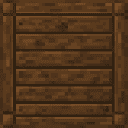
The shelf is a wooden block, so it must be broken with an axe to be retrieved cleanly.
Abilities And Mechanics
- Each shelf can hold exactly one item at a time, displayed at a slight tilt so it's clearly visible from most angles.
- The displayed item is purely visual — it's not consumed or altered, just held in place until removed.
- Works with essentially any item in the game, letting you build custom displays, museums, or trophy walls.
Progression And Strategy
There's no crafting tree or upgrade path — Display Shelf is a simple decorative and organizational tool. Use it to:
- Highlight rare loot, enchanted gear, or unique finds in your base.
- Build item museums or collection rooms.
- Add visual detail to shops, shelves, and display cases in your builds.
How to install
This Java mod can be used on Windows and Mac PCs with the CreativeMode Launcher or any Minecraft launcher of your choice.

1. Download and install the new CreativeMode Launcher

2. Click to play on the top of the screen.
3. That's it — launches instantly. No complicated setup required.
Want to use on a different launcher? Download mod and manually install.
Players also liked

Slippery World


The Slippery World mod adds a magical item that transforms every block in your world to be as slippery as ice when activated. Simply right-click the Slippery World item to toggle the global slippery effect on or off - when active, the item will glow with an enchanted shimmer and…




Armadillo Scute Shield


create a minecraft item that has the following description: 'A shield made from armadillo scute that blocks in a 360 degree radius around the player.'
Wand Of Connections
The Wand of Connections is a magical building tool that lets you precisely control how decorative blocks join together—right-click any connectable block (stairs, fences, walls, glass panes, redstone wire, vines, etc.) to cycle forward through its connection states, or Shift + rig…
This mod is licensed under the CreativeMode Mods License.