

Description
Cloud Vessel adds a player-owned flying cloud vehicle and a private 33x33x33 pocket-dimension home you craft mid-game using the Cloud Vessel Core, with all custom items in a new Cloud Vessel creative tab; the billowy exterior floats level and is solid enough to stand on. Right-click the cloud to enter its indestructible, time-synced interior (locked and free of mob spawns) or mount the exterior by left-clicking (attack) or by using the interior's Drive Mode Block, then use the Cloud Exit Sign to return to the exterior; your vessel and private interior persist across logouts and remain active while in use. While driving the cloud now moves correctly with WASD (normalized diagonal movement), Space to ascend, Shift to descend and faces the direction you look, and Left Ctrl reliably dismounts you from drive mode and applies a Slow Falling safety buff.
Mod Wiki
Cloud Vessel
Quickstart
- Craft a Cloud Shell — combine a Water Bucket and a Lava Bucket side-by-side in a crafting grid.



- Craft the Cloud Vessel Core — surround a Diamond with eight Cloud Shells.


-
Spawn your vessel — hold the Cloud Vessel Core and right-click (use) to summon your personal Cloud Vessel nearby. Each player can own only one vessel per world.
-
Board and fly — left-click (attack) the cloud to mount the exterior and start driving immediately. Use WASD to move, Space to ascend, Shift to descend, and look in any direction to steer. Press Left Ctrl to dismount safely (you'll receive a Slow Falling buff).
Overview
Cloud Vessel gives every player their own billowy flying cloud they can ride through the skies and enter as a private home. The cloud is indestructible and floats naturally in the world. Its interior is a fully enclosed 33×33×33 pocket dimension — locked to outsiders, free of mob spawns, and kept in sync with the overworld's day/night cycle. Both the exterior vehicle and the private interior persist across logouts and remain active as long as you're using the vessel.
What It Adds
| Item / Block | Description |
|---|---|
| Cloud Vessel Core | One-use item that spawns your personal Cloud Vessel. |
| Cloud Shell | Crafting ingredient and indestructible building block used inside your vessel. |
| Drive Mode Block | Placeable block inside your interior that lets you pilot the cloud from within. |
| Cloud Exit Sign | Placeable block inside your interior that teleports you back to the cloud's exterior. |
| Cloud Vessel (entity) | The flying cloud itself — solid exterior you can stand on, with an accessible interior. |
All items appear in the Cloud Vessel creative tab.
How To Use
Boarding the Cloud
There are two ways to mount the exterior and enter drive mode:
- Left-click (attack) the cloud from the outside to mount it directly.
- Use the Drive Mode Block inside the interior (right-click it) to engage drive mode from within.
Once mounted, the cloud becomes a fully omnidirectional flying vehicle.
Flying Controls
| Input | Action |
|---|---|
| W / A / S / D | Move forward, left, backward, right (diagonal movement is normalized) |
| Space | Ascend |
| Shift | Descend |
| Mouse look | Steer — the cloud faces the direction you look |
| Left Ctrl | Dismount drive mode; grants a Slow Falling safety buff |
Entering the Interior
Right-click the cloud entity to enter your private 33×33×33 pocket-dimension interior. The interior is:
- Private — only you can enter.
- Mob-free — no hostile spawns.
- Time-synced — matches the overworld's day/night cycle.
Returning to the Exterior
Right-click a Cloud Exit Sign placed inside your interior to teleport back onto the cloud's exterior.
Crafting And Obtaining
Cloud Shell


Cloud Vessel Core


Drive Mode Block
Cloud Exit Sign
Abilities And Mechanics
- Indestructible vessel — the Cloud Vessel entity and its structural blocks cannot be destroyed.
- Persistent — your vessel stays in the world after you log out and resumes when you return.
- Single ownership — each player may have exactly one Cloud Vessel. Attempting to use a second Core while you already own one will return an error message.
- Owner-only access — other players cannot enter or commandeer your vessel.
- Slow Falling on dismount — pressing Left Ctrl to exit drive mode applies a Slow Falling effect, preventing fall damage after descending from height.
- Idle float — when not actively piloted, the cloud drifts gently and holds its position.
Progression And Strategy
- The Cloud Shell is your gateway ingredient — craft it early since it feeds into every other Cloud Vessel recipe.
- The Cloud Vessel Core requires eight Cloud Shells and a Diamond, making it a mid-game investment. Gather your diamonds before committing.
- Once spawned, furnish your interior pocket dimension with the Drive Mode Block and Cloud Exit Sign so you can switch seamlessly between piloting and living inside your vessel.
- Use the interior as a mobile, mob-free base. Since it persists across sessions, you can store items and set up crafting stations inside without worrying about despawns or raids.
- When exploring, ascend high with Space, then glide forward with WASD. Use Left Ctrl to dismount near a destination — the Slow Falling buff gives you a safe landing window.
How to install
This Java mod can be used on Windows and Mac PCs with the CreativeMode Launcher or any Minecraft launcher of your choice.

1. Download and install the new CreativeMode Launcher
2. Click to play on the top of the screen.
3. That's it — launches instantly. No complicated setup required.
Want to use on a different launcher? Download mod and manually install.
Players also liked

Throwable Spinning Blades


Throwable Spinning Blades adds a family of throwable melee weapons—wood, stone, iron, golden, diamond, and netherite blades—that act like boomerangs with increasing damage, durability, range, and hit count as you progress. Right-click to throw a spinning blade that damages multip…
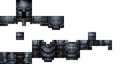
Stone Evader Armor

The Stone Evader Armor set consists of four pieces: helmet, chestplate, leggings, and boots, each offering slightly better protection and durability than leather armor. When wearing the complete set, you gain a 27% chance to completely evade incoming mob and player attacks—succes…
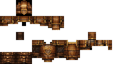
Wooden Heart Armor
The Wooden Heart Armor Set is a wood-themed armor set consisting of a helmet, chestplate, leggings, and boots that provides 1.5 times the protection of leather armor with gold-level enchantability. When wearing the complete set, you gain the Wooden Heart set bonus: every 10 secon…

Coalforged Steel Armor
The Coalforged Steel Armor set is a mid-game armor tier positioned between iron and diamond, offering enhanced protection with a full set bonus. Each of the four pieces (Helmet, Chestplate, Leggings, and Boots) features coal-forged craftsmanship and can be right-clicked to instan…
Hell Rage Staff
The Hell Rage Staff is a magical weapon that summons three friendly blazes to fight by your side. Right-click with the staff to call forth the blazes, which will automatically attack hostile mobs with fireballs while following you around the battlefield. Each summoned blaze lasts…
This mod is licensed under the CreativeMode Mods License.