

Description
Build grand houses and mighty castles with the Castle Builder Staff, bringing powerful construction commands straight to your hotbar.
Mod Wiki
Castle Builder Staff
Quickstart
- Open the Creative inventory’s Equipment category and take the Builder Staff, or obtain it with:
/give @s com_castle_builder_staff_ioiiyi2x:builder_staff - Hold the Builder Staff and use it to open the Builder Staff menu.
- Choose a material, then try Floor 9×9, Room 9×4×9, or Bridge 3×9. Builds are placed in front of you according to the direction you are facing.
- Try Build Grand House and Build Mighty Castle in a clear area. These structures are large and rise around the area in front of you.
- For command shortcuts, craft the Castle Builder Staff. Put an item named
cmd:/say Helloin your hotbar, then either:- Hold the Castle Builder Staff in your off-hand and select the command item to run it directly, or
- Select the Castle Builder Staff and use it to cycle through command items in hotbar order.
Overview
Castle Builder Staff provides two construction-focused items:
- Builder Staff — opens a building menu with material selection, basic building pieces, a Grand House, and a Mighty Castle.
- Castle Builder Staff — executes commands stored on items in your hotbar.
Both items are single-stack items.
What It Adds
Builder Staff
The Builder Staff menu contains:
| Menu option | Result |
|---|---|
| Floor 9×9 | Places a 9×9 floor in front of you |
| Wall 9×5 | Places a 9-block-wide, 5-block-tall wall in front of you |
| Ceiling 9×9 | Places a 9×9 ceiling above the build position |
| Room 9×4×9 | Builds a room shell with a floor, ceiling, and four walls |
| Bridge 3×9 | Places a 3-block-wide, 9-block-long bridge |
| Build Grand House | Places a large premade house |
| Build Mighty Castle | Places a large premade castle |
| Change material | Cycles through the available building materials |
Castle Builder Staff
The Castle Builder Staff turns specially named or marked hotbar items into command shortcuts. It can run commands directly or cycle through several commands without opening chat.
How To Use
Building With the Builder Staff
- Hold the Builder Staff.
- Use it to open the menu.
- Select Change material until the desired material is shown.
- Face the direction where you want the build placed.
- Choose a building piece or a premade structure.
The current material is shown in the menu. Building materials are selected per player and cycle in this order:
- Stone
- Oak Planks
- Bricks
- Glass
- Quartz
The smaller pieces are positioned relative to your current location and facing direction. Stand on or near the intended build area and leave enough room in front of you.
Building Premade Structures
Choose Build Grand House or Build Mighty Castle from the Builder Staff menu. The structure is centered in front of you, so use the staff while facing the open area where you want the build to rise.
Because these structures are much larger than the basic pieces, clear a broad area before placing them.
Running Hotbar Commands
The Castle Builder Staff recognizes a command when an item’s custom name or lore line begins with either:
cmd:command:
The text after the prefix is run as a command. For example, name an item:
cmd:/say Hello
The leading slash is optional, so cmd:say Hello also identifies the command.
Direct execution
To run one command directly:
- Place the command-marked item in your hotbar.
- Hold the Castle Builder Staff in your off-hand.
- Select the command item in the hotbar.
- Use the staff.
The selected command item is executed immediately.
Cycling through commands
To cycle through multiple commands:
- Place two or more command-marked items in different hotbar slots.
- Select the Castle Builder Staff.
- Use it repeatedly.
Each use runs the next marked command from left to right across the hotbar, then starts again from the first command. The staff itself is ignored when looking for command items.
The action bar displays the command that was attempted. If no command-marked items are in the hotbar, it prompts you to add an item named cmd:<command>.
Crafting And Obtaining
Builder Staff
Craft the Builder Staff at a crafting table using a command block, an Ender Pearl, and a Blaze Rod.



You can also use:
/give @s com_castle_builder_staff_ioiiyi2x:builder_staff
Castle Builder Staff
Craft the Castle Builder Staff at a crafting table using a command block, Redstone, and a Blaze Rod.

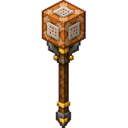
You can also use:
/give @s com_castle_builder_staff_ioiiyi2x:my_sword
The Castle Builder Staff is sword-like and deals 8 attack damage. It has 800 durability.
Abilities And Mechanics
- The Builder Staff uses the material currently displayed in its menu for floors, walls, ceilings, rooms, and bridges.
- Premade houses and castles use their own authored designs.
- Builds are placed according to your position and the horizontal direction you are facing.
- Basic building pieces use the selected material without consuming blocks from your inventory.
- The Castle Builder Staff runs commands as the player using it.
- Command shortcuts can be stored in ordinary hotbar items by using a matching name or lore line.
- A command item selected in the hotbar takes priority for direct execution when the staff is held in the off-hand.
- When the staff itself is selected, uses cycle through all command-marked items in hotbar order.
Progression And Strategy
- Start with the floor, wall, and ceiling options to test the placement direction before attempting a large structure.
- Use Stone or Bricks for sturdy-looking fortifications, Oak Planks for houses, Glass for open rooms, and Quartz for bright decorative builds.
- Build the basic room first, then add bridges or additional structures around it.
- Reserve a wide, open location for the Grand House and especially the Mighty Castle.
- Keep command shortcuts in separate hotbar slots and arrange them in the order you want the Castle Builder Staff to execute them.
- Test command shortcuts with harmless commands before using commands that modify large areas or affect other players.
How to install
Download the mod and follow the step-by-step installation guide.
Remixed from
Command Block Staff
CyberSamurai
Bedrock 1.21.93
Players also liked











This mod is licensed under the CreativeMode Mods License.