

Description
Wield command power and unleash your favorite commands instantly from your hotbar.
Mod Wiki
Command Block Staff
Quickstart
- Obtain a Command Block Staff or Builder Staff from the Creative inventory, or use:
/give @s com_command_block_staff_fovopj73:my_sword 1/give @s com_command_block_staff_fovopj73:builder_staff 1
- Place a staff in your hotbar and use it.
- For the Command Block Staff, rename a hotbar item to
cmd:/say Helloorcommand:/time set day. Using the staff executes commands stored on nearby hotbar items. - For the Builder Staff, choose a structure from its menu, then select a building material.
Overview
Command Block Staff adds two command-powered tools:
- Command Block Staff — stores and quickly executes commands written in item names or lore.
- Builder Staff — creates simple floors, walls, ceilings, rooms, and bridges in front of you.
Both staffs are single-stack items and are listed with equipment in the Creative inventory.
What It Adds
| Item | Main function |
|---|---|
| Command Block Staff | Execute commands from your hotbar |
| Builder Staff | Build preset structures with selectable materials |
The Command Block Staff also functions as a sword, dealing 8 damage and having 800 durability. It can use sword enchantments.
How To Use
Command Block Staff
The staff reads command text from items in your hotbar. A command can be stored in either:
- The item's custom name
- Any lore line on the item
Begin the text with either cmd: or command:. A leading slash is optional.
Examples:
cmd:/say Hellocommand:time set daycmd:/give @s diamond 1
Execute a selected command
Hold the Command Block Staff in your offhand and select a command item in your hotbar. Using the staff executes the command written on the selected item.
Cycle through commands
If the Command Block Staff is the selected hotbar item, using it searches the hotbar for command items and executes them in hotbar order. Repeated uses cycle through the available commands and return to the first command after the last one.
If no command items are found, the staff displays a reminder to add a hotbar item named cmd:<command>.
A successful command is shown in the action bar. If the command cannot be executed, the action bar displays command failed.
Builder Staff
Use the Builder Staff to open the Builder Staff menu. Structures are centered in front of you and are built using the selected material.
The menu offers:
- Floor 9×9
- Wall 9×5
- Ceiling 9×9
- Room 9×4×9
- Bridge 3×9
- Change material
The staff faces the structure along the nearest cardinal direction based on where you are looking. Builds replace blocks in their construction area, so check the space before selecting a structure.
Crafting And Obtaining
Both staffs are crafted at a crafting table.
Command Block Staff


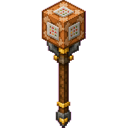
The recipe uses a command block, redstone, and a blaze rod.
Builder Staff


The recipe uses a command block, an ender pearl, and a blaze rod.
You can also obtain either item from the Creative inventory under equipment or use the /give commands in the Quickstart section.
Abilities And Mechanics
Builder materials
The Builder Staff cycles through these materials:
- Stone
- Oak Planks
- Bricks
- Glass
- Quartz
Select Change material to move to the next material. After Quartz, the selection returns to Stone.
The selected material applies to the next floor, wall, ceiling, room, or bridge you build.
Structure sizes
| Structure | Result |
|---|---|
| Floor 9×9 | A 9-by-9 floor at your feet, extending forward |
| Wall 9×5 | A 9-block-wide, 5-block-high wall in front of you |
| Ceiling 9×9 | A 9-by-9 ceiling above and in front of you |
| Room 9×4×9 | A four-block-high room with a floor, ceiling, and four walls |
| Bridge 3×9 | A three-block-wide bridge extending nine blocks forward |
The Builder Staff does not require you to carry the selected building material in your inventory.
Progression And Strategy
- Keep command items in separate hotbar slots so the Command Block Staff can cycle through them predictably.
- Use short, clear names such as
cmd:/weather clearorcmd:/gamemode creative. - Put frequently used commands earlier in the hotbar for easier cycling.
- Keep the Command Block Staff in your offhand when you want to select commands directly.
- Test Builder Staff structures in an open area before using them near important builds, since construction replaces blocks.
- Use Glass for quick shelters, Stone or Bricks for durable-looking structures, Oak Planks for basic builds, and Quartz for decorative construction.
How to install
Download the mod and follow the step-by-step installation guide.
Players also liked



Cosmic Stone Gauntlet


Wield every Infinity Stone and unleash universe-shaking powers with the Cosmic Stone Gauntlet.

Iron Man Armor


Too let you know the when you use the laser gauntlet it will shoot a laser and to make it stop press the laser button again and when you hold the repulser you can shoot repulser blasts hat go 50 blocks but when you crouch with the repulser you shoot missiles and the missiles coul…
Statue Nueralizer (Make Mobs Statues)

Wanna use a nueralizer on a mob while it is chasing you? How about instead of wiping their memories like in men in black, we turn them into statues in a big white flash... hehe. Flash any living mob into a white statue matching its appearance, preserving traits and health—then sn…
Ender Dragon Crossbow

A soul-bound dragon weapon that evolves from fiery crossbow to void-tearing lance.
Remixes of this Mod

This mod is licensed under the CreativeMode Mods License.