
Description
Turn your spare goods into treasures with a vending machine you stock yourself.
Mod Wiki
Block Bazaar
Quickstart
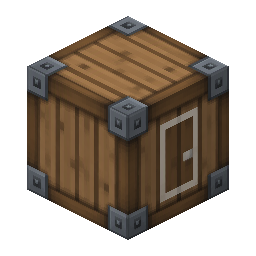
Craft a Block Bazaar at a crafting table:


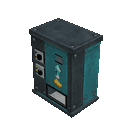
Place it in an open area with room for a 2×2×2 structure. Interact with any part of the machine to open its menu. Choose Set intake item and Set dispensed item, entering each as an item identifier and amount—for example, minecraft:emerald 3. Then choose Exchange to trade using items in your inventory.
Overview
Block Bazaar adds a configurable vending machine for exchanging one item type for another. Its trade settings are saved on the machine, and trades use your inventory directly; the machine does not need to be stocked with items.
What It Adds
- Block Bazaar: A two-block-high, 2×2 vending machine assembled when you place its item.
How To Use
Interact with the machine to see what it accepts and dispenses, or choose an option:
- Set intake item: Enter the item identifier and amount the machine accepts.
- Set dispensed item: Enter the item identifier and amount it gives in return.
- Exchange: Trade if you have enough of the intake item and enough inventory space for the output.
Enter amounts from 1 to 64. Use the exact item identifier, such as minecraft:emerald 3. If either item is not configured, or your inventory cannot complete the trade, the exchange does not go through.
Crafting And Obtaining
Craft the Block Bazaar at a crafting table using the recipe shown in Quickstart. It is also available in the Creative inventory.
How to install
Download the mod and follow the step-by-step installation guide.
Players also liked
Vending machine 2.0

🛒 Vending Machine 2.0 – Your World, Your Marketplace! Turn your Minecraft world into a trading empire! 🤑 Craft custom vending machines, set your own prices, and offer up to six rewards in exchange for items. From survival essentials to valuable treasures, every machine is an o…

Memory Game


Memory blast mod spawns in blocks around the player different colors red blue green orange yellow and buttons on the light blocks and a block in the middle when you click shows ui says Start it will make any of color first color gonna light up you click the button and that block…
The Threshold


The Threshold is a fully customizable automatic door system with an intuitive, easy-to-use menu for Minecraft Bedrock. It is perfect for hidden bases, castle gates, secure entrances, and seamless builds. Choose the size, material, access rules, and opening style to create a door…
World At War: War Machines 1940


Take control of hyper powerful vehicles capable of destroying civilizations.
Everyblock Portals
 anon

Explore Portalwilds, a generated dimension of birch groves, and use a Portal Core and Compass to travel home.
This mod is licensed under the CreativeMode Mods License.