

Description
Build a staircase to bedrock with a Bedrock miner!!!
Mod Wiki
Bedrock Stair Maker
Quickstart
- Craft the Bedrock Stair Maker:


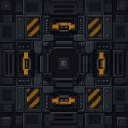
- Place it at the starting point of your staircase. Look horizontally in the direction you want the staircase to travel before placing it.
- Move clear of the area. The machine starts automatically and does not require fuel or a separate activation.
- Watch it build downward. It creates four steps per game tick until the staircase reaches bedrock level.
- Enter the finished staircase from behind the machine. Bring lighting and supplies if you plan to use the tunnel for mining or travel.
In Creative mode, you can also find the machine in the Functional item group or use /give @s bedrock-stair-maker-zt5htwfk:bedrock_stair_maker_zt5htwfk.
Overview
The Bedrock Stair Maker is an automatic construction machine that creates a broad, walkable staircase down to Y=-64. It advances one block forward and one block downward at each level, replacing terrain in its path with a constructed stone staircase.
The machine continues working until it reaches bedrock level, then stops permanently. It does not need fuel, a redstone signal, or player input after placement.
What It Adds
- The Bedrock Stair Maker item and placeable machine block
- An automatic staircase extending down to Y=-64
- A three-block-wide corridor with four blocks of interior clearance
- Smooth stone slab floors
- Stone walls and ceilings
- Wall torches placed at regular intervals
- Automatic entrance clearing around the machine
How To Use
Choose the Direction
The staircase follows the machine's horizontal facing direction. Look toward the desired direction while placing it.
Place the machine with enough open space around it for the entrance and avoid locations containing structures or terrain you want to preserve.
Start the Machine
The machine begins building automatically as soon as it is placed. It completes four staircase levels per game tick, so the route can extend rapidly.
There is no interface, fuel slot, button, lever, or redstone control. To stop the machine, break it.
Enter the Staircase
The machine clears an entrance around its front and sides, while leaving the machine itself intact. Once the staircase is built, walk forward from the machine into the descending corridor.
The corridor is three blocks wide and has four full blocks of clearance above its smooth stone slab floor.
Recover the Machine
The machine can be mined with an iron-tier pickaxe or better. When broken, it drops as an item and can be placed again elsewhere.
Abilities And Mechanics
Automatic Downward Construction
Each completed level:
- Moves one block farther in the machine's facing direction
- Drops one block lower than the previous level
- Replaces the existing terrain with stone construction
- Clears a three-block-wide, four-block-high interior
- Places three smooth stone slabs across the floor
The machine builds through air, water, dirt, stone, and other terrain rather than merely removing blocks that happen to be in the way.
Bedrock Endpoint
Construction continues through levels down to Y=-64. The machine does not build below this level, and it marks the staircase as finished when the endpoint is reached.
Built-In Lighting
Every fifth completed step receives wall torches on both sides when the required wall spaces are available. These torches provide regular lighting along the route without requiring the player to place them manually.
Terrain Replacement and Item Safety
The machine forcibly replaces blocks along the staircase with its own stone structure. Check the area carefully before placing it, especially if the route crosses valuable builds, farms, storage, or ore deposits.
Dropped item entities in and around the constructed staircase are removed as the machine works. Do not leave valuable items on the ground along its path.
Visual and Audio Feedback
While operating, the machine produces smoke and critical-hit particles and periodically plays a stone-breaking sound. These effects indicate that construction is in progress.
Crafting And Obtaining
The recipe becomes available in the recipe book after entering a world. The machine requires yellow concrete, black concrete, iron ingots, redstone, a diamond, and a furnace:
In Creative mode, obtain it from the Functional item group or with the item command shown in Quickstart.
Progression And Strategy
- Place the machine where a long, straight descent is useful, such as near a base, mine, or underground transport hub.
- Face it away from important terrain because the staircase overwrites blocks along its full width and height.
- Clear valuable items from the planned route before starting it.
- Stand back while it works; construction advances quickly.
- Use the built-in torches as navigation markers, and add additional lighting if you expand the corridor.
- Keep the machine in place until it finishes if you want the complete route to Y=-64. Once finished, mine it with an iron-tier pickaxe or better and reuse it elsewhere.
How to install
This Java mod can be used on Windows and Mac PCs with the CreativeMode Launcher or any Minecraft launcher of your choice.

1. Download and install the new CreativeMode Launcher

2. Click to play on the top of the screen.
3. That's it — launches instantly. No complicated setup required.
Want to use on a different launcher? Download mod and manually install.
Players also liked

Black Hole Apocalypse


An endless black hole that swallows everything, grows without limit, and now needs a pause between uses

Mass Driver Wand


The Mass Driver Wand is a gravity manipulation device that allows you to pick up and throw blocks from a distance. Right-click while looking at any block (up to 64 blocks away) to instantly pick it up and store it in the wand, which will glow to indicate it contains a block. Righ…
Lavaforge Blaster

The Lavaforge Blaster is a powerful weapon that fires scorching projectiles capable of turning the world into molten chaos. Right-click to shoot a fast-moving bolt that instantly converts any block it strikes into a lava source, and deals heavy magic damage to any mob it hits whi…

White House Estate

Recreation of the United States White House and its immediate grounds: a neoclassical, three-story presidential mansion featuring the iconic north and south porticoes with columned facades, central pediment, symmetrical east and west wings, porte-cochère, roof and chimney details…

Windfire Staff


The Windfire Staff is a dual-mode magical weapon that alternates between Fire and Wind modes—right-click to cast its mode-specific projectile (1 second cooldown) and sneak + right-click to toggle modes; the current mode appears in the item name, tooltip, and durability/focus bar…
This mod is licensed under the CreativeMode Mods License.