

Description
Use an enchanted wand to trade ores and gems for useful items.
Mod Wiki
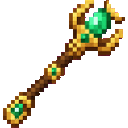
Arcane Trade Wand
Quickstart
Craft the Arcane Trade Wand, then use it while holding it to open the Arcane Trade shop. Keep ores, gems, or other listed token items in your inventory, browse the offers, and select an item to buy it.


Overview
The wand opens a paginated shop where you can exchange mining materials and gems for items. The shop shows your combined token balance and the cost of each offer. Purchases give you one item and place it in your inventory.
What It Adds
- Arcane Trade Wand: A single-use-in-hand shop opener.
- Arcane Trade shop: Shows six offers per page, with buttons to move between pages.
How To Use
- Put the wand in your main hand or offhand and use it to open the shop.
- Browse the offers and check the token cost beside each item.
- Select an offer to buy it. Use the arrow buttons at the bottom to change pages.
A purchase succeeds only if you have enough tokens and room in your inventory for the item. If it fails, check your balance and inventory space.
Crafting And Obtaining
Craft the wand in a crafting table using the recipe above.
The shop accepts these items as tokens, each worth 1 token:
- Coal and charcoal
- Copper ingots and raw copper
- Iron ingots and raw iron
- Gold ingots and raw gold
- Redstone and lapis lazuli
- Amethyst shards, emeralds, diamonds, and netherite ingots
Tokens are counted from your inventory and spent when you buy an item. If the item you are buying is itself one of these token items, that same item does not count toward its own cost.
Abilities And Mechanics
Offer prices depend on the item’s rarity:
| Rarity | Cost |
|---|---|
| Common | 1 token |
| Uncommon | 3 tokens |
| Rare | 8 tokens |
| Epic | 20 tokens |
Each purchase provides one item. Your inventory needs an empty slot or room in a matching stack to receive it.
Progression And Strategy
Gather token items as you explore, then use the shop balance and offer costs to decide when to spend them. Keep inventory space available before purchasing, especially when shopping for items you want to collect.
How to install
This Java mod can be used on Windows and Mac PCs with the CreativeMode Launcher or any Minecraft launcher of your choice.

1. Download and install the new CreativeMode Launcher

2. Click to play on the top of the screen.
3. That's it — launches instantly. No complicated setup required.
Want to use on a different launcher? Download mod and manually install.
Players also liked


Sculk Pickaxe


Hunt hidden diamonds through stone with a sculk-powered pickaxe that reveals nearby ore.
Boomeraxe


The Boomeraxe adds tiered throwable axes (wood, stone, iron, gold, diamond, and netherite) that also function as effective handheld pickaxes and multipurpose tools: hold right-click to charge and release to throw — a full-charge throw sends it far and it returns to you like a loy…
Reality Mining Tool

Mine all items and blocks, even illegal ones—and please make sure the "Reality Mining Tool" is in the inventory.

Masterwork Tools
 anon
anonForge a legendary pickaxe that mines faster, hits harder, and endures realistic wear.
This mod is licensed under the CreativeMode Mods License.