

Description
Hunt hidden diamonds through stone with a sculk-powered pickaxe that reveals nearby ore.
Mod Wiki
Sculk Pickaxe
Quickstart
- Craft the Sculk Pickaxe with two diamonds, one sculk sensor, and two sticks:


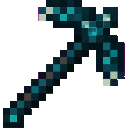
- Place it in your main hand.
- Right-click to scan the area around you.
- Follow the cyan-glowing diamond ore highlights to locate the nearest deposits.
- Mine the revealed diamond ore with the pickaxe.
The scan has a 30-second cooldown. Right-clicking again during the cooldown displays the remaining time instead of starting another scan.
Overview
The Sculk Pickaxe is a diamond-tier pickaxe with a sculk-powered diamond detection ability. When activated, it searches for nearby diamond ore hidden through stone and marks the closest deposits with glowing highlights.
It can also be used as a regular pickaxe for blocks that require a pickaxe.
What It Adds
- Sculk Pickaxe — a non-stackable diamond-tier pickaxe.
- Diamond scanning — detects diamond ore and deepslate diamond ore around the player.
- Temporary ore highlights — discovered ore is displayed with a cyan glow and sculk particles.
- Scan feedback — a sculk scan sound, particles, and status messages indicate the result.
How To Use
Scanning
Hold the Sculk Pickaxe in either hand and use it. The scan:
- Searches within a 50-block spherical radius of your position.
- Detects both regular diamond ore and deepslate diamond ore.
- Selects up to five closest ore blocks.
- Marks detected blocks with temporary glowing displays.
- Plays a sculk-themed sound and releases sculk particles around you.
The pickaxe reports whether diamonds were detected and how many deposits were found. If no qualifying ore is found nearby, it reports that no diamonds were detected.
Only already-loaded areas are checked, so unexplored or unloaded chunks may not be included in the scan.
Following Highlights
Look for the cyan-glowing ore markers and mine toward them. A highlight remains while the matching diamond ore block is still present, for up to five minutes. It disappears sooner if the ore block is mined or replaced.
Mining
The Sculk Pickaxe functions as a pickaxe and can mine blocks in Minecraft’s pickaxe-mineable category. It is also recognized as a pickaxe for systems that require one.
Crafting And Obtaining
Craft the Sculk Pickaxe in a crafting table:
The recipe uses:
- 2 diamonds
- 1 sculk sensor
- 2 sticks
In Creative mode, it is available in the Tools & Utilities tab.
For commands, its item ID is sculk-pickaxe-3n6fen2n:sculk_pickaxe_3n6fen2n.
Abilities And Mechanics
| Feature | Details |
|---|---|
| Scan range | 50 blocks from the player |
| Search shape | Sphere |
| Maximum highlights | 5 closest diamond ore blocks |
| Detected blocks | Diamond Ore and Deepslate Diamond Ore |
| Cooldown | 30 seconds |
| Highlight duration | Up to 5 minutes |
| Stack size | 1 |
The scan checks individual ore blocks, so several blocks from the same vein may be reported as separate deposits.
Progression And Strategy
Use the Sculk Pickaxe after entering underground areas where diamond ore may be concealed by stone or deepslate. Activate it from a central position, then travel toward the nearest highlighted blocks.
For the best results:
- Scan after entering a new mining area or cave system.
- Stay near loaded terrain while scanning.
- Mine the closest highlighted blocks first.
- Wait for the cooldown before attempting another scan.
- Use the pickaxe normally between scans to excavate stone and reach the revealed ore.
How to install
This Java mod can be used on Windows and Mac PCs with the CreativeMode Launcher or any Minecraft launcher of your choice.

1. Download and install the new CreativeMode Launcher

2. Click to play on the top of the screen.
3. That's it — launches instantly. No complicated setup required.
Want to use on a different launcher? Download mod and manually install.
Players also liked

Mob Carrier


The Mob Carrier lets you capture and relocate multiple mobs, storing them in grouped stacks by type (for example, Goat x4) so you can carry many of the same mob at once; sneak (hold Left Shift) and right-click a mob to capture it—non-sneak interactions are passed through, but sne…

Inferno Flamebreaker


Smash foes from above and unleash blazing fireballs with the Inferno Flamebreaker.

Vanishing Wooden Executioner


The Vanishing Wooden Executioner is a mysterious sword that automatically appears in your inventory when your health is at or below 50% and will instantly one‑shot any mob while present; it disappears if your health rises above 70% (it remains hidden/non‑usable between 50–70%), p…
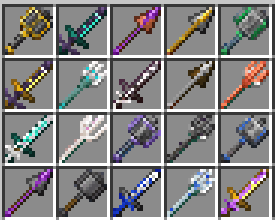
Forged in Style


Weapon trims. Trim axes, tridents, maces, spears, swords, and shields in the smithing table.

Mob Bucket

The Mob Bucket lets you capture and relocate any living mob — including villagers — by right-clicking directly on the creature; the bucket will rename itself and show the captured mob's name and entity type in its title and tooltip. Right-click any block surface to release the mo…
This mod is licensed under the CreativeMode Mods License.