

Description
Take to the skies in a fighter jet armed with missiles, bombs, and heavy firepower.
Mod Wiki
Thunderwing Fighter
Quickstart
- Craft the Thunderwing Fighter placer at a crafting table:


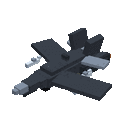
- Select the Thunderwing Fighter placer and use it in an open area to place the fighter.
- Interact with the placed fighter to take the single pilot seat. Do not crouch while boarding.
- Use normal movement controls to steer and fly. The fighter is air-controlled, has no gravity, and flies at a speed of 0.8.
- While mounted, tap/use or press Jump to fire the missile launcher. Aim in the direction you are looking before firing.
You can also summon the fighter directly with:
/summon com_thunderwing_fighter_gmthngne:my_vehicle
Overview
The Thunderwing Fighter is a one-seat flying vehicle built for aerial attacks. It lets one player take to the skies and launch explosive TNT missiles in the direction they are aiming.
What It Adds
-
Thunderwing Fighter — A rideable fighter jet with:
- One pilot seat
- Gravity-free flight
- Air-controlled movement
- A third-person mounted camera
- A missile launcher
- 40 health
-
Thunderwing Fighter placer — A craftable item used to place the fighter in the world.
How To Use
Placing the Fighter
Hold the Thunderwing Fighter placer and use it in a suitable open area. The fighter appears as a rideable vehicle.
The placer is a single-use-sized item with a maximum stack size of one.
Boarding
Interact with the placed fighter to board it. Only one player can ride at a time. Crouching skips the normal boarding interaction.
When you leave the vehicle, you dismount above its center.
Flying
The fighter can fly freely without falling under gravity. While seated, use your usual movement controls to steer through the air. It can move forward, backward, and sideways, although backward movement is slower.
Firing Missiles
The missile launcher is controlled by the vehicle's primary action:
- Tap or use while mounted.
- Press Jump while mounted.
- Each activation fires one missile in the direction you are looking.
- Missiles travel quickly and use TNT, detonating as explosive projectiles.
- The launcher has a cooldown of 40 ticks, or about 2 seconds.
A large explosion effect appears when the missile detonates.
Crafting And Obtaining
Craft the Thunderwing Fighter placer at a crafting table using iron, feathers, redstone, glass, and TNT.
Alternatively, spawn the vehicle directly with:
/summon com_thunderwing_fighter_gmthngne:my_vehicle
Abilities And Mechanics
| Feature | Details |
|---|---|
| Seats | 1 pilot |
| Flight | Gravity-free, air-controlled movement |
| Health | 40 |
| Missile speed | 2.5 |
| Missile type | TNT |
| Missile cooldown | 40 ticks, approximately 2 seconds |
| Boarding | Interact with the fighter; crouching skips interaction |
| Dismounting | Places the pilot above the fighter's center |
The fighter is treated as a tamed vehicle and can be named.
Progression And Strategy
- Craft the fighter before gathering a large supply of combat materials so you can immediately test its flight and missile range.
- Use open terrain for takeoff and landing; the vehicle is easiest to control when it has room to maneuver.
- Aim carefully before activating the launcher, since missiles travel in your viewing direction.
- Keep the cooldown in mind during attacks: fire, reposition, and prepare the next shot while waiting for the launcher to recharge.
- Use altitude and movement to approach targets from different angles, but avoid flying directly into your own explosions.
How to install
Download the mod and follow the step-by-step installation guide.
Players also liked

Diamondbound Iron Sword


Reforge iron with diamonds and unleash devastating sword strikes.
Silicon City President

In your laboratory in a big city you want to become the president you must mine New ors and make electronic parts then make a pc then buy games from villagers and make videos in YouTube To make money then upgrade your level by doing tasks for upgrading the villagers trading and m…
Propeller Gunship

Take to the skies in a gunship, fire bullets, and drop devastating bombs.
Dead Parrot


The only reason this parrot was standing for the cover image was that it had been nailed to it's perch... but in all reality it is an ex-parrot. Bereft of life, it's gone to meet it's maker... place this decoration wherever you like and hear a certain angry customer go on about t…
This mod is licensed under the CreativeMode Mods License.