

Description
Ride a robotic dog and blast enemies away with its super bark!
Mod Wiki
Robo Barkhound
Quickstart
- Gather the ingredients for the Robo Barkhound placer.
- Craft it at a crafting table:


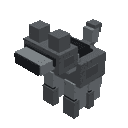
- Hold the Robo Barkhound item and use it on a block. The robotic dog appears beside the block and automatically seats you.
- Ride it using your normal movement controls.
- While mounted, aim at enemies and tap/use to fire the Super Bark. You can also press Jump to trigger the bark.
- The bark has a 2-second cooldown. Watch the action-bar prompt for the cooldown timer and the Tap: Super Bark control.
The placer is reusable after placing the Barkhound. You can also summon one directly with:
/summon com_robo_barkhound_eoqi7iij:my_vehicle
Overview
Robo Barkhound is a rideable robotic dog built for fast ground travel and enemy crowd control. It has one seat for a player and attacks by launching a sonic, explosive projectile that blasts nearby enemies away.
What It Adds
- Robo Barkhound placer item
- A rideable robotic dog with one player seat
- Ground-controlled movement
- A Super Bark ranged attack
- Sonic explosion effects on impact
- 40 health for the Barkhound
- A nameable, tamed vehicle entity
How To Use
Placing the Barkhound
Use the Robo Barkhound item on the side or top of a block. The Barkhound is placed facing the direction you are looking and immediately seats the player who placed it.
The placer is not consumed, so the same item can be used to place the vehicle again after moving or leaving it.
Riding
The Barkhound accepts players as riders and has one seat. Use standard movement controls to steer it across the ground.
Sneaking while interacting skips the normal ride interaction. To mount it normally, interact without crouching.
While riding:
- The view switches to third person.
- Your armor, offhand item, and held item are hidden temporarily for the riding presentation.
- Your equipment and view are restored when you dismount.
Dismounting
Use the normal dismount control. You leave the Barkhound on top of the vehicle.
Abilities And Mechanics
Super Bark
The Super Bark launches a fast wither-skull projectile in the direction you are looking. It produces a sonic explosion on impact and blasts nearby entities away.
To fire:
- Tap or use while mounted.
- Press Jump while mounted.
- You can also trigger it by attacking a nearby block or entity while riding.
The attack has a 40-tick cooldown, equal to 2 seconds. The action-bar prompt shows when the bark is ready and how much cooldown remains.
Aim near groups of enemies rather than relying only on a direct hit—the impact blast is useful for pushing several threats away at once.
Durability And Movement
The Robo Barkhound has 40 health. It is a ground vehicle with a single controlling rider and can be pushed by entities and pistons.
Crafting And Obtaining
Craft the Robo Barkhound placer at a crafting table using:
- Iron ingots
- Redstone
- Bones
- A saddle
- Leather
In Creative mode, you can obtain the Robo Barkhound item directly from the item inventory or use the summon command:
/summon com_robo_barkhound_eoqi7iij:my_vehicle
Progression And Strategy
Robo Barkhound has no separate upgrade path. Its main progression is preparing the saddle, metal, redstone, bones, and leather needed to craft the reusable placer.
For effective use:
- Fire the Super Bark at groups of enemies to make space.
- Use the knockback blast to interrupt approaching threats or push enemies away from ledges and defensive positions.
- Keep moving between attacks instead of waiting through the cooldown in one place.
- Leave enough room around the vehicle for mounting and dismounting.
- Name the Barkhound if you want to give your vehicle a distinctive identity.
How to install
Download the mod and follow the step-by-step installation guide.
Players also liked
Thunderwing Sky Rider


Race through the skies aboard a lightning-summoning plane built for speed.
Voidfire Watchblade


Wield the Voidfire Watchblade and summon eerie black-eyed blocks wherever you walk.

Bomber Bee


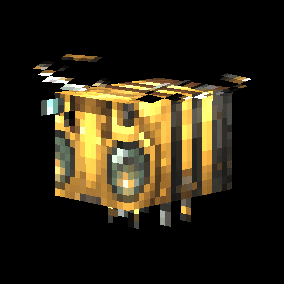
A mechanical bee that patrols the skies above hostile mobs. When it detects an enemy threat, the Bomber Bee flies directly overhead and deploys non-destructive TNT charges that damage mobs without destroying blocks or the surrounding terrain.


This mod is licensed under the CreativeMode Mods License.