CreativeMode

Creative
Mode

ExploreModJamsCreateJoin our community
Sign in
Craft first mod
CreativeMode

Creative
Mode

Sign in
Create
Account
Community
Resources

Create without limits.

Privacy PolicyTerms of Use

© 2026 CreativeMode. Not an official Minecraft product. Not approved by or associated with Mojang or Microsoft.

CREATIVEMODE

    Create
    Account
    Community
    Resources

    Create without limits.

    Privacy PolicyTerms of Use

    © 2026 CreativeMode. Not an official Minecraft product. Not approved by or associated with Mojang or Microsoft.

    CREATIVEMODE

    v1
    MC Bedrock

    Maya

    by
    lazaruscode
    lazaruscode

    14 downloads

    Mayan
    Decoration
    +3 more
    v1
    MC Bedrock

    Maya

    by
    lazaruscode
    lazaruscode

    14 downloads

    Mayan
    Decoration
    Block
    Creative
    +1 more

    Description:

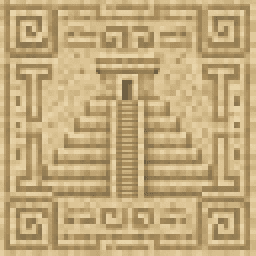
    Maya adds a cohesive library of 54 placeable full-cube decorative stone blocks carved with authentic-looking Maya-style rounded glyphs across six palettes (pale limestone, warm sandstone, dark basalt, red ceremonial stone, cracked ancient stone, and mossy overgrown stone). The set includes wall panels, corner stones, horizontal friezes, pillar faces, floor tiles, altar tops, shrine centers, doorway frames, and royal tomb blocks—some perfectly tiling and symmetrical for long runs, others ornate focal pieces for altars and doorways—with glyphs applied to every visible face so orientation never leaves a blank side. All block textures are rendered from 1024×1024 carved-stone sources for high-detail builds (with a few related blocks sharing source art to keep the pack compact) and the library was designed to maximize distinct glyph variety so long walls and chambers avoid obvious repetition. To use, open the Creative inventory under Construction, choose your palette and family, and place or rotate blocks as usual to create mystical temples, shrines, tombs, and jungle ruins.

    Mod Wiki

    Maya

    Quickstart

    1. Install the .mcaddon and create or open a world with the pack enabled.
    2. Enter Creative mode and open the inventory.
    3. Navigate to the Construction tab and search for "Maya" to browse all available blocks.
    4. Pick any block — try a Maya Limestone Wall Panel to start — and place it like any normal full block.
    5. Mix block families (Wall Panel, Corner Stone, Frieze, Pillar Face, etc.) from the same palette to build a cohesive structure, or blend palettes for weathered, multi-era looks.

    No crafting recipes are required — all 54 blocks are Creative-only decorative pieces.


    Overview

    Maya is a decorative block library that brings authentic-looking Maya-style carved stone to your builds. It provides 54 full-cube blocks across six stone palettes and nine architectural families, each face carved with rounded glyphs so no side is ever blank regardless of how a block is oriented. Textures are rendered at high resolution for crisp, detailed temple and ruin builds.


    What It Adds

    Six Stone Palettes

    PaletteCharacter
    LimestonePale, clean ceremonial stone
    SandstoneWarm, sun-bleached desert stone
    BasaltDark volcanic stone
    Red CeremonialDeep red ritual stone
    Cracked AncientWeathered, fractured stone
    Mossy OvergrownJungle-reclaimed, moss-covered stone

    Nine Block Families

    Each palette contains one block from every family — 9 blocks per palette, 54 total:

    FamilyBest Used For
    Wall PanelLong interior and exterior walls; seamlessly tiling
    Corner StoneStructural corners; symmetrical for clean joins
    Horizontal FriezeDecorative band courses along walls or rooflines
    Pillar FaceStacked vertical columns and monumental pillars
    Floor TilePaving temples, plazas, and chamber floors
    Altar TopFocal ornate surfaces for altars and raised platforms
    Shrine CenterCentral ornate piece for shrine and niche builds
    Doorway FrameFlanking and topping doorway openings
    Royal Tomb BlockOrnate accent stone for tomb chambers and crypts

    How To Use

    All Maya blocks are standard full cubes — place, rotate, and break them exactly like vanilla stone. Because every face carries glyph art, you never need to worry about orientation leaving an undecorated side exposed.

    Pickaxe required — all blocks are pickaxe-destructible and cannot be broken efficiently by hand.

    Block durability by palette:

    PaletteMining TimeBlast Resistance
    Basalt2.2 s9.0
    Limestone, Sandstone, Red, Cracked, Mossy1.8 s6.0

    Basalt blocks are slightly harder and more blast-resistant than the other five palettes, making them a practical choice for builds where explosions are a concern.


    Crafting And Obtaining

    All 54 Maya blocks are available exclusively from the Creative inventory under the Construction category. There are no crafting recipes — search "Maya" in the inventory to find the full library instantly.


    Progression And Strategy

    Choosing a palette for your build theme:

    • Start a fresh temple or palace with bright Limestone or warm Sandstone — their clean surfaces read as newly built or well-preserved.
    • Use Red Ceremonial stone for sacrificial platforms, altar areas, and inner sanctums where a dramatic color contrast is welcome.
    • Use Dark Basalt for underground vaults, volcano-side temples, or any structure that should feel ominous and ancient.
    • Layer in Cracked Ancient and Mossy Overgrown blocks to suggest age, neglect, and jungle reclamation — scatter them among cleaner blocks to simulate partial ruin.

    Building with families:

    • Lay Floor Tiles as your base, use Wall Panels for large flat runs, place Corner Stones where walls meet, and cap horizontal courses with Horizontal Friezes for an authentic banded facade.
    • Stack Pillar Faces vertically to build freestanding columns or engaged pilasters.
    • Place Doorway Frame blocks on the sides and top of an opening, then set a Shrine Center or Altar Top as the focal piece behind the opening.
    • Reserve Royal Tomb Blocks for inner burial chambers or hidden crypts to reward explorers who venture deeper into your structure.

    How to install

    Download the mod and follow the step-by-step installation guide.
    Players also liked

    Vanta Black Block - media 1
    Bedrock
    Vanta Black Block

    Vanta Black... The color that absorbs light better than any other. In the images…

    8 downloads

    El Castillo  - media 1
    Bedrock
    El Castillo

    A monumental structure to accent your skyline with. This is a rendering of a 3D…

    56 downloads

    Pharaoh Stone Block - media 1
    Bedrock
    Pharaoh Stone Block

    Placeable decorative block with a Pharaoh-themed stone texture for Egyptian-styl…

    20 downloads

    Chichen Itza Builder 2 - media 1
    Bedrock
    Chichen Itza Builder 2

    Chichen Itza 2 is the temple known as El Castillo. Version 2 is a much larger ve…

    8 downloads

    Cherry Wisp - media 1
    Bedrock
    Cherry Wisp

    Imagine a fairy that got lost on the way to a Disney movie and decided to squat…

    15 downloads

    This mod is licensed under the CreativeMode Mods License.

    CreativeMode

    Creative
    Mode

    ExploreModJams
    Create
    Items or Blocks icon

    Items or Blocks

    Join our community
    Craft first mod
    CreativeMode

    Creative
    Mode

    Craft first mod