Description
/give @s infinity-master-gauntlet-bic6do2d:infinity_master_gauntlet_bic6do2d
Crafting recipe:



Keep the gauntlet in either hand when using Infinity Snap. Gauntlet holders are protected from being selected by their own Snap.
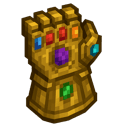
The Infinity Gauntlet is a gold power artifact with a large library of destructive, defensive, movement, utility, and reality-altering abilities. Every power has its own control type and two adjustable power settings.
The gauntlet tracks:
The item bar displays charge. The optional HUD displays the active power, control type, readiness, charge, heat, and cooldown trim.
| Key | Action |
|---|---|
| V | Open Gauntlet Command Center |
| U | Open Power Settings for the selected power |
| G | Open the Cosmic Forge customization menu |
| H | Show or hide the gauntlet HUD |
| R | Cycle to the next power |
| Right-click | Use the selected power |
These keys can be changed in Minecraft’s control settings. The gauntlet must be held for its menus and controls to respond.
Open the Gauntlet Command Center with V. Scroll through the power list and click a power to make it active. The selected power is also shown in the HUD and tooltip.
The command center provides quick access to:
You can also press R to cycle through normal powers. A selection message appears above the hotbar.
The selected power determines how right-click behaves.
Held powers do not slow your movement while you are channeling them. The tooltip, HUD, and command center show the exact control type for the selected ability.
Select Block Transmutation and press U or open its tuning panel from the command center. Choose the target block and adjust the transmutation size and target range, then use the gauntlet to perform the conversion.
Some duration settings can be extended to Permanent in Power Settings. A permanent toggleable effect remains active until you use the same power again to stop it.
Select Infinity Snap from the special card in the command center and right-click once to activate it.
Infinity Snap:
The gauntlet itself normally remains after the Snap. A world administrator can make it vanish after use with:
/gamerule destroyInfinityGauntletAfterSnap true
Set the rule back to false to keep the gauntlet after future Snaps.
Reverse Snap is dormant until an Infinity Snap has occurred. After a Snap, select it from the command center and right-click.
Reverse Snap restores the Snap’s recorded players and animals, ends Snap-based spawning suppression, returns affected players from spectator mode, and grants restored players temporary regeneration and absorption. After use, the special selection returns to Infinity Snap.
Press U while holding the gauntlet, or choose Open Power Tuning in the command center.
Each power has two sliders appropriate to its function. Examples include:
| Power | Adjustable settings |
|---|---|
| Reality Warp | Radius, conversion percentage |
| Time Freeze | Radius, duration |
| Flight Mode | Duration, glide boost |
| Block Transmutation | Size, target range |
| Shadow Clone | Clone count, lifetime |
| Infinity Vision | Vision radius, outline strength |
| Infinity Snap | Erase percentage, Empower |
Changes save directly to the gauntlet.
Press G or choose Open Cosmic Forge to customize the held gauntlet.
Global settings:
Selected-power settings:
Left-click and drag a slider to change it. Right-click a slider to reset only that value. Reset Theme restores the global visual settings.
Charge is displayed from 0/1000 to 1000/1000. It regenerates while the gauntlet is held:
If a charge-managed power does not have enough charge, it will not activate.
Heat is displayed from 0/1000 to 1000/1000. Using charge-managed powers raises heat, while time lowers it.
Reaching maximum heat causes an overheat period. During overheat, the gauntlet cannot use charge-managed powers and the player receives temporary weakness and slowness. The HUD displays OVERHEATED while this is active.
Normal powers recover quickly, usually in about 8 ticks, with a minimum of 3 ticks. Holding and releasing powers can recover slightly faster depending on how long they were used.
Use Cooldown Trim in the Cosmic Forge to shorten standard power cooldowns further. Cooldown Trim does not remove Infinity Snap’s long recovery time.
This Java mod can be used on Windows and Mac PCs with the CreativeMode Launcher or any Minecraft launcher of your choice.

1. Download and install the new CreativeMode Launcher

2. Click to play on the top of the screen.
3. That's it — launches instantly. No complicated setup required.
Want to use on a different launcher? Download mod and manually install.
mymes1
Java 1.21.5
This mod is licensed under the CreativeMode Mods License.


