

Description
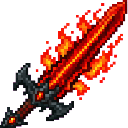
The Inferno Dominion Blade is a devastating fire-themed sword that grants continuous Fire Resistance and Strength V while held; hold Shift and right-click to cycle between three modes (Fire Nuke, Flamethrower, Fire Tornado) with a chat message, sound and fiery mode-swap animation, and right-click to unleash the selected ability. Fire Nuke fires an extremely large, long-range fiery explosion up to 64 blocks away with beam-casting visuals, a mushroom-cloud animation, shockwave rings, lava and flame effects and widespread ignition for maximum devastation, while Flamethrower sprays a rapid multi-tick stream of spiraling fire lances that damage, knock back, ignite enemies and leave burning trails. Fire Tornado summons a huge, persistent towering tornado of flame with spiraling particle arms, smoke and lava/fire rings that deals heavy damage, ignites and violently flings or whirls caught entities — all modes feature dramatic custom animations and effects for a cinematic, destructive playstyle.
Mod Wiki
Inferno Dominion Blade
Quickstart
- Craft the blade using the recipe below, or find it in the Combat creative tab.
- Hold it in your hand — you instantly gain Fire Resistance and Strength V.
- Shift + Right-click to cycle through the three ability modes. A chat message, sound, and animation confirm the switch.
- Right-click to unleash the currently selected ability.


Overview
The Inferno Dominion Blade is a fire-themed Netherite-tier sword built for maximum, cinematic devastation. Simply holding it keeps you fireproof and supercharged with Strength V. Its three right-click abilities — Fire Nuke, Flamethrower, and Fire Tornado — each deliver a dramatically different style of fiery destruction, complete with custom animations, particles, and sounds.
What It Adds
| Content | Description |
|---|---|
| Inferno Dominion Blade | A single powerful sword item found in the Combat creative tab |
Abilities And Mechanics
Passive Effects (always active while held)
- Fire Resistance — You cannot be burned or take fire/lava damage.
- Strength V — Massively increased melee damage on every swing.
Switching Modes
Hold Shift and Right-click to cycle through the three modes in order. Each switch plays a sound effect, shows a fiery animation, and prints the new mode name in chat so you always know what's active.
🔥 Mode 1 — Fire Nuke
Right-click to fire a long-range beam that travels up to 64 blocks. On impact it detonates with:
- An enormous explosion with a mushroom-cloud animation
- Expanding shockwave rings
- Scattered lava and flame effects
- Widespread ignition of everything caught in the blast
Best used against large groups, fortresses, or anything you want completely leveled from a safe distance.
🔥 Mode 2 — Flamethrower
Right-click to spray a rapid, multi-tick stream of spiraling fire lances in front of you. Each lance:
- Damages and knocks back hit enemies
- Ignites targets on contact
- Leaves a burning trail across the terrain
Best used at close-to-medium range when you want sustained, sweeping fire coverage.
🔥 Mode 3 — Fire Tornado
Right-click to summon a towering, persistent tornado of flame. The tornado features:
- Spiraling particle arms, smoke columns, and lava/fire rings
- Heavy continuous damage to anything inside it
- Ignition of caught entities
- Violent flinging and whirling of any entity pulled into the vortex
Best used in tight spaces or chokepoints where enemies cannot easily escape the spiral.
Progression And Strategy
- Craft the blade as soon as you have Netherite — the passive Fire Resistance alone makes Nether exploration dramatically safer.
- Use Fire Nuke for long-range siege situations; stand back and watch the mushroom cloud.
- Switch to Flamethrower when rushing into crowds; the knockback and ignition keep enemies off-balance.
- Drop a Fire Tornado in a doorway or narrow corridor to create an impassable wall of fire that tosses enemies around.
- Because Fire Resistance is always active, you can stand inside your own Fire Tornado or Flamethrower trail without taking damage — use this aggressively.
How to install
This Java mod can be used on Windows and Mac PCs with the CreativeMode Launcher or any Minecraft launcher of your choice.

1. Download and install the new CreativeMode Launcher

2. Click to play on the top of the screen.

3. That's it — launches instantly. No complicated setup required.
Want to use on a different launcher? Download mod and manually install.
Players also liked

Midnight Challenger


The Dodge Challenger is a sleek, black rideable car you place as a multiblock structure — right-click any part of the placed structure to spawn and automatically mount it. The seat faces backwards but controls are not inverted: pressing forward drives the car in the direction you…
Shrek Golem


Meet the Shrek Golem: a towering green guardian that looks like Shrek fused with an iron golem and patrols villages to defend against hostile mobs. Right-click it to hear random quotes from the Shrek movies, complete with booming voice effects that add humor and personality to yo…
Galaxy Venomblade


The Galaxy Venomblade is a devastating mystical sword that strikes with 15 base attack damage, surpassing even the mightiest vanilla weapons. Each hit inflicts Poison II for 5 seconds and Blindness for 3 seconds on your target, making it extremely difficult for enemies to recover…
Infinity Mirror


And insanely overpowered weapon which can spawn, teleport and destroy. Refer below to key bindings for controls.
Holy Light Excalibur

Wield Holy Light Excalibur, a symmetrical holy blade that fires a radiant beam from afar.
This mod is licensed under the CreativeMode Mods License.