

Description
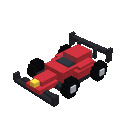
Assemble an F1-style racer, take the wheel, and tear across Minecraft at full speed.
Mod Wiki
Hamza Formula Racer
Quickstart
- Craft the racer or take it from the Functional Blocks tab in Creative mode.
- Place it on clear ground. The single racer item automatically assembles the full F1-style racer from its parts and faces the direction you are looking.
- Use (right-click) any part of the assembled racer with an empty hand. The parts are replaced by a drivable vehicle, and you are mounted automatically.
- Drive with the standard movement controls:
- W — move forward at top speed
- S — reverse
- A/D — maneuver to the sides
- Mouse — aim the racer and choose its direction
- Sprint key — dismount
- While driving, check the top HUD for speed, heading, and altitude. The camera switches to third-person rear view automatically.


Overview
Hamza Formula Racer adds a craftable, single-seat F1-style ground racer. Place the racer item to assemble its detailed multi-part body, then interact with the assembled parts to convert it into a fast vehicle.
The racer is designed for open tracks, roads, and large areas where you can build up speed and maneuver freely.
What It Adds
| Content | Description |
|---|---|
| Hamza Formula Racer | The craftable item used to assemble the racer |
| Racer parts | The visual and collision parts of the assembled vehicle |
| Drivable racer | A one-player vehicle created when the assembled racer is activated |
| Driving HUD | Displays speed, heading, and altitude while riding |
How To Use
Assemble the Racer
Place the Hamza Formula Racer item on the ground. It creates the complete racer automatically, including its body and other visible parts.
Leave plenty of open space around the placement location. Parts can only be assembled in spaces that can be replaced, so nearby blocks may prevent portions of the racer from appearing.
The racer is oriented according to the direction you are facing when placing it.
Start Driving
Use any visible racer part to activate the vehicle. You can interact with the main body or another part of the same assembled racer.
When activated:
- The assembled parts are removed.
- A drivable racer appears.
- You are mounted in the driver's seat automatically.
- Only one rider can use the racer at a time.
Drive
Look in the direction you want to travel and use the movement keys. The racer follows your facing direction.
- Forward travel is the fastest movement.
- Reverse and side-to-side movement are slower, making them useful for turning around or making fine adjustments.
- The racer is a ground vehicle and settles onto the ground instead of hovering.
- It can briefly travel over uneven terrain or become airborne before gravity brings it back down.
Dismount
Press the sprint key to leave the racer. The racer remains parked in the world and can be used again.
The normal sneak/shift dismount does not exit this vehicle, so use the sprint key instead.
Recover the Racer
To pack the vehicle away, hit the racer. It ejects its rider, disappears, and drops a Hamza Formula Racer item that can be placed again.
Crafting And Obtaining
The racer requires:
- 5 iron ingots
- 1 glass pane
- 2 redstone
- 1 minecart
Craft the complete racer with . The finished item stacks to one.
Creative-mode players can also obtain it directly from the Functional Blocks tab.
Abilities And Mechanics
Driving HUD
The HUD appears across the top of the screen while riding:
- SPD — current movement speed
- HDG — current heading in degrees
- ALT — current world height
Automatic Camera
Mounting the racer automatically switches the camera to third-person rear view, giving you a better view of the vehicle and the track. Dismounting restores the camera mode you were using before driving.
Vehicle Handling
The racer does not get pushed around by other entities. It stops when you release the movement controls, allowing it to remain parked wherever you leave it.
Assembled Parts
The placed racer parts behave as one assembled vehicle. Interacting with any part can activate the racer, and damaging one part of the assembled structure breaks the structure as a unit.
Progression And Strategy
There is no tiered progression system. The main gameplay loop is:
- Gather the crafting materials.
- Craft and place a racer.
- Activate it and drive.
- Build tracks, ramps, or open circuits around it.
- Hit the vehicle when you want to recover the item and relocate it.
For the best driving experience, prepare a clear, level starting area and leave room for the racer to accelerate, reverse, and turn. Use wide corners for high-speed runs and the slower side or reverse movement for lining up with narrow sections of a track.
How to install
This Java mod can be used on Windows and Mac PCs with the CreativeMode Launcher or any Minecraft launcher of your choice.

1. Download and install the new CreativeMode Launcher

2. Click to play on the top of the screen.

3. That's it — launches instantly. No complicated setup required.
Want to use on a different launcher? Download mod and manually install.
Players also liked
Artifacts Of The Ages


Wield era-spanning artifacts and steel armor to dominate the deadly Artifact SMP.
Tempest Cloud Cruiser


The Tempest Cloud Cruiser is a rideable multiblock flying cloud vehicle you build and activate by right-clicking any part to transform it into a hovering cruiser; while piloting use WASD to move, Space to ascend, Shift to descend, your view to turn, and Ctrl to exit (which return…
Crimson Tnt Bomber


Pilot a crimson bomber, drop TNT from the skies, and battle to survive.
Phantom Player Hunter

Suit up before ten days, or named enchanted hunters notice you—laughing, throwing pearls, and arriving with thunder.

Infinite Halo Sword

Wield the Infinite Halo Sword and unleash godlike power beneath a radiant ring of light.
This mod is licensed under the CreativeMode Mods License.