

Description
Wield the Infinite Halo Sword and unleash godlike power beneath a radiant ring of light.
Mod Wiki
Infinite Halo Sword
Quickstart
- Obtain the sword from the Combat section of the Creative inventory, or craft it using the recipe below.
- Place the Infinite Halo Sword in your main hand or offhand.
- Look around to see a radiant ring of gold and end-rod particles around your gaze.
- Use normal melee attacks to unleash its immense damage.


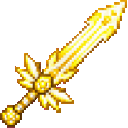
The recipe becomes available after you enter a world. The sword cannot be stacked, so each inventory slot holds one.
Overview
The Infinite Halo Sword is a powerful melee weapon surrounded by a glowing halo effect. Holding it in either hand creates a ring of alternating golden and end-rod particles in front of your face.
It is treated as a sword and has a permanent enchanted-style glint.
What It Adds
- Infinite Halo Sword
- Extreme attack damage: 1,000,000
- Sword-type weapon
- Holds one per inventory slot
- Enchanted-style shimmering appearance
- Radiant halo particle effect while held in either hand
How To Use
Equip the Sword
Put the sword in your main hand or offhand. The halo appears automatically while you hold it; no separate activation or keybind is required.
The ring follows the direction you are looking and appears just in front of your eyes. It is visible on players holding the sword in either hand.
Attack
Use the standard Minecraft attack control to strike nearby targets. The sword deals extraordinarily high melee damage, making it suitable for taking on powerful enemies or testing combat damage.
For reliable hits, wait for the normal attack cooldown before attacking again.
Visual Effect
The halo is made from alternating golden dust and end-rod particles. It is a visual effect only; the sword does not require a charge-up or special trigger to display it.
Crafting And Obtaining
Craft the Infinite Halo Sword with gold blocks, a nether star, quartz blocks, and a diamond sword:
You can also obtain it directly from the Combat creative inventory. The item ID for commands is:
infinite-halo-sword-io76gvkg:infinite_halo_sword_io76gvkg
Abilities And Mechanics
| Feature | Effect |
|---|---|
| Attack damage | 1,000,000 |
| Halo | Golden and end-rod particles form a ring in front of the holder |
| Hand use | The halo works from either the main hand or offhand |
| Stack size | 1 |
| Weapon type | Sword |
The Infinite Halo Sword has no separate right-click ability or activation sequence. Its power comes from its extreme melee damage, while the halo provides its distinctive visual presence.
Progression And Strategy
The sword is an endgame-style crafting goal because its recipe requires a nether star, gold blocks, quartz blocks, and a diamond sword. Once obtained, use it when you want overwhelming melee power rather than a conventional combat challenge.
For the best presentation, equip it in your main hand and face the area or opponent you want to showcase—the halo is oriented along your look direction.
How to install
This Java mod can be used on Windows and Mac PCs with the CreativeMode Launcher or any Minecraft launcher of your choice.

1. Download and install the new CreativeMode Launcher

2. Click to play on the top of the screen.
3. That's it — launches instantly. No complicated setup required.
Want to use on a different launcher? Download mod and manually install.
Players also liked

Inferno Flamebreaker


Smash foes from above and unleash blazing fireballs with the Inferno Flamebreaker.
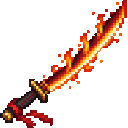
Crimson Flame Katana

Wield a magma-edged katana and unleash fiery bursts that briefly ignite nearby foes.

Cheat Menu [KEY TO OPEN: left alt key]


A mod menu that has enchantments, effects, item spawners, and structure spawners, you can use it in survival and creative,sorry for no other screenshots, the rest is for you to explore and find

Forged in Style

Weapon trims. Trim axes, tridents, maces, spears, swords, and shields in the smithing table.
This mod is licensed under the CreativeMode Mods License.