
Description
The Flamewatch Turret is an automated defensive block that detects nearby hostile mobs and fires faster, higher-origin flaming arrows with distance-compensated drop and short in-flight tracking to reliably ignite threats while you focus on other tasks. Simply place the turret where you want defense and it will automatically target and burn enemies—no micromanagement required. A recent fix ensures placed turrets now reconnect their firing logic after re-entering a world (Overworld, Nether, and End), so they resume firing instead of behaving like inert blocks.
Mod Wiki
Flamewatch Turret
Quickstart
- Gather iron ingots, a bow, arrows, flint and steel, and redstone.
- Craft the Flamewatch Turret at a crafting table:


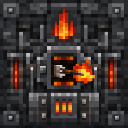
- Place the turret anywhere you want automated fire defense.
- Step back — it immediately begins scanning for nearby hostile mobs and shooting flaming arrows at them automatically. No further interaction needed.
Overview
The Flamewatch Turret is a placeable defensive block that autonomously hunts and ignites hostile mobs within its range. Once placed, it requires no input from you: it detects enemies, leads its shots to account for distance and arrow drop, and fires flaming arrows every two seconds. It works in the Overworld, Nether, and End, and resumes firing automatically whenever you re-enter a world.
What It Adds
| Item | Type | Description |
|---|---|---|
| Flamewatch Turret | Block | Automated flaming-arrow turret that targets hostile mobs |
The turret is a full-sized solid block with a faint glow (light level 4) and a dark red appearance. It is resistant to explosions and takes about 3 seconds to mine by hand. When broken, it drops itself so you can pick it up and redeploy it elsewhere.
How To Use
Placement: Simply place the turret on any solid surface in your base, along a perimeter wall, at a chokepoint, or anywhere hostile mobs are a threat.
Targeting: The turret automatically scans for hostile mobs within a 16-block radius every game tick. When a target is found, it fires a flaming arrow toward the mob once every 2 seconds (40 ticks).
Firing logic: Arrows are launched from near the top of the turret block. The turret calculates drop compensation based on how far away the target is, so shots arc into the mob's body rather than falling short. A brief in-flight course correction further steers arrows onto fast-moving or close targets.
On fire: Every arrow is set ablaze before launch, igniting whatever it hits.
Sound: A distinct flame-shot sound plays each time the turret fires, giving you audio feedback that it is active.
Removal: Break the turret with any tool (or by hand) and it drops as an item you can carry and redeploy.
Crafting And Obtaining
Craft one Flamewatch Turret at a crafting table using the recipe below:
Ingredients at a glance:
- Iron Ingots ×5 — forms the frame and base
- Bow ×1 — provides the firing mechanism
- Arrow ×2 — loaded into the turret's magazine
- Flint and Steel ×1 — ignites the arrows
- Redstone ×1 — powers the automatic targeting logic
Abilities And Mechanics
| Property | Value |
|---|---|
| Scan radius | 16 blocks |
| Fire rate | 1 shot every 2 seconds |
| Arrow type | Flaming (ignites targets on hit) |
| Fire origin | Near the top of the block |
| Drop compensation | Scales with distance (up to +0.85 blocks aim offset) |
| In-flight tracking | Brief course correction toward target during flight |
| Light emission | Level 4 (faint glow) |
| Mining time | ~3 seconds |
| Explosion resistance | 6.0 |
| Dimensions supported | Overworld, Nether, End |
The turret picks the nearest hostile mob within range as its priority target each firing cycle. If no hostile mobs are present, it idles silently until one enters range.
Progression And Strategy
- Early defense: The turret's ingredients are all accessible in early-to-mid survival, making it a strong base-defense option before you have advanced armor or weapons.
- Chokepoints: Place turrets at cave entrances, doorways, or narrow corridors to maximize their 16-block coverage and limit mob pathing around them.
- Layered coverage: Multiple turrets with overlapping ranges eliminate gaps and handle swarms more reliably — each fires independently on its own 2-second cycle.
- Nether and End use: The turret functions in all three dimensions, making it useful for protecting Nether fortress farming spots or End island platforms.
- Retrieval: Since the turret drops itself when broken, you can freely reposition your defenses as your base grows or your needs change without losing any resources.
How to install
Download the mod and follow the step-by-step installation guide.
Players also liked

Skybeam Sentinel


Skybeam Sentinel is a compact, craftable one-block defensive turret: place it as a full block and it will automatically scan for and lock onto nearby hostile mobs, prioritizing the nearest valid target and displaying a clear electric lock indicator with periodic reacquisition. Wh…
The Sentry


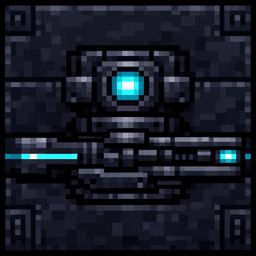
The Sentry is a placeable 1x1 stationary mechanical turret—obsidian-black steel with a pivoting neck, sleek railgun, and glowing cyan eye—that you place to automatically defend an area; once placed it scans for hostile mobs up to 25 blocks, pivots to face targets, and fires a pow…

Safety Light
Looks exactly like a normal torch but emits white light and heals you and keeps you healed even if being attacked if you stand near it.

Anti-Creeper
The Anti-Creeper block catches any Creepers entering the 30 block area around itself, launches them 60 blocks into the air, allowing them to harmlessly fall to their death without griefing your build. This only works on Creepers. Can be placed underground too for aesthetic purpos…

Netherite Smelt Drill


Mine nine blocks at once and smelt ores instantly with a powerful Netherite drill.
This mod is licensed under the CreativeMode Mods License.