

Description
Every dog deserves a little house of their own 🐾 Just added a simple Dog House to the mod — easy to craft, cozy enough for your loyal companion to finally have a spot to call home. Takes just a few planks and a door, nothing fancy, just right.
Mod Wiki
Faithful Doghouse
Quickstart
- Gather 8 oak planks and 1 oak door.
- Craft the Faithful Doghouse. Its recipe is unlocked automatically:


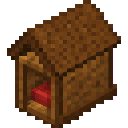
- Select the doghouse and place it where a clear 2×2×2 block space is available. The doorway faces you when placed, while the rest of the doghouse extends away from you.
- Right-click the doghouse with a nearby tamed wolf that belongs to you. The nearest eligible wolf is brought inside, seated, and made more compact so it fits comfortably.
- Right-click the doghouse again to release the seated dog.
Overview
The Faithful Doghouse is a decorative, interactive shelter for your tamed wolves. It forms a complete two-block-wide, two-block-long, two-block-high structure when placed and always aligns its doorway toward the player placing it.
The doghouse is intended to be placed on a clear area, such as beside a home, farm, or outdoor kennel.
What It Adds
- A placeable wooden doghouse structure
- Automatic orientation toward the placing player
- A nearby-dog interaction for seating your tamed wolf inside
- A compact resting appearance for a dog inside the house
- One-item recovery when the structure is broken
How To Use
Placing
Hold the Faithful Doghouse and place it on a suitable block. Before placing, ensure that the entire 2×2×2 area needed by the structure is empty or replaceable.
The entrance faces the player who places it. To control the direction of the doorway, stand on the side you want the entrance to face before placing the doghouse.
Welcoming a Dog
Right-click the doghouse while you have a nearby tamed wolf that belongs to you. The closest eligible wolf is:
- Moved into the doghouse
- Stopped and seated
- Turned toward the entrance
- Displayed at approximately 75% of its normal size while resting
The doghouse confirms this with the message: “Your faithful dog settles into the doghouse.”
Wild wolves, untamed wolves, and dogs belonging to another player cannot be welcomed.
Releasing a Dog
Right-click the doghouse again while the seated dog is inside or immediately nearby. The dog stands up and leaves the doghouse. The doghouse confirms this with the message: “Your dog leaves the doghouse.”
If no nearby tamed dog belongs to you, the doghouse displays: “No nearby tamed dog belongs to you.”
Crafting And Obtaining
Craft the Faithful Doghouse from oak materials:
- 8 oak planks
- 1 oak door
- Output: 1 Faithful Doghouse
The recipe is provided automatically and can be found in the recipe book once the doghouse is available.
The doghouse is also available in the Functional creative inventory tab.
Abilities And Mechanics
Unified Structure
Although the doghouse occupies several blocks, it behaves as one structure. Its visible sections are connected and aligned automatically when placed.
Direction
The doorway faces the player who places the doghouse. The orientation cannot be adjusted after placement, so choose the placement position carefully.
Dog Ownership
Only a living, tamed wolf owned by the interacting player can use the doghouse. When multiple eligible dogs are nearby, the closest one is selected.
Breaking
Break any part of the doghouse with an axe or another suitable tool. The complete structure is removed together and returns as one Faithful Doghouse, preventing duplicate drops or separated pieces.
Progression And Strategy
- Place doghouses near areas where your wolves spend time.
- Stand on the side facing your preferred approach before placing one.
- Keep dogs close to the doghouse before right-clicking so the intended wolf is selected.
- Use multiple doghouses to create separate resting spots for different parts of your base.
- Leave the surrounding 2×2×2 area clear when relocating or rebuilding the structure.
How to install
This Java mod can be used on Windows and Mac PCs with the CreativeMode Launcher or any Minecraft launcher of your choice.

1. Download and install the new CreativeMode Launcher

2. Click to play on the top of the screen.
3. That's it — launches instantly. No complicated setup required.
Want to use on a different launcher? Download mod and manually install.
Players also liked
Great sink


Build a stylish sink, switch it on, and enjoy periodic splashes and chimes.
traders


Trade rare Phantom’s Eyes with Pale Garden Traders, Jungle Traders, and Desert Traders for a Creaking-crushing lantern.

Sharktoad Ambusher


This mod adds the Sharktoad Ambusher, a dangerous aquatic predator with a frog-like body and shark-themed appearance that lurks in water waiting for weakened prey. When submerged it detects injured players below half health and will rapidly charge to deliver a powerful attack, an…
Stormgold Emerald

The Stormgold Emerald is a powerful magical gem that passively grants you a Speed I boost as long as it is anywhere in your inventory. Right-clicking with it will call down 5 simultaneous lightning bolts upon the nearest living creature within 32 blocks, accompanied by a crack of…

Aegis Potion

The Aegis Potion is a drinkable potion that grants complete immunity to all damage for 3 minutes by applying a visible Aegis Immunity status effect. To use it, hold the potion and right-click to drink; the active effect appears in the standard status effect HUD and inventory with…
This mod is licensed under the CreativeMode Mods License.