

Description
Build a stylish sink, switch it on, and enjoy periodic splashes and chimes.
Mod Wiki
Blockcraft Sink
Quickstart
- Obtain the Blockcraft Sink from the Functional Blocks section of the Creative inventory, or craft one using the recipe below.
- Place it in a clear area. Placing the item builds the complete sink assembly and orients it toward you.
- Right-click the sink—or any visible part of it—to switch it on.
- Watch and listen for periodic water-splash particles and chimes.
- Right-click it again to switch it off.
Overview
Blockcraft Sink adds a decorative, interactive sink for kitchens, bathrooms, workshops, and other builds. It has an on/off state with audiovisual effects but does not provide an inventory or a water container.
What It Adds
- Blockcraft Sink — A placeable sink assembly with a stylish model.
- Interactive on/off switching.
- Splash particles and chimes while active.
- Automatic orientation when placed.
How To Use
Placing
Hold the Blockcraft Sink and place it on a suitable block location. The complete sink assembly is created from the placement point, so leave enough room around the location for its model.
Switching On And Off
Right-click any part of the placed sink:
- On: Plays a chime, then produces splash particles and a soft chime about once per second.
- Off: Stops the periodic splashes and chimes.
You can interact with the sink from any of its visible parts, not just the main base.
Removing
Breaking a part of the sink dismantles the complete assembly. Breaking the main sink block allows the placeable sink item to be recovered; the decorative assembly parts are not separate items.
Crafting And Obtaining
The sink uses four stone crafting materials, one bucket, and three iron ingots:


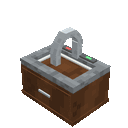
It is also available in the Creative inventory under Functional Blocks.
Abilities And Mechanics
- The sink is a decorative multi-block-style assembly.
- It faces the direction determined when placed.
- Its active effects are visual splash particles and note-block-style chimes.
- The sink has no storage, fluid input, or fluid output.
Progression And Strategy
Use the sink as a finishing detail in residential or utility builds. Place it near counters, walls, or other furnishing blocks, and leave enough open space for the full model. Keep it switched off when you want a quiet decoration, or switch it on to add movement and ambient sound to the room.
How to install
This Java mod can be used on Windows and Mac PCs with the CreativeMode Launcher or any Minecraft launcher of your choice.

1. Download and install the new CreativeMode Launcher

2. Click to play on the top of the screen.
3. That's it — launches instantly. No complicated setup required.
Want to use on a different launcher? Download mod and manually install.
Players also liked

Cobble Crusher


Turn cobblestone into rubble with the Cobble Crusher, a drill built for relentless mining.

Bond of Flame


Wield the Emberlight Totem to unleash a blazing ring that scorches nearby mobs and blasts them away in Minecraft 1.20.1.
Wand Of Connections


The Wand of Connections is a magical building tool that lets you precisely control how decorative blocks join together—right-click any connectable block (stairs, fences, walls, glass panes, redstone wire, vines, etc.) to cycle forward through its connection states, or Shift + rig…

Bandana Wolf


Encounter the Bandana Wolf, a giant wolf wearing a glowing rune-etched bandana that prowls the forests with chilling howls and devastating melee strikes. Combine salmon, cod, and the legendary Eternal Bandana to summon the Grizzly Boss, a colossal bear whose thunderous charges an…

Wolf Den Dog House


Adds a roomy 2x2x2 wooden Dog House with a red roof (craftable or in the Creative inventory) that you can rotate when placing so the wide doorway faces the direction you want; the doorway is now big enough for a wolf to fit fully inside. Right-click the empty house to have it sea…
This mod is licensed under the CreativeMode Mods License.