


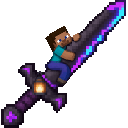
Description
Take flight and smash blocks or mobs with an unbreakable, Steve-themed Netherite sword that lights the dark.
Mod Wiki
Eternal Netherlight Blade
Quickstart
Craft the blade using the recipe below, or find it in the Combat tab of the Creative inventory. Hold it in either hand to gain flight and a light source in dark areas. Try these controls:
- Main hand, use: Launch a primed TNT charge forward.
- Main hand, crouch + use: Lock onto the nearest living target you’re looking at; use again to release the lock.
- Off hand, use: Dash forward.
- Attack: Strike with the blade to instantly defeat non-player living targets and break blocks quickly.
Holding the blade also gives you a written guide if you don’t already have one in your inventory.
Overview
The Eternal Netherlight Blade is an unbreakable, Steve-themed Netherite sword with powerful mining and combat abilities. It lets you fly while held, casts light around you in darkness, and launches TNT that can steer toward a locked target.
What It Adds
- A durable-free Netherite sword with very high mining speed.
- Flight and a moving light source while the blade is held in either hand.
- A forward dash when the blade is used from the off hand.
- A launched TNT charge, with optional target lock-on.
- A written in-game guide supplied when you hold the blade.
How To Use
- Fly: Hold the blade in either hand, then use the usual Minecraft flight controls.
- Light the way: Carry the blade into dark areas. Its light follows you and goes away when you stop holding it.
- Break blocks: Hold the blade in either hand while mining. Non-air blocks break almost instantly.
- Attack: Hit a non-player living target with the blade to defeat it instantly.
- Fire TNT: Use the blade from your main hand to launch a primed charge in the direction you’re facing.
- Lock on: Crouch and use the main-hand blade while looking at a living target within range. Your next TNT shot steers toward that target. Crouch-use again to release the lock.
- Dash: Use the blade from your off hand to surge forward. The dash has a short cooldown.
Crafting And Obtaining
The recipe is given in your recipe book when you enter a world. To craft the blade, use:
This requires three Amethyst Shards, three Arrows, a Crafting Table, and two Calibrated Sculk Sensors. Find Amethyst Shards in geodes. Arrows can be crafted or collected from skeletons. Find Sculk Sensors in the Deep Dark or Ancient Cities; Silk Touch is needed to harvest them. Craft each Calibrated Sculk Sensor from one Sculk Sensor and three Amethyst Shards.
Abilities And Mechanics
The TNT charge is primed when launched and explodes after a very short fuse. Keep your distance, especially when firing at close range. A locked target is temporary and is not saved when you leave the world.
The blade does not wear out. Its light is temporary rather than a lantern item you can place.
Progression And Strategy
Gather the sensors and other ingredients before heading to the crafting table. In combat, lock onto a target before firing to guide the TNT toward it; leave room to avoid the blast. The off-hand dash and granted flight are useful for moving around, while the blade’s rapid block breaking makes it handy for clearing a path.
How to install
This Java mod can be used on Windows and Mac PCs with the CreativeMode Launcher or any Minecraft launcher of your choice.

1. Download and install the new CreativeMode Launcher

2. Click to play on the top of the screen.
3. That's it — launches instantly. No complicated setup required.
Want to use on a different launcher? Download mod and manually install.
Players also liked
The valley civilization {horror}

Explore the Pool Rooms, Backrooms, and an impossible resort—then find the door home.
The Virus Mod


Enter Hygron rifts to be pulled into the Hygron Core — a sprawling raid stronghold of themed sections (corrupted courtyards, labs, cathedrals, factories, mirror halls, sky bridges and a final castle) where you fight patrols, ambushes, minibosses and cinematic bosses to unlock pro…
Olympus

Hey y'all! Explore Olympus, a majestic, golden sky-world composed entirely of sweeping, floating quartz islands and solid, walk-on cloud blocks suspended high above the mortal realm. Heavily based on Rick Riordan's legendary book series, this divine dimension is bathed in an eter…
This mod is licensed under the CreativeMode Mods License.