

Description
Manage claims, homes, rewards, and mounts in a book, with an admin-run gold shop.
Mod Wiki
CuiCui Menu - SMP maker
Quickstart
- Craft the CuiCui Menu book at a crafting table:



- Hold the book and use it to open its menu. You can also open it with
/menu. - Try Land & Protection → Claim to protect the chunk you’re standing in. A claim costs 8 gold ingots; expanding it into another chunk costs 8 more.
- Visit Teleportation → Home to set a home inside your own claim, or open Pets & Mounts to summon and ride a companion.
- For a flying mount, craft the CuiCui Sky Mount placer and use it to summon your mount:


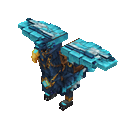
While riding, follow the on-screen Tap: Flap prompt to flap upward.
Overview
CuiCui Menu is a book-based set of tools for an SMP world. Use it to manage protected land, travel, homes, companions, rewards, and trading. The menus also include navigation, jobs, quests, achievements, and a gold-based shop.
What It Adds
- Land & Protection: Create and expand claims, invite players, adjust claim permissions and protection, and manage claim information.
- Travel: Save a home, track destinations, travel to the Frontier Mining World, or choose other travel options from the book.
- Pets & Mounts: Manage personal mounts and companions, including the flying CuiCui Sky Mount.
- Jobs & Rewards: Earn job XP, pursue quests and achievements, and collect login and playtime rewards.
- Shop and trading: Use a gold-priced supply shop and a public market for player listings.
- Other book tools: Find friends, use storage, check statistics, and adjust settings.
How To Use
Use the CuiCui Menu book to open the main menu, then choose a section. If you misplace the book, craft another or use /menu.
Claims
Open Land & Protection → Claim while standing in the chunk you want to protect. Your first claim asks you to name your town. Claim additional chunks from within the adjacent chunk you want to add; each costs 8 gold ingots.
Use Claim settings to manage protection options and trusted-player permissions. Claim members can be given access such as building, breaking blocks, using containers, or teleporting. The book also provides claim information, invitations, and public warps.
Homes and travel
Set or replace your home from Teleportation → Home while inside a claim you own. Return there from the same menu. Travel options also include the Frontier Mining World; its travel screen explains whether you’re entering or returning. Random travel may place you near hazards, so be ready when you arrive.
Mounts and companions
Open Pets & Mounts to summon and manage mounts. The mount menu includes options to recall, rename, or dismiss available mounts and to control whether they wander. CuiCui is a personal flying griffin; while riding, use the displayed Tap: Flap action to gain lift.
Shop and market
The supply shop lets you enter an item or block identifier and buy 64 of an eligible item for 1 gold ingot. Some valuable items and durable equipment are reserved for admins. The Public Gold Market is separate: players can list items, buy listings, and collect gold from sales.
Crafting And Obtaining
Both items are made at a crafting table. The book opens the main menu; the CuiCui Sky Mount placer provides another way to summon the flying mount.
Abilities And Mechanics
- Gold has several uses: claims cost 8 gold ingots per chunk, and the supply shop charges 1 gold ingot for a 64-item purchase.
- Rewards have different collection methods: claim completed quests through their details page; achievements award gold for completed milestones. Daily login and playtime rewards are also available from Jobs & Progression.
- Compass tracking can point toward an online friend, your claim, or north. You can turn tracking off from its menu.
- The Mining World is a separate destination with its own generated terrain and ore features.
Progression And Strategy
Start by claiming the area where you plan to build, then save a home there. Keep some gold available for expanding your claim before spending it at the shop. Check Jobs & Progression regularly for job XP, claimable quests, achievements, and available login rewards.
How to install
Download the mod and follow the step-by-step installation guide.
Players also liked

Spellstorm Grimoire


Spellstorm Grimoire is a mystical book that gives you a huge arsenal of castable spells — lightning, fireball (and huge fireball), water surge, a visible black hole vortex, earth pillar, deflect, light, heavy, time stop, gravity, a floating sword attack, high velocity, heal, shie…


Hacker Hand Terminal

The Hacker Hand Terminal is a sleek, handheld console you can open with a right-click to access a multi-page menu of powerful world and player controls. From its intuitive GUI you can instantly give yourself any item, spawn entities, apply effects, control weather and time, telep…

X-Ray Device

The X-Ray Device scans a 15‑block horizontal radius (Y -64 to Y 16) for diamond_ore and deepslate_diamond_ore and then opens a simple UI listing exact x y z coordinates for every ore found (no blocks are changed), finishing with a subtle glass sound. Equip the X‑Ray Device and us…
This mod is licensed under the CreativeMode Mods License.