Description
Ceiling Glow Panel adds a two-piece lighting system to Minecraft. Thin panels mount flush to ceilings and emit a wide 3×3 field of bright light — but only when powered by a nearby wall-mounted Electric Panel. This creates a natural "wiring" requirement: you must run Electric Panels along walls before ceiling lights will work, encouraging deliberate room planning and infrastructure layout.
| Block | Description |
|---|---|
| Ceiling Glow Panel | Thin panel placed on the underside of solid blocks; emits a 3×3 invisible light field below when powered |
| Electric Panel | Flat panel mounted on a wall; powers all Ceiling Glow Panels within 15 blocks |
Both blocks are found in the Functional Blocks creative tab and drop themselves when broken with a pickaxe.
Right-click any horizontal face of a solid block (north, south, east, or west sides). The panel attaches flush to the wall. If the wall block is removed, the Electric Panel falls. You can place Electric Panels on any solid wall surface.
Right-click the bottom face of a solid block while looking up at the ceiling. The panel cannot be placed on floors or walls. Once placed, the panel checks for a nearby Electric Panel automatically.
A Ceiling Glow Panel is lit when at least one Electric Panel exists within a 15-block radius. When lit, it generates an invisible 3×3 grid of light blocks directly below it at full brightness (light level 15). No redstone, switches, or additional wiring is needed — proximity to an Electric Panel is the only requirement.
When an Electric Panel is removed or moves out of range, nearby Ceiling Glow Panels automatically switch off and clean up their invisible light sources.
Craft the Ceiling Glow Panel (yields 4):



Craft the Electric Panel (yields 1):


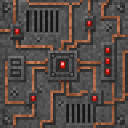
Both blocks drop themselves when mined with a pickaxe and are also available directly from the Functional Blocks creative inventory tab.
This Java mod can be used on Windows and Mac PCs with the CreativeMode Launcher or any Minecraft launcher of your choice.

1. Download and install the new CreativeMode Launcher

2. Click to play on the top of the screen.
3. That's it — launches instantly. No complicated setup required.
Want to use on a different launcher? Download mod and manually install.


Enter Hygron rifts to be pulled into the Hygron Core — a sprawling raid stronghold of themed sections (corrupted courtyards, labs, cathedrals, factories, mirror halls, sky bridges and a final castle) where you fight patrols, ambushes, minibosses and cinematic bosses to unlock pro…



Fire a Sonic Boom Gun to blast foes and shatter fragile blocks with a 25-block beam. hi this gun was not designed by creative mod it was designed by me i really love making stuff and this is one of them i had this idea for a couple of months but i just didnt make it for some reas…



Hey y'all! Explore Olympus, a majestic, golden sky-world composed entirely of sweeping, floating quartz islands and solid, walk-on cloud blocks suspended high above the mortal realm. Heavily based on Rick Riordan's legendary book series, this divine dimension is bathed in an eter…
This mod is licensed under the CreativeMode Mods License.