


Description
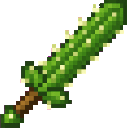
Craft the Cactus Blade and unleash lightning-fast strikes with a surprisingly sharp edge.
Mod Wiki
Cactus Blade
Quickstart
Craft the Cactus Blade with two cactus blocks and a stick:
- Enter a world and open your crafting table or recipe book. The recipe is available from the start.
- Place the Cactus Blade in your main hand or offhand.
- Attack normally for fast melee strikes.
- Right-click to lunge in the direction you are looking.
- Sneak while holding the blade to launch yourself upward. This boost can trigger once per second.
In Creative mode, find the Cactus Blade in the Combat tab. You can also use:
/give @s cactus-blade-rawq6ill:cactus_blade_rawq6ill
Overview
The Cactus Blade is a one-handed melee weapon made from cactus and a stick. It combines strong attacks with movement abilities:
- High attack damage
- A forward lunge on use
- An upward boost while sneaking
- Extra damage when striking during a fall
- Iron-tier durability
- Compatibility with weapon, sword, and mace enchantment categories
What It Adds
| Feature | Effect |
|---|---|
| Cactus Blade | A stackable weapon with a maximum stack size of 1 |
| Forward lunge | Right-click to propel yourself in the direction you are facing |
| Sneak boost | Crouch while holding the blade to launch upward |
| Falling damage bonus | Gain 10 additional attack damage for every block of fall distance when attacking while falling |
| Tool classification | Recognized as both a sword and a mace for relevant game mechanics and enchantments |
How To Use
Melee Attacks
Hold the Cactus Blade and attack entities normally. Its high damage makes it effective against hostile mobs and other targets.
Forward Lunge
Right-click with the blade to move forward:
- The lunge follows your horizontal look direction.
- A small upward movement is included, helping you clear minor obstacles and begin aerial attacks.
- Your current vertical movement is preserved if it is already greater than the lunge's upward boost.
- The ability has no separate cooldown.
Sneak Boost
Hold the Cactus Blade in either hand and start sneaking to launch upward.
- The boost sets your upward movement to a strong vertical impulse.
- It also forces you off the ground, making it useful for jumping into combat.
- The boost has a 20-tick cooldown, equal to 1 second.
- Keep sneaking to use the boost again whenever the cooldown expires.
Falling Attacks
Attack an enemy while falling to gain additional damage based on your fall distance. The blade adds 10 damage per block fallen, in addition to its normal attack damage and the mace's falling-attack behavior.
Use the sneak boost or forward lunge to gain height, then strike as you descend.
Crafting And Obtaining
The Cactus Blade is crafted from:
- 2 cactus
- 1 stick
The cactus is placed above the stick in a vertical arrangement. The recipe is unlocked when you enter a world and can be viewed in the recipe book.
For a compact recipe reference, see .
The blade is also available in the Combat Creative inventory tab.
Abilities And Mechanics
- The Cactus Blade uses iron tool material and has iron-tier durability.
- It can be enchanted as a weapon, sword, or mace where the enchantment is compatible.
- It is eligible for durability-related enchantments, Fire Aspect, Mace enchantments, and Vanishing.
- It can be held in the main hand or offhand to activate its sneak boost.
- Its movement abilities affect the player rather than launching a separate projectile.
Progression And Strategy
- Craft the blade as soon as you have access to cactus and a stick.
- Practice the forward lunge in open terrain before using it near cliffs or hazards.
- Use the sneak boost to gain height, then attack while descending for maximum falling-attack damage.
- Combine repeated lunges with aerial strikes to close distance quickly.
- Prioritize durability enchantments if you use the blade frequently, and consider Fire Aspect for additional combat utility.
How to install
This Java mod can be used on Windows and Mac PCs with the CreativeMode Launcher or any Minecraft launcher of your choice.

1. Download and install the new CreativeMode Launcher

2. Click to play on the top of the screen.

3. That's it — launches instantly. No complicated setup required.
Want to use on a different launcher? Download mod and manually install.
Players also liked
Aria


Aria è un demone umanoide che ti aiuterà con buff, attacchi e varie attività

The Iron Golem Summoner


The Iron Golem Summoner is a functional block that, when right-clicked, opens a GUI with five buttons to spawn between 1 and 5 friendly iron golems in a circle around the summoner. In Survival, pressing any spawn button consumes exactly one iron ingot (not per golem) and the GUI…

Bloomshower Can


create a minecraft item that has the following description: 'A watering can that makes crops grow when you right-click with it. The watering can should affect crops in a 3-block radius from the block the player clicks on.'

Everlink Doorknob


An Item that lets you created pair of doors that are linked to each others. Walk through one door to be transported to the other door and vice versa. Works across dimensions. The item allows you to store the coordinates of a door to link it to another door at any time. Happy trav…
Cheese Launcher Blade


The Cheese Launcher Blade is a powerful sword that sends any mob or player flying approximately 100 blocks through the air when struck, launching them in the direction you are facing with an upward arc. Simply hit an enemy with it as you would any normal sword, and they will be v…
This mod is licensed under the CreativeMode Mods License.