

Description
Craft a Bomb Thrower and rain explosive destruction on anything in your way! Be extra careful and always shoot far away from you... splash damage may harm you!
Mod Wiki
Bomb Thrower
Quickstart
- Craft a Bomb Thrower and some Bombs using the recipes below.
- Hold the Bomb Thrower in either hand and right-click to fire toward your aim. You need Bombs anywhere in your inventory; each shot uses one.
- Try it against a target or a clear patch of ground: the projectile explodes when it hits something.
In Creative mode, firing does not consume Bombs, but the Bomb Thrower can still overheat.
Overview
The Bomb Thrower is a one-at-a-time ranged weapon that launches explosive Bomb projectiles. Bombs are its ammunition, and each impact creates a powerful TNT-style blast that can damage nearby creatures and break blocks. Keep your distance from the impact.
What It Adds
- Bomb Thrower: A ranged weapon that uses Bombs as ammunition.
- Bomb: Explosive ammunition, crafted in batches of four and stackable up to 16.
How To Use
Hold the Bomb Thrower in your main hand or offhand and right-click to shoot. You do not need to hold the Bombs themselves: the weapon uses one from your inventory when fired. Aim at a target or surface; the Bomb explodes on impact.
The weapon has a brief firing cooldown. A heat meter appears near the bottom-right of the screen while you hold it.
Crafting And Obtaining
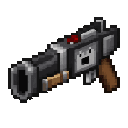
Craft the Bomb Thrower:


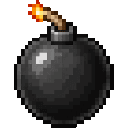
Craft four Bombs for ammunition:


Both items are also available in the Creative inventory’s Combat tab.
Abilities And Mechanics
Each shot adds heat, while heat gradually falls when the weapon is not jammed. At maximum heat, the Bomb Thrower jams for 6 seconds; when it becomes usable again, its heat is reset to 55%. Watch the heat meter to avoid being caught without a shot.
Progression And Strategy
Bring plenty of Bombs for sustained use, but fire in measured bursts to manage heat. Use the blast against groups or obstacles, and leave room between yourself and the impact point.
How to install
This Java mod can be used on Windows and Mac PCs with the CreativeMode Launcher or any Minecraft launcher of your choice.

1. Download and install the new CreativeMode Launcher
2. Click to play on the top of the screen.
3. That's it — launches instantly. No complicated setup required.
Want to use on a different launcher? Download mod and manually install.
Players also liked
Crimson Tnt Bomber


Pilot a crimson bomber, drop TNT from the skies, and battle to survive.
The valley civilization {horror}

Explore the Pool Rooms, Backrooms, and an impossible resort—then find the door home.


The Virus Mod


Enter Hygron rifts to be pulled into the Hygron Core — a sprawling raid stronghold of themed sections (corrupted courtyards, labs, cathedrals, factories, mirror halls, sky bridges and a final castle) where you fight patrols, ambushes, minibosses and cinematic bosses to unlock pro…
CyberPunk: Sandevistan overdrive\\unfinished:progress 78%

Equip a Sandevistan, slow the battlefield, and push your cyberware before cyberpsychosis takes hold.
This mod is licensed under the CreativeMode Mods License.