

Description
Turn blocks into canvases, then repaint their textures with a paintbrush and colorful palette.
Mod Wiki
Block Painter
Quickstart
- Craft a Paintbrush at a crafting table:


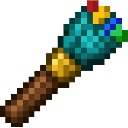
- Use the Paintbrush on a block to turn that block into a plain white Canvas. This replaces the block you use it on.
- Use the Paintbrush on the Canvas again to open the design form. Choose a palette colour and pattern, then select Apply design.
Overview
Block Painter lets you make full-block canvases and customize them with colours and decorative patterns. Painting is done through an in-game form; no dyes or other paint supplies are needed.
What It Adds
- Paintbrush: A single-use-at-a-time tool for converting blocks and editing canvases.
- Canvas: A full-block canvas with a selectable colour and pattern.
- Design options: 32 palette colours, a custom hex colour field that selects the nearest palette swatch, and patterns including letters, numbers, a smiley, a heart, and punctuation marks.
How To Use
- Use the Paintbrush on a non-Canvas block to replace it with a white Canvas. The first use only converts the block; use the brush again to edit it.
- Use the Paintbrush on a Canvas to open the design form. Its colour and pattern selections start at the Canvas’s current design.
- Pick a palette colour, or enter a six-digit hex colour such as
#33AAFFto choose the nearest swatch. Leave the hex field blank to use the palette selection. - Choose a pattern and select Apply design. Close or cancel the form to leave the design unchanged.
- Mine a Canvas to collect it as an item; place it like a regular block.
Crafting And Obtaining
The Paintbrush is crafted at a crafting table using a diamond, sticks, and an ink sac. Canvases are made by using the Paintbrush on blocks, and mined Canvases drop as Canvas items.
Abilities And Mechanics
The palette includes White, Black, Charcoal, Gray, Light gray, Brown, Tan, Maroon, Red, Coral, Orange, Gold, Yellow, Cream, Lime, Olive, Green, Forest, Mint, Teal, Cyan, Sky blue, Blue, Navy, Periwinkle, Lavender, Purple, Violet, Magenta, Pink, Peach, and Copper.
Patterns include None, the letters A–Z, Smiley, Heart, the numbers 1–9, Exclamation mark (!), and Question mark (?). A custom hex entry does not create a new colour; it selects the closest texture swatch in the palette.
How to install
Download the mod and follow the step-by-step installation guide.
Players also liked
Wemmbu orbital strike cannon


Call down orbital strikes, unleash 1,000 wither skulls, and fire a brutal arrow volley
Spellstorm Grimoire

Spellstorm Grimoire is a mystical book that gives you a huge arsenal of castable spells — lightning, fireball (and huge fireball), water surge, a visible black hole vortex, earth pillar, deflect, light, heavy, time stop, gravity, a floating sword attack, high velocity, heal, shie…
Fire arms Arsenal

Gear up with guns, camo armor, precision sniping, visible rockets, C4 bombs, and nukes for explosive battlefield chaos.
Hacker Hand Terminal

The Hacker Hand Terminal is a sleek, handheld console you can open with a right-click to access a multi-page menu of powerful world and player controls. From its intuitive GUI you can instantly give yourself any item, spawn entities, apply effects, control weather and time, telep…

X-Ray Device

The X-Ray Device scans a 15‑block horizontal radius (Y -64 to Y 16) for diamond_ore and deepslate_diamond_ore and then opens a simple UI listing exact x y z coordinates for every ore found (no blocks are changed), finishing with a subtle glass sound. Equip the X‑Ray Device and us…
This mod is licensed under the CreativeMode Mods License.