
Description
A massive statue of Anubis to tighten up that Egyptian build you have going.
Mod Wiki
Anubis
Quickstart
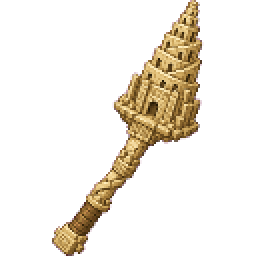
- In Creative mode, open the Equipment section of the inventory and take the Anubis Wand.
- Find a large, level area with enough room for a monument measuring 54 blocks wide, 144 blocks tall, and 72 blocks long.
- Stand at the location where you want the base of the monument to begin and aim at the ground.
- Use the Anubis Wand to fire its projectile. The monument will be placed at the projectile’s impact point.
- Wait for the full structure to appear before exploring it. Leave plenty of open space above and around the placement area.
The wand has a short cooldown between uses. In Creative mode, it can be used without manually supplying ammunition.
Overview
Anubis adds a monumental, highly detailed statue of the jackal-headed Egyptian god Anubis. The statue stands in a tall, symmetrical pose on a raised sandstone pedestal and faces forward.
The structure is intended as a landmark, temple centerpiece, ceremonial entrance, or large-scale desert build.
What It Adds
Anubis Statue
The statue features:
- A broad-shouldered human torso with a jackal’s head
- Long, pointed ears extending upward
- A sharp jackal snout
- Almond-shaped eyes highlighted with gold and lapis lazuli
- A black concrete and obsidian body
- A Nemes-style collar and chest harness
- Alternating gold, yellow terracotta, and blue concrete ornamentation
- A white ceremonial kilt made from smooth quartz and quartz stairs
- An ornate gold belt
- Straight-hanging muscular arms
- A golden Ankh held in one hand
Raised Pedestal
The statue stands on a 12-block-high rectangular pedestal made from:
- Smooth sandstone
- Cut sandstone
The pale pedestal contrasts strongly with the statue’s black body and colorful ceremonial details.
How To Use
Placing the Monument
The Anubis Wand launches a projectile. When the projectile hits, the monument is placed around that location.
For the best result:
- Aim at a ground-level block where the pedestal should start.
- Use flat terrain or prepare a level foundation first.
- Clear trees, hills, buildings, and other structures from the placement area.
- Make sure there is at least 144 blocks of vertical clearance.
- Keep the area open for 72 blocks in length and at least 54 blocks across.
- Use the wand only after choosing the final location, since the monument is placed in its built-in orientation.
The structure appears progressively as it is placed, so avoid interfering with the area until construction is complete.
Using the Wand
The Anubis Wand is the mod’s placement tool:
- Equip it in your active hand.
- Aim at the intended placement point.
- Use the wand to fire.
- The projectile places the monument when it impacts.
- Wait briefly before firing it again.
The wand does not deal damage. Its projectile is designed to trigger the monument placement.
Survival and Commands
The Anubis Wand is available in the Creative inventory under Equipment. If you need to give it to a player with a command, use:
/give @s com_anubis_lzw6nzhf:structure_wand
The monument itself is not assembled through a crafting recipe. It is placed by firing the wand.
Monument Dimensions
| Measurement | Size |
|---|---|
| Width across the shoulders | 54 blocks |
| Height from pedestal base to ear tips | 144 blocks |
| Length from front feet to rear of pedestal | 72 blocks |
| Pedestal height | 12 blocks |
These measurements describe the complete monument, including its raised base and upper ears.
Abilities And Mechanics
Wand Projectile
The wand launches a visible projectile toward the point you are aiming at. On impact, it triggers the placement of the complete Anubis monument.
The projectile:
- Has a visible flying effect
- Does not cause impact damage
- Can knock back entities on contact
- Disappears after triggering placement
Fixed Orientation
The monument is placed in its default forward-facing orientation. The wand does not provide rotation or mirroring controls, so choose your approach and surrounding build layout before placing it.
Block-by-Block Appearance
The structure is placed in sections, allowing the monument to build upward and outward after activation. Large builds may take a short time to finish appearing.
Progression And Strategy
Anubis has no equipment tiers, combat progression, or upgrade system. Its main progression is architectural: choose a dramatic site and build the surroundings around the finished monument.
Good locations include:
- Desert temples and tomb complexes
- Palace courtyards
- Nether-themed gateways
- Memorial gardens
- Adventure-map landmarks
- Large ceremonial avenues
For a strong Egyptian-themed setting, combine the pedestal with sandstone stairs, columns, pools, banners, braziers, and a wide processional path. Keep the front of the statue unobstructed so its face, collar, kilt, and Ankh can be seen from a distance.
How to install
Download the mod and follow the step-by-step installation guide.
Players also liked
The Greybeard


Welcome to tower Greybeard. Yes, I know it isn't looking like it used to when it was first built, but a little touch up here and there and your new home will be a fantastical new place for many to live. Oh, you didn't know? The inside of the spire has enough room for several vill…

This mod is licensed under the CreativeMode Mods License.