

Description
to a new biome called electric forest with lightning and glowing blue trees and a wood set
Mod Wiki
Voltwood Grove
Quickstart
- Gather Amethyst Shards, Copper Ingots, and Quartz.
- Craft a Storm Shard, then use it to call down a lightning bolt and confirm that the item is ready for portal construction.
- Craft Stormgate Frames from Obsidian and Storm Shards.
- Place a Stormgate Frame anywhere, then interact with or tap it.
- The gate prepares an elevated landing grove in the Overworld and teleports you to the Electric Forest. Follow the blue glow to find Voltwood trees and Electric Lumiflora.
- Bring an axe for Voltwood Logs and Planks. Watch for lightning around the landing grove.
A single Stormgate Frame is usable on its own; no multi-block portal shape is required.
Overview
Voltwood Grove adds the Electric Forest, a storm-lit woodland filled with glowing blue Voltwood trees, luminous foliage, Electric Soil, and a small wood set.
The Stormgate sends players to a prepared grove near the Overworld’s central coordinates at a high elevation. The destination includes an Electric Soil landing area, a Voltwood Plank platform, Voltwood trees, and Electric Lumiflora.
Activating the gate can rebuild the landing area, so avoid building important structures around the destination before using it.
What It Adds
| Content | Description |
|---|---|
| Electric Forest | A glowing, lightning-filled Voltwood grove reached through a Stormgate Frame. |
| Storm Shard | A crafted item used to make Stormgate Frames. Using one calls down lightning at your location. |
| Stormgate Frame | A luminous portal block. Interact with it to travel to the Electric Forest. |
| Electric Soil | The distinctive ground block of the grove. It is shovel-friendly. |
| Voltwood Log | The blue forest’s tree-trunk block. It is axe-friendly. |
| Voltwood Leaves | Glowing blue leaves found in Voltwood tree canopies. |
| Voltwood Planks | Building blocks made from Voltwood Logs. |
| Voltwood Sapling | A glowing Voltwood plant for decoration. |
| Electric Lumiflora | A bright, quickly breakable glowing plant found around the grove. |
How To Use
Storm Shards
Use a Storm Shard while holding it to produce a lightning strike at your position. The item also displays a reminder that Stormgate Frames are crafted from Obsidian and Storm Shards.
Storm Shards stack up to 16.
Stormgate Frames
Place a Stormgate Frame on a suitable surface and interact with it. The frame immediately:
- Creates or refreshes the Electric Forest landing area.
- Teleports you to the elevated grove in the Overworld.
- Displays an ELECTRIC FOREST storm message.
- Produces a lightning strike near the landing platform.
You can leave the grove by traveling away from the landing area through the Overworld. The gate does not send you to a separate dimension.
Exploring The Grove
The landing area is surrounded by Voltwood trees and Electric Lumiflora. Harvest the glowing wood and plants, then use the trees as a source of building materials.
Lightning can appear around players near the Electric Forest landing area. The storm effect is most noticeable near the grove, where the area is marked by the blue glow and storm messages.
Crafting And Obtaining
Storm Shard
Craft a Storm Shard with Amethyst Shards, Copper Ingots, and Quartz.



Stormgate Frame
A Stormgate Frame requires Obsidian and one Storm Shard. Each crafting operation produces 8 frames.

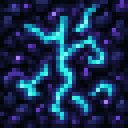
Voltwood Planks
Convert one Voltwood Log into 4 Voltwood Planks.
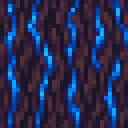
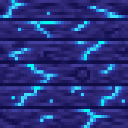
Finding Grove Materials
The Electric Forest landing area provides:
- Voltwood Logs in its tree trunks
- Voltwood Leaves in the canopies
- Electric Lumiflora around the trees
- Electric Soil beneath the grove
- Voltwood Planks on the central landing platform
The custom blocks and Storm Shard are also available through the Creative inventory under their respective item or block categories.
Abilities And Mechanics
Glowing Woodlands
Voltwood Leaves, Voltwood Saplings, and Electric Lumiflora emit light, making them useful for atmospheric builds and illuminated paths. Stormgate Frames also glow when placed.
Stormfront Effects
Entering the grove activates an on-screen Electric Forest storm display. Lightning strikes can occur around the landing area while you explore.
Using a Storm Shard creates an immediate lightning effect at your current position, so use it with care around flammable builds or animals.
Block Tools
- Mine Voltwood Logs and Voltwood Planks with an axe for the intended tool interaction.
- Mine Electric Soil with a shovel for the intended tool interaction.
- Electric Lumiflora and Voltwood Saplings break very quickly and work well as decorative lighting.
Progression And Strategy
- Start by collecting Amethyst Shards, Copper Ingots, Quartz, and Obsidian.
- Make several Storm Shards if you want multiple gates or lightning effects.
- Craft a batch of Stormgate Frames and place one near a safe base location.
- Activate the frame and collect Voltwood Logs, Leaves, Saplings, Lumiflora, and Electric Soil from the grove.
- Turn the logs into Planks for blue-toned construction.
- Use Lumiflora, Leaves, and Saplings to decorate paths, treehouses, and storm-themed builds.
- Keep valuable structures away from the grove’s landing coordinates, since activating a Stormgate can refresh the prepared landing area.
How to install
Download the mod and follow the step-by-step installation guide.
Players also liked




Vitality Strawberry


Bite into a Vitality Strawberry for full hearts, full hunger, and powerful effects.


This mod is licensed under the CreativeMode Mods License.