

Description

Race through battle and unleash powerful boosts with the Voidlight Tempest Spear.
Mod Wiki
Voidlight Tempest Spear
Quickstart
Craft the standard spear at a crafting table:


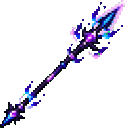


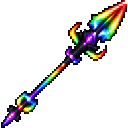
Hold it in either hand for a continuously refreshed Speed V effect. Right-click to activate a burst of beneficial effects; this ability has a 20-second cooldown.
Overview
The Voidlight Tempest Spear is a melee weapon with two craftable forms. Both can be held in either hand for a passive boost and used to grant yourself a longer burst of effects. The recipes are unlocked automatically when you join.
What It Adds
| Spear | Passive while held |
|---|---|
| Voidlight Tempest Spear | Speed V |
| Rainbow Voidlight Tempest Spear | Strength V |
The Rainbow spear’s burst does not grant Speed; its other burst effects are the same as the standard spear’s.
Crafting And Obtaining
Craft the standard spear with a netherite ingot, amethyst shard, lapis lazuli, pink dye, cyan dye, black dye, and a stick:


To craft the Rainbow spear, combine the standard spear with red, orange, yellow, green, purple, lime, blue, and magenta dyes:
Both spears are also available in the Creative Combat inventory.
Abilities And Mechanics
Right-click either spear to give yourself a burst lasting 30 seconds. The burst grants Haste II, Strength II, Regeneration II, Resistance II, Fire Resistance, Water Breathing, Night Vision, Jump Boost II, Slow Falling, Invisibility, Absorption III, Health Boost II, Luck, Dolphin’s Grace, Conduit Power, and Hero of the Village. It also immediately grants Saturation and Instant Health.
Holding a spear in either hand refreshes its passive effect while it remains held. The standard spear’s burst includes Speed II; the Rainbow spear’s does not.
Progression And Strategy
Use the standard spear when you want a movement boost while keeping it in hand, or the Rainbow spear when you prefer a held Strength boost. Save the right-click burst for a fight or other demanding moment; its effects last longer than its cooldown.
How to install
This Java mod can be used on Windows and Mac PCs with the CreativeMode Launcher or any Minecraft launcher of your choice.

1. Download and install the new CreativeMode Launcher

2. Click to play on the top of the screen.
3. That's it — launches instantly. No complicated setup required.
Want to use on a different launcher? Download mod and manually install.
Players also liked


Purple-gold tools and Armor


Adds a Purple-Gold endgame progression centered on a rare Purple-Gold ingot and a full set of Purple-Gold tools, sword, and armor with distinctive visuals and powerful stats. Use the Purple-Gold pickaxe to chain-mine connected matching ore veins by mining a tagged ore block (ore…

Armor Stand Tank Arsenal


Armor Stand Tank Arsenal adds a highly detailed drivable tank built from invisible armor stands displaying blocks; place a tank with the Tank Spawner by right-clicking the ground and right-click a tank to mount it. Control the tank with WASD (W/S forward and back, A/D to turn); t…


This mod is licensed under the CreativeMode Mods License.