

Description
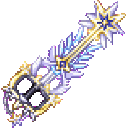
Pick up mobs with the Ultima Vault Keyblade, carry them along, and throw them wherever you want.
Mod Wiki
Ultima Vault Keyblade
Quickstart

- Craft the keyblade:


- Select the Ultima Vault Keyblade in your hotbar.
- Find a mob and sneak-right-click it to capture it. Most ordinary vanilla and modded mobs can be captured, including pigs, horses, villagers, pillagers, and allays.
- Walk around with the captured mob riding along as your passenger.
- Aim where you want to send it and right-click normally to throw it.
- Press O by default to open the Keyblade Vault. The keyblade can be anywhere in your inventory when opening the vault.
The recipe is unlocked automatically. In Creative mode, the keyblade is also available in the Combat item group.
Overview
The Ultima Vault Keyblade is a powerful sword and portable vault. Its main ability is capturing mobs, carrying them with you, and throwing them back into the world.
It can also store blocks, spawn eggs, and ordinary item stacks. The vault can hold up to 1,000 entries.
What It Adds
- Mob capture and carrying
- Mob throwing
- Block capture and placement
- A personal storage vault
- Support for spawn eggs
- A high-powered sword and mining tool
- A glowing enchantment-style visual effect
- A maximum stack size of one
How To Use
Capture a Mob
Hold the keyblade and sneak-right-click a capturable mob within about five blocks.
- The mob is added to the vault.
- The mob rides on you while captured.
- Its existing state, such as equipment, names, and other persistent properties, is retained.
- You cannot capture the same mob twice.
- Capturing fails when the vault is full.
Capturing is intentionally a sneak interaction. A normal right-click on a mob performs the throw action instead.
Carry a Mob
Captured mobs travel with you as passengers. You can walk, turn, open the vault, and continue moving without manually positioning them.
The mob is kept passive while carried. Its normal movement behavior is restored when it is released.
Throw a Mob
With at least one mob captured, aim in the desired direction and right-click normally.
- The oldest captured mob is thrown first.
- The mob is released a few blocks ahead of you.
- It receives forward momentum and a small upward lift.
- If you are aiming at a nearby wall, the release position is adjusted to avoid placing the mob inside it.
- Right-clicking a block, an entity, or empty space can all trigger a throw when a captured mob is available.
Capture a Block
Sneak-right-click a non-air block with the keyblade.
- The exact block state is stored in the vault.
- The targeted block is removed from the world.
- The block counts as one vault entry.
Use this carefully around valuable or functional blocks, since capturing removes the targeted block immediately.
Release a Block
When no captured mob is available, right-click normally to release the first non-mob entry in vault order.
A captured block is placed:
- Against the face of the block you are aiming at, or
- A few blocks ahead if you are not aiming at a block.
The target position must be replaceable and suitable for the stored block.
The Keyblade Vault
Opening the Vault
Press O by default while no other screen is open and the keyblade is in your inventory.
The vault screen contains:
- Captured contents: 27 entries per page
- Player inventory: Your normal inventory below the vault
- Previous and Next page controls
- An Arrange button
- A page indicator
- Mouse-wheel page switching when multiple pages exist
The keyblade cannot be placed inside its own vault.
Vault Contents
Different entries use different display icons:
| Stored content | Vault display | How to use it |
|---|---|---|
| Captured mob | Name tag labeled Captured <mob> | Right-click normally with the keyblade to throw it |
| Captured block | The block's item icon | Right-click normally to place it |
| Spawn egg | The spawn egg | Right-click normally to release the egg's mob |
| Ordinary item | The stored item stack | Move it back to your inventory through the vault screen |
Use Arrange to sort the vault contents. Leave captured mob and block entries in the vault if you want to release them with the keyblade; their display icons are representations of the captured entries rather than ordinary replacement items.
Storing Items
Open the vault and move ordinary item stacks from your inventory into the upper contents area. You can use regular container controls, including moving stacks between the vault and your inventory.
Spawn eggs stored in the vault can be released with a normal right-click. Ordinary item stacks should be taken back out through the vault screen.
Crafting And Obtaining
Craft the Ultima Vault Keyblade with:
- Diamond blocks
- Echo shards
- A nether star
- A blaze rod
The keyblade is also available in the Creative inventory under Combat.
Abilities And Mechanics
Vault Capacity
The keyblade stores up to 1,000 total entries, including captured mobs, captured blocks, spawn eggs, and ordinary item stacks.
When the vault reaches capacity, new captures fail.
Interaction Controls
| Action | Result |
|---|---|
| Sneak + right-click a mob | Capture the mob |
| Sneak + right-click a block | Capture and remove the block |
| Normal right-click with a captured mob | Throw the oldest captured mob |
| Normal right-click with no captured mob | Release the first releaseable non-mob entry |
| Press O | Open the Keyblade Vault |
A normal right-click does not capture mobs. Always sneak when you want to capture something.
Sword And Tool Functions
The keyblade is also a sword with extremely high attack power. It is suitable for mining all block types and breaks blocks very quickly.
Progression And Strategy
- Capture a few passive mobs first to learn the throw distance and aiming.
- Use the keyblade's vault to organize transportable mobs and blocks without filling your regular inventory.
- Keep captured mobs and blocks in the vault until you are ready to release them.
- Use Arrange to make release order easier to manage.
- Remember that a captured block is removed immediately, so avoid sneak-right-clicking blocks unless you intend to store them.
- If you want to transport ordinary materials, use the vault screen rather than trying to release them with a right-click.
- When throwing mobs near structures, aim into an open area so they have room to land and resume normal behavior.
How to install
This Java mod can be used on Windows and Mac PCs with the CreativeMode Launcher or any Minecraft launcher of your choice.

1. Download and install the new CreativeMode Launcher

2. Click to play on the top of the screen.

3. That's it — launches instantly. No complicated setup required.
Want to use on a different launcher? Download mod and manually install.
Players also liked







Galaxy Titan Tool


The Super Warden Mace is a warden/sculk‑themed all‑in‑one tool and weapon you spawn with (or receive on respawn) that massively raises your max health, keeps your hunger full, and grants creative‑mode flight and Speed 10 while carried. Press the Control (sprint) key while on the…
This mod is licensed under the CreativeMode Mods License.