

Description
A useful converter of items and enchantment
Mod Wiki
Sculk Exchange Core
Quickstart
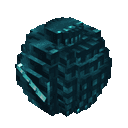
- Craft a Sculk Ender Pearl and a Token Converter using the recipes below.
- Hold and use the Sculk Ender Pearl to open its menu. Convert unenchanted items in your inventory into energy, then spend 100 energy per item to duplicate an item you already carry.
- Place the Token Converter and interact with it. Deposit an unenchanted item to earn tokens and register its type; then choose Take out items to withdraw items of any registered type.
- Choose Enchantment converter in the Token Converter menu to transfer, enhance, or reroll enchantments on items in your inventory.
Overview
The mod provides two ways to exchange items:
- Token Converter: Deposit items for tokens, then spend tokens to withdraw items. Your token balance and registered item types are personal, but available through any Token Converter you use, across dimensions.
- Sculk Ender Pearl: Use it to convert items into energy and duplicate items. Your energy is also personal.
Balances are not shared between players.
What It Adds
| Item or block | Use |
|---|---|
| Sculk Ender Pearl | Opens the energy menu when used. Convert unenchanted inventory items into energy or duplicate an item you carry. |
| Token Converter | Place and interact with it to deposit items, withdraw registered item types, or open the enchantment converter. |
How To Use
Token Converter
Interact with a placed Token Converter to open its menu.
- Deposit items: Select an unenchanted item from your inventory, then choose a quantity. Deposits are limited to 64 items at a time. Each item earns tokens according to its value.
- Take out items: First deposit an item to register its type. You can then select that type and withdraw up to 64 items, limited by your token balance. The quantity page shows the cost and your current balance.
- Registering a type does not store a pile of that item: tokens let you withdraw more of any type you have registered.
Some example values per item:
| Item | Tokens |
|---|---|
| Carrot | 3 |
| Coal | 5 |
| Iron ingot | 25 |
| Gold ingot | 50 |
| Emerald | 250 |
| Diamond | 1,000 |
| Netherite ingot | 5,000 |
Modded items can also be deposited and withdrawn. Their values are assigned automatically; most unfamiliar item IDs are worth 1 token, while certain rarity or material keywords receive higher values.
Sculk Ender Pearl
Hold and use the Sculk Ender Pearl to open its menu. It shows your energy and scans your inventory.
- Convert inventory items to energy: Select an unenchanted item and quantity to consume. Energy per item uses the same values as tokens.
- Duplicate an item: Select an item already in your inventory and choose a quantity. Each duplicate costs 100 energy, up to 64 per request. The original item is not consumed; if your inventory is full, duplicates that do not fit drop nearby.
- The pearl itself is reusable.
Enchantment Converter
Open Enchantment converter from a Token Converter menu, then select an enchanted item in your inventory.
- Transfer enchantments: Choose an unenchanted, enchantable target item. All enchantments move to one target item, and the source item is returned without its enchantments. If the target is in a stack, you need an empty inventory slot for the enchanted item.
- Increase one enchantment: Select an enchantment to raise it by one level. The converter may attempt levels above normal limits, but the game can reject some changes.
- Replace one enchantment randomly: Select an enchantment to replace it with a random one at the same level.
- Enhancing or rerolling costs 100 tokens. Confirm with Keep / Save to apply the change and pay; choosing Discard costs nothing. Some enchantments may not be accepted on a given item.
Items with enchantments cannot be deposited for tokens or converted into energy.
Crafting And Obtaining
Craft both items at a crafting table.
Sculk Ender Pearl


Token Converter


Progression And Strategy
Start with low-value items to register types and build a small token balance. Higher-value resources such as diamonds and emeralds can fund larger withdrawals. For duplication, check the Sculk Ender Pearl’s inventory scan before consuming items: valuable materials produce more energy, while each duplicate always costs 100.
Recipes




How to install
Download the mod and follow the step-by-step installation guide.
Players also liked

Spellstorm Grimoire


Spellstorm Grimoire is a mystical book that gives you a huge arsenal of castable spells — lightning, fireball (and huge fireball), water surge, a visible black hole vortex, earth pillar, deflect, light, heavy, time stop, gravity, a floating sword attack, high velocity, heal, shie…


Sukunas Wrath

sukuna’s wrath v2 is a cursed artifact fueled by Sukuna’s Fingers you discover in ancient ruins, fortresses, and shrines. Consume fingers to grow your corruption and unlock tiered abilities—hold sneak (Shift) to swap into the Ability Hotbar, then left-click to unleash skills like…

X-Ray Device

The X-Ray Device scans a 15‑block horizontal radius (Y -64 to Y 16) for diamond_ore and deepslate_diamond_ore and then opens a simple UI listing exact x y z coordinates for every ore found (no blocks are changed), finishing with a subtle glass sound. Equip the X‑Ray Device and us…
This mod is licensed under the CreativeMode Mods License.