

Description
Hate your roommates? Friends keep stealing your precious gemstones ? NO LONGER! this mod gives you your own personal chunk where you may place all your belongings. when crafting the key and using you will land in a walled rom 20 blocks high and 1 chunk big, this ensures you can place as many chest inside as you may want (as long as you want a rom with 600 double chests). this mod was inspired by spirit keys mod from long ago enjoy!
Mod Wiki
Pocket Realm Key
Quickstart
Craft a Pocket Realm Key with two iron ingots and one diamond:


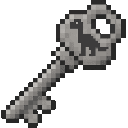
Hold the key and use it outside your pocket realm to enter your personal room. Inside, use the glowing Realm Door to return to where you entered.
Overview
The key sends you to a dedicated, enclosed room in the pocket realm. Your room is assigned to you and remains yours for future visits. Each time you enter, the key records your current location as the return point.
What It Adds
| Content | Use |
|---|---|
| Pocket Realm Key | Opens the passage to your room when used outside the pocket realm. |
| Arcane Barrier | Forms the room’s indestructible floor, ceiling, and walls. It drops nothing. |
| Realm Door | The glowing doorway in the room’s entrance wall; use it to go home. |
How To Use
- Enter: Use the key outside the pocket realm. Your room is built for you and you arrive inside it.
- Make the room your own: Build in the open space inside the barrier shell. The room has a 14-by-14-block interior and is 18 blocks tall.
- Return: Use the Realm Door from inside the pocket realm. It takes you back to your recorded entrance location and dimension.
- Visit again: Use the key from wherever you are outside the pocket realm. This records that location as your new return point.
The key does not take you home when used inside the pocket realm; use the glowing doorway instead. The Realm Door only works from within the pocket realm.
Crafting And Obtaining
The Pocket Realm Key is crafted with the recipe shown in Quickstart. In Creative mode, you can also find it in the Tools tab. The room’s Arcane Barrier and Realm Door are created as part of the room rather than being required crafting ingredients.
How to install
This Java mod can be used on Windows and Mac PCs with the CreativeMode Launcher or any Minecraft launcher of your choice.

1. Download and install the new CreativeMode Launcher

2. Click to play on the top of the screen.

3. That's it — launches instantly. No complicated setup required.
Want to use on a different launcher? Download mod and manually install.
Players also liked

Skyborne Gunship


The Skyhawk Gunship is a rideable military helicopter that you can place as a multiblock structure and then mount by right-clicking any part of it. Once inside, you fly using WASD to move horizontally, Space to ascend, and Shift to descend, with the helicopter facing the directio…

Armor Stand Tank Arsenal


Armor Stand Tank Arsenal adds a highly detailed drivable tank built from invisible armor stands displaying blocks; place a tank with the Tank Spawner by right-clicking the ground and right-click a tank to mount it. Control the tank with WASD (W/S forward and back, A/D to turn); t…
Prismatic Dreamlands


Enter a fever-dream realm of prismatic forests, face nightmare bosses, and forge gear stronger than netherite.

Black Armor Tech


High-tech black armor with lasers, night vision, steady aim, and menus in your language
Fallout 4 Power armor T-67


Wear rugged, industrial power armor with four matching pieces and a military finish.
This mod is licensed under the CreativeMode Mods License.