

Description
The PC Link Device is a handheld tool: right-click while holding it to teleport into your private Pocket PC Dimension, arriving on a raised, lit circular arrival platform inside the central quartz hub; use the Return Home Terminal there to return safely to the exact spot, facing, and dimension you came from. The Pocket PC facility has been visually refined into a premium futuristic Pokémon storage center—fully sealed with white stained glass, quartz frames and pillars to remove gaps and void exposure, with flat modern quartz roofs, an open reception-style welcome hub with a floor-integrated PC Core, storage/statistics displays, Return Home and Storage Management terminals, and clear sightlines down the four storage wings and pens—while keeping all storage mechanics, teleportation, layout counts, Cobblemon synchronization, creative tab, and multiplayer behavior unchanged. The PC Link Device item itself functions exactly as before but sports an upgraded high-definition icon with cleaner edges, sharper shading, and more detailed screen and buttons for improved visual clarity.
Mod Wiki
Pocket PC Dimension
Quickstart
- Open your inventory — the PC Link Device recipe is automatically unlocked when you join the world.
- Craft the PC Link Device:


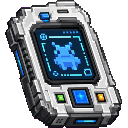
- Hold the PC Link Device and right-click to instantly teleport into your private Pocket PC Dimension.
- Explore the futuristic quartz facility, check the terminals, then right-click the Return Home Terminal (or right-click with the PC Link Device again) to return to your exact position, facing direction, and dimension.
Overview
Pocket PC Dimension gives every player a personal, fully private pocket dimension styled as a premium futuristic Pokémon storage center. Holding a single handheld item — the PC Link Device — lets you step in and out of this space at any time, from any dimension. The facility generates automatically on your first visit and persists across sessions. In multiplayer, every player has their own isolated copy.
What It Adds
| Content | Type | Description |
|---|---|---|
| PC Link Device | Item (tool) | Handheld teleporter; right-click to enter or exit your Pocket PC Dimension |
| Main PC Core | Block | Floor-integrated hub block; right-click to view storage statistics |
| Storage Management Terminal | Block | Displays box and Pokémon storage information (read-only) |
| Return Home Terminal | Block | Teleports you back to your saved return location |
All three blocks and the PC Link Device appear in the Pocket PC creative tab.
How To Use
Entering Your Dimension
Hold the PC Link Device in either hand and right-click. The game saves your exact position, facing angles, and current dimension, then teleports you to a lit circular arrival platform inside the central welcome hub of your facility. A sound effect plays on entry. The item gains a glint and its tooltip shows ● Currently in Pocket Dimension while you are inside.
There is a short cooldown (~2 seconds) after using the device to prevent accidental rapid teleportation.
Returning Home
You can leave in two ways:
- Right-click the Return Home Terminal anywhere in the facility.
- Right-click the PC Link Device again while inside.
Either method teleports you back to the exact coordinates, camera angle, and dimension you departed from.
If you somehow enter the dimension without a saved return point, you will be sent to the world spawn instead.
Interacting with the Terminals
Main PC Core — Right-click to read a summary panel in chat showing:
- Your username
- Total storage boxes (30)
- Number of physical pens in the facility
- A note that the Pokémon mirror display is read-only
Storage Management Terminal — Right-click to read:
- Box layout directions (North boxes 1–7, South 8–14, East 15–21, West 22–28)
- Your known Pokémon count
- A reminder that the terminal is read-only
Return Home Terminal — Right-click to return home immediately.
All terminals are mineable with a pickaxe and drop themselves, though they exist pre-built inside your generated facility — you do not need to place them yourself.
Crafting And Obtaining
The PC Link Device recipe is automatically added to your recipe book the first time you join the world, so it will appear in the recipe book tab straight away.
Ingredients at a glance:
- Redstone (×4, corners and sides)
- Eye of Ender (×1, top center)
- Iron Ingot (×2, middle sides)
- Clock (×1, center)
- Lapis Lazuli (×1, bottom center)
Abilities And Mechanics
Private Per-Player Dimensions
Each player's facility is generated in its own isolated region. No two players share the same space, and no one can enter another player's facility through normal play.
Automatic Facility Generation
The quartz hub and its four storage wings are built automatically the first time you enter. The structure features:
- A sealed white stained glass and quartz exterior with no void exposure
- A flat quartz roof
- A central welcome hub with a floor-integrated PC Core, a Return Home Terminal, a Storage Management Terminal, and holographic floating labels
- Four cardinal storage wings (North, South, East, West) with open storage pens and clear sightlines
Cobblemon Synchronization
If the Cobblemon mod is present on the server, the facility is themed and sized to match Cobblemon's PC box system (30 boxes). Storage counts displayed on the terminals reflect your Cobblemon data in a read-only, safe display mode that does not modify or risk corrupting your save.
Sound
A unique teleportation sound plays both on entry and on return.
Progression And Strategy
- Craft the PC Link Device early — it only requires common materials (redstone, iron, lapis, a clock, and an Eye of Ender).
- Use it as a safe panic room: stepping into your Pocket Dimension saves your overworld position, so you can return to the exact spot you left.
- Keep the device in your hotbar for quick access from any dimension — it works from the Nether, End, and modded dimensions alike.
- Operators (permission level 2) can use the command
/pocketpc inspect <player>to teleport into any player's facility for moderation or support purposes.
How to install
This Java mod can be used on Windows and Mac PCs with the CreativeMode Launcher or any Minecraft launcher of your choice.

1. Download and install the new CreativeMode Launcher
2. Click to play on the top of the screen.
3. That's it — launches instantly. No complicated setup required.
Want to use on a different launcher? Download mod and manually install.
Players also liked

The Virus Mod


Enter Hygron rifts to be pulled into the Hygron Core — a sprawling raid stronghold of themed sections (corrupted courtyards, labs, cathedrals, factories, mirror halls, sky bridges and a final castle) where you fight patrols, ambushes, minibosses and cinematic bosses to unlock pro…
This mod is licensed under the CreativeMode Mods License.